Dell Unity: Replication transfers stop working (User Correctable)
Summary: How to deal with an event in which Replication transfers stopped.
This article applies to
This article does not apply to
This article is not tied to any specific product.
Not all product versions are identified in this article.
Symptoms
Even though automatic synchronization by RPO is set in Replication, no transfer is being performed and the Last Sync Time is still out of date.
Although the transfer is not in progress, the Sync State is idle, and Health State is OK.
Although the transfer is not in progress, the Sync State is idle, and Health State is OK.
Cause
The following are possible causes.
(1) There is some problem with the Snapshot to be transferred.
(2) When clearing the task of a JOB in manual sync is performed.
(1) There is some problem with the Snapshot to be transferred.
(2) When clearing the task of a JOB in manual sync is performed.
Resolution
(1) Resolution:
This issue is addressed in Unity OE 5.4.0.
Workaround:
Perform the following steps to delete the problematic snapshot from the Unisphere UI.
Pause replication > Delete a snapshot > Resume replication
(2) Pause and resume replication.
This issue is addressed in Unity OE 5.4.0.
Workaround:
Perform the following steps to delete the problematic snapshot from the Unisphere UI.
Pause replication > Delete a snapshot > Resume replication
NOTE: Contact Dell Technical Support if an error occurs during any of the steps.
(2) Pause and resume replication.
Additional Information
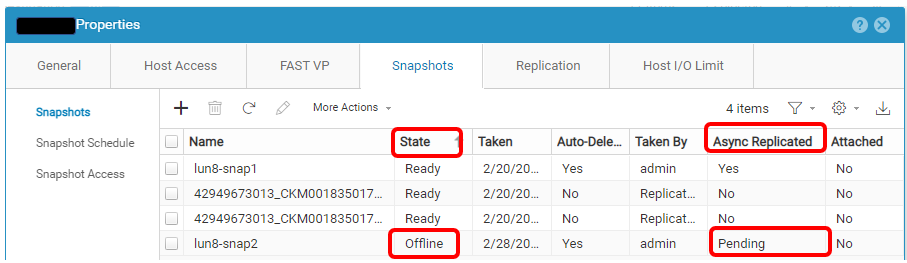
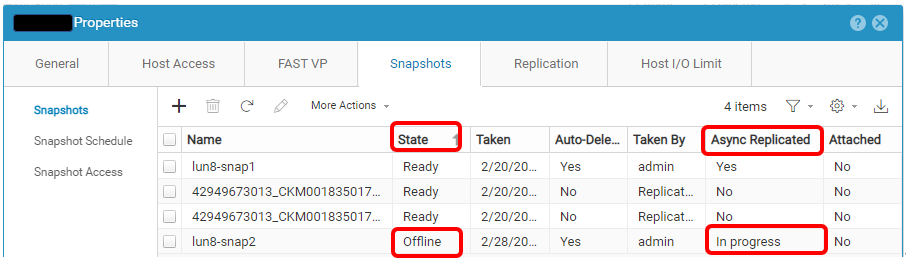
Here is an example of a problematic Snapshot.
Affected Products
Dell EMC Unity, Dell Unity 300, Dell EMC Unity 300F, Dell EMC Unity 350F, Dell EMC Unity XT 380, Dell EMC Unity XT 380F, Dell EMC Unity 400, Dell EMC Unity 400F, Dell EMC Unity 450F, Dell EMC Unity XT 480, Dell EMC Unity XT 480F, Dell EMC Unity 500
, Dell EMC Unity 500F, Dell EMC Unity 550F, Dell EMC Unity 600, Dell EMC Unity 600F, Dell EMC Unity 650F, Dell EMC Unity XT 680, Dell EMC Unity XT 680F, Dell EMC Unity XT 880, Dell EMC Unity XT 880F, Dell EMC Unity Family |Dell EMC Unity All Flash, Dell EMC Unity Family, Dell EMC Unity Hybrid, Dell EMC UnityVSA Professional Edition/Unity Cloud Edition
...
Article Properties
Article Number: 000210066
Article Type: Solution
Last Modified: 31 Dec 2025
Version: 2
Find answers to your questions from other Dell users
Support Services
Check if your device is covered by Support Services.