Beheben des Cloudlink-SFTP-Backupspeicherfehlers „Auth fail“
Summary: Beheben des Fehlers „Auth fail“ beim Testen des Zugriffs auf einen SFTP-Backupspeicher
This article applies to
This article does not apply to
This article is not tied to any specific product.
Not all product versions are identified in this article.
Symptoms
„Auth fail“-Fehler beim Testen des Zugriffs auf einen SFTP-Backupspeicher:
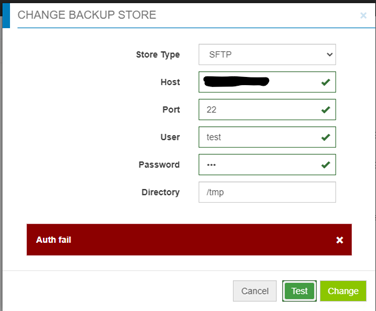
Cause
- Das Kennwort ist falsch.
- Die Kennwortauthentifizierung ist auf dem Zielserver deaktiviert (nur die Challenge-Antwort ist aktiviert) – Cloudlink verwendet für den SFTP-Backupspeicher jedoch die Kennwortauthentifizierung und nicht die Challenge-Antwort.
Resolution
Wenn es sich nicht um ein falsches Kennwort handelt, überprüfen Sie die Datei /etc/ssh/sshd_config auf dem Zielserver und suchen Sie den Eintrag „PasswordAuthentication“.
Wenn „PasswordAuthentication“ auf „no“ festgelegt ist, ändern Sie es auf „yes“ und starten Sie den ssh-Service neu.
Zum Beispiel: „systemctl restart sshd.service“
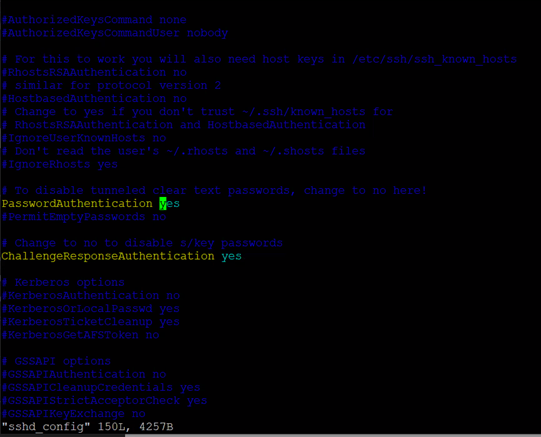
Wenn „PasswordAuthentication“ auf „no“ festgelegt ist, ändern Sie es auf „yes“ und starten Sie den ssh-Service neu.
Zum Beispiel: „systemctl restart sshd.service“
Affected Products
CloudLink SecureVM, CloudLinkArticle Properties
Article Number: 000210190
Article Type: Solution
Last Modified: 16 May 2026
Version: 6
Find answers to your questions from other Dell users
Support Services
Check if your device is covered by Support Services.