Cloudlink sftp yedekleme deposu hatası "auth fail" (doğrulama başarısız) ile ilgili düzeltme
Summary: Bir sftp yedekleme deposuna erişimi test ederken "Auth fail" (Doğrulama başarısız) hatasının çözülmesi.
This article applies to
This article does not apply to
This article is not tied to any specific product.
Not all product versions are identified in this article.
Symptoms
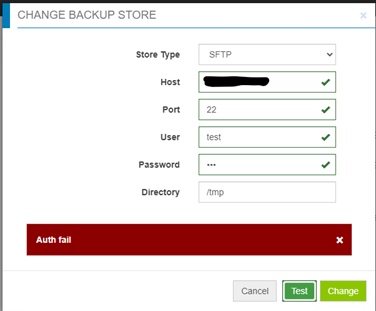
Bir sftp yedekleme deposuna erişimi test ederken doğrulama başarısız oluyor:
Cause
- Parola yanlış.
- Hedef sunucuda parola doğrulama devre dışı bırakıldı (yalnızca Sınama yanıtı etkinleştirildi) - Cloudlink, sftp yedekleme deposu için parola doğrulama kullanıyor ancak sınama yanıtı kullanmıyor.
Resolution
Yanlış şifre söz konusu değilse hedef sunucudaki /etc/ssh/sshd_config dosyasını kontrol edip "PasswordAuthentication" ayarını bulun.
PasswordAuthentication "no" olarak ayarlanmışsa bunu "yes" olarak değiştirin ve ardından SSH hizmetini yeniden başlatın.
Örnek: "systemctl restart sshd.service".
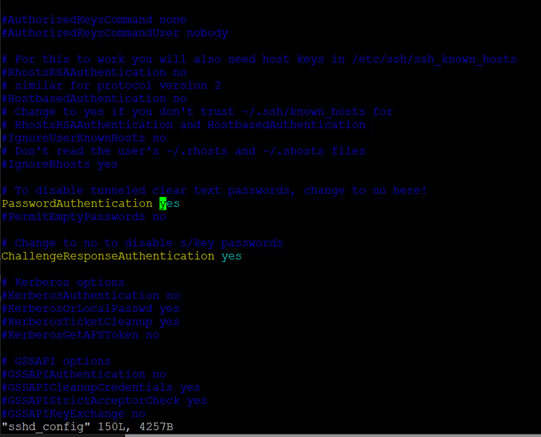
PasswordAuthentication "no" olarak ayarlanmışsa bunu "yes" olarak değiştirin ve ardından SSH hizmetini yeniden başlatın.
Örnek: "systemctl restart sshd.service".
Affected Products
CloudLink SecureVM, CloudLinkArticle Properties
Article Number: 000210190
Article Type: Solution
Last Modified: 16 May 2026
Version: 6
Find answers to your questions from other Dell users
Support Services
Check if your device is covered by Support Services.