Cloudlink sftp 備份儲存錯誤「auth fail」修正
Summary: 解決測試 sftp 備份儲存存取時出現的錯誤「Auth fail」。
This article applies to
This article does not apply to
This article is not tied to any specific product.
Not all product versions are identified in this article.
Symptoms
Auth fail」時,發生測試 SFTP 備份儲存的存取:
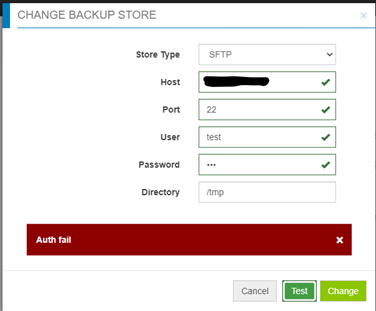
Cause
- 密碼不正確。
- 目標伺服器上的密碼驗證已停用 (僅啟用質詢回應):Cloudlink 對 sftp 備份儲存空間使用密碼驗證,但未使用質詢回應。
Resolution
如果不是密碼大小寫不正確,請在目標伺服器上檢查檔案 /etc/ssh/sshd_config,找到「PasswordAuthentication」設定。
如果密碼驗證設定為「no」,請變更為「yes」,然後重新啟動 ssh 服務。
比如:「systemctl restart sshd.service」
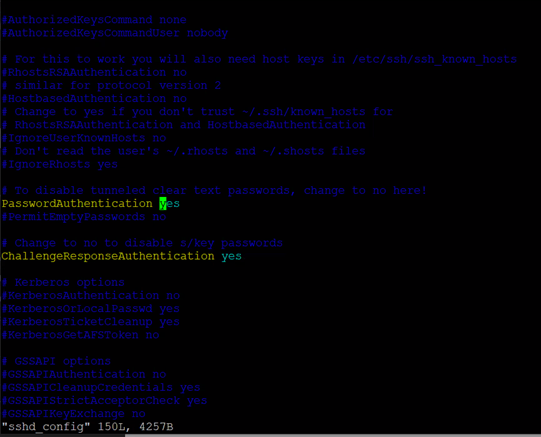
如果密碼驗證設定為「no」,請變更為「yes」,然後重新啟動 ssh 服務。
比如:「systemctl restart sshd.service」
Affected Products
CloudLink SecureVM, CloudLinkArticle Properties
Article Number: 000210190
Article Type: Solution
Last Modified: 16 May 2026
Version: 6
Find answers to your questions from other Dell users
Support Services
Check if your device is covered by Support Services.