NetWorker: Windows-Dateisystembackup für Azure-Client fehlen Dateien
Summary: Das Windows-Dateisystem auf Azure überspringt Dateien, obwohl keine NetWorker-Richtlinie dafür vorhanden ist.
This article applies to
This article does not apply to
This article is not tied to any specific product.
Not all product versions are identified in this article.
Symptoms
Das Windows-Dateisystem auf Azure überspringt Dateien, obwohl keine NetWorker-Richtlinie dafür vorhanden ist.
Die Ausgabe zum Speichern des Debuggings zeigt
Die Ausgabe zum Speichern des Debuggings zeigt
87713:save: Found prototype specification for '\\?\GLOBALROOT\Device\HarddiskVolumeShadowCopy1288\': skip : hiberfil.sys
87713:save: Found prototype specification for '\\?\GLOBALROOT\Device\HarddiskVolumeShadowCopy1288\Areas Compartidas\':+ skip : *.*
Cause
Das Backupdateisystem befindet sich auf dem Azure-Storage-Volume. Das System verwendet den Volume Shadow Copy Service (VSS) Writer "Sync Share Service Writer". Dateien werden standardmäßig übersprungen.
Um zu überprüfen, ob dies die Ursache ist,
- Öffnen Sie eine Eingabeaufforderung als Administrator und führen Sie Folgendes aus:
C:\>  DISKSHADOW /l writers.txt
DISKSHADOW> LIST WRITERS DETAILED
DISKSHADOW> exit
- Sehen Sie sich die Ausgabedatei für writers.txt an. Wenn die folgende Meldung angezeigt wird, ist das eine Bestätigung des Problems.
* WRITER "Sync Share Service Writer"
.////
and that writer contains Components with affected drive
            - Components:
            - File List: Path = J:\DataFiles, Filespec = *.*
            - Paths affected by this component:
                - J:\DataFiles
            - Volumes affected by this component:
                               - \\?\Volume{c34a534a-63a2-4aee-b47a-e2092dc7a901}\ [J:\]
Resolution
Deaktivieren Sie VSS zum Sichern von Azure-Storage-Volumes mit dem Befehl:
VSS:*=off
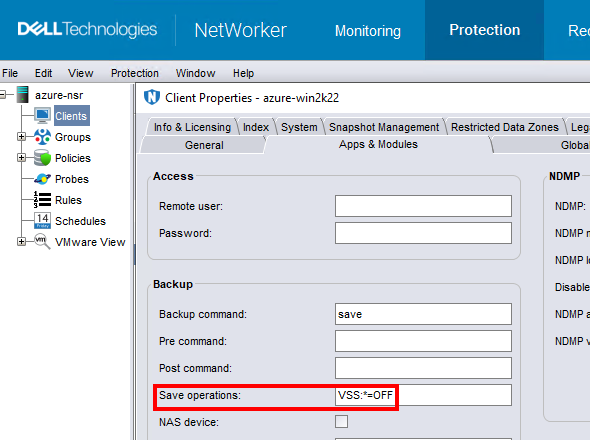
HINWEIS: Tun Sie dies nur für Clients, die Dateisystemdaten sichern. Das Durchführen eines Backups ohne VSS macht es unmöglich, die Fenster zu sichern
DISASTER_RECOVERY:\ Saveset; Das bedeutet, dass eine Bare-Metal-Recovery (BMR) der Windows-VM nicht möglich ist.
Affected Products
NetWorkerProducts
NetWorker FamilyArticle Properties
Article Number: 000210906
Article Type: Solution
Last Modified: 04 Mar 2026
Version: 3
Find answers to your questions from other Dell users
Support Services
Check if your device is covered by Support Services.