NetWorker: File mancanti nel backup del file system di Windows per client Azure
Summary: Il file system Windows su Azure ignora i file anche se non esiste alcuna direttiva NetWorker a tale scopo.
This article applies to
This article does not apply to
This article is not tied to any specific product.
Not all product versions are identified in this article.
Symptoms
Il file system Windows su Azure ignora i file anche se non esiste alcuna direttiva NetWorker a tale scopo.
L'output del salvataggio del debug mostra
L'output del salvataggio del debug mostra
87713:save: Found prototype specification for '\\?\GLOBALROOT\Device\HarddiskVolumeShadowCopy1288\': skip : hiberfil.sys
87713:save: Found prototype specification for '\\?\GLOBALROOT\Device\HarddiskVolumeShadowCopy1288\Areas Compartidas\':+ skip : *.*
Cause
Il file system di backup si trova nel volume di archiviazione di Azure. Il sistema utilizza il writer del servizio Copia Shadow del volume (VSS) "Sync Share Service Writer". Ignora i file per progettazione.
Per verificare che questa sia la causa,
- Aprire un prompt dei comandi come amministratore ed eseguire:
C:\>  DISKSHADOW /l writers.txt
DISKSHADOW> LIST WRITERS DETAILED
DISKSHADOW> exit
- Esaminare il file di output per writers.txt. Se viene visualizzato il seguente messaggio, il problema è confermato.
* WRITER "Sync Share Service Writer"
.////
and that writer contains Components with affected drive
            - Components:
            - File List: Path = J:\DataFiles, Filespec = *.*
            - Paths affected by this component:
                - J:\DataFiles
            - Volumes affected by this component:
                               - \\?\Volume{c34a534a-63a2-4aee-b47a-e2092dc7a901}\ [J:\]
Resolution
Disattivare VSS per eseguire il backup dei volumi di storage Azure con il comando:
VSS:*=off
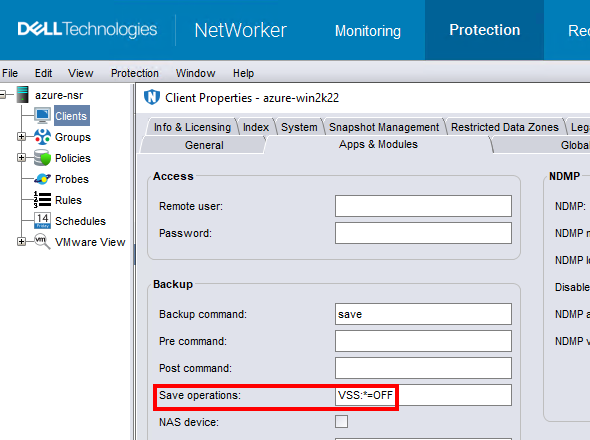
NOTA: Eseguire questa operazione solo per i client che eseguono il backup dei dati del file system. L'esecuzione di un backup senza VSS rende impossibile eseguire il backup delle finestre
DISASTER_RECOVERY:\ set di salvataggio; Ciò significa che il ripristino bare-metal (BMR) della macchina virtuale Windows non sarebbe possibile.
Affected Products
NetWorkerProducts
NetWorker FamilyArticle Properties
Article Number: 000210906
Article Type: Solution
Last Modified: 04 Mar 2026
Version: 3
Find answers to your questions from other Dell users
Support Services
Check if your device is covered by Support Services.