NetWorker: Azure 클라이언트용 Windows 파일 시스템 백업에 파일이 없습니다.
Summary: NetWorker 보호 지침이 없더라도 Azure의 Windows 파일 시스템은 파일을 건너뜁니다.
This article applies to
This article does not apply to
This article is not tied to any specific product.
Not all product versions are identified in this article.
Symptoms
NetWorker 보호 지침이 없더라도 Azure의 Windows 파일 시스템은 파일을 건너뜁니다.
디버그 저장 출력에 표시되는 내용
디버그 저장 출력에 표시되는 내용
87713:save: Found prototype specification for '\\?\GLOBALROOT\Device\HarddiskVolumeShadowCopy1288\': skip : hiberfil.sys
87713:save: Found prototype specification for '\\?\GLOBALROOT\Device\HarddiskVolumeShadowCopy1288\Areas Compartidas\':+ skip : *.*
Cause
백업 파일 시스템은 Azure Storage 볼륨에 있습니다. 시스템은 VSS(볼륨 섀도 복사본 서비스) 기록기 "동기화 공유 서비스 기록기"를 사용합니다. 의도적으로 파일을 건너뜁니다.
이것이 원인인지 확인하려면
- 관리자 권한으로 명령 프롬프트를 열고 다음을 실행합니다.
C:\>  DISKSHADOW /l writers.txt
DISKSHADOW> LIST WRITERS DETAILED
DISKSHADOW> exit
- 출력 파일에서 writers.txt 확인합니다. 아래 메시지가 표시되면 문제를 확인하는 것입니다.
* WRITER "Sync Share Service Writer"
.////
and that writer contains Components with affected drive
            - Components:
            - File List: Path = J:\DataFiles, Filespec = *.*
            - Paths affected by this component:
                - J:\DataFiles
            - Volumes affected by this component:
                               - \\?\Volume{c34a534a-63a2-4aee-b47a-e2092dc7a901}\ [J:\]
Resolution
다음 명령을 사용하여 Azure 스토리지 볼륨을 백업하기 위한 VSS를 끕니다.
VSS:*=off
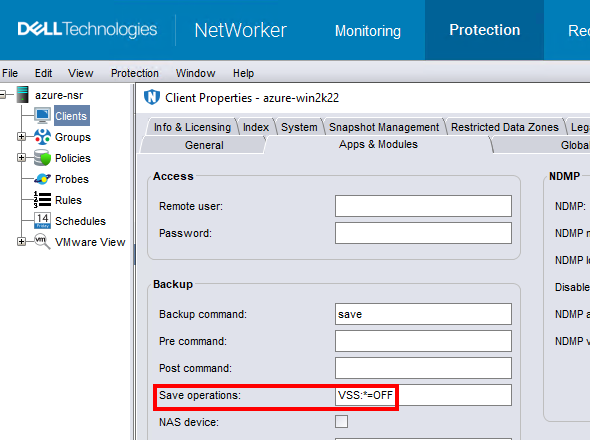
참고: 파일 시스템 데이터를 백업하는 클라이언트에 대해서만 이 작업을 수행하십시오. VSS 없이 백업을 수행하면 Windows를 백업할 수 없음
DISASTER_RECOVERY:\ 세이브 세트; 즉, Windows VM의 BMR(Bare Metal Recovery)이 불가능합니다.
Affected Products
NetWorkerProducts
NetWorker FamilyArticle Properties
Article Number: 000210906
Article Type: Solution
Last Modified: 04 Mar 2026
Version: 3
Find answers to your questions from other Dell users
Support Services
Check if your device is covered by Support Services.