NetWorker:Azure 用戶端的 Windows 檔案系統備份缺少檔案
Summary: Azure 上的 Windows 檔案系統會略過檔案,儘管沒有 NetWorker 指令可以這麼做。
This article applies to
This article does not apply to
This article is not tied to any specific product.
Not all product versions are identified in this article.
Symptoms
Azure 上的 Windows 檔案系統會略過檔案,儘管沒有 NetWorker 指令可以這麼做。
除錯儲存輸出顯示
除錯儲存輸出顯示
87713:save: Found prototype specification for '\\?\GLOBALROOT\Device\HarddiskVolumeShadowCopy1288\': skip : hiberfil.sys
87713:save: Found prototype specification for '\\?\GLOBALROOT\Device\HarddiskVolumeShadowCopy1288\Areas Compartidas\':+ skip : *.*
Cause
備份檔案系統位於 Azure 儲存磁碟區上。系統使用卷影複製服務 (VSS) 編寫器「同步共用服務編寫器」。它按設計跳過檔。
若要確認這是原因,
- 以系統管理員身分開啟命令提示字元並執行:
C:\>  DISKSHADOW /l writers.txt
DISKSHADOW> LIST WRITERS DETAILED
DISKSHADOW> exit
- 查看輸出檔案以瞭解 writers.txt。如果您看到以下訊息,則代表這可確認問題。
* WRITER "Sync Share Service Writer"
.////
and that writer contains Components with affected drive
            - Components:
            - File List: Path = J:\DataFiles, Filespec = *.*
            - Paths affected by this component:
                - J:\DataFiles
            - Volumes affected by this component:
                               - \\?\Volume{c34a534a-63a2-4aee-b47a-e2092dc7a901}\ [J:\]
Resolution
使用以下命令關閉用於備份 Azure 儲存磁碟區的 VSS:
VSS:*=off
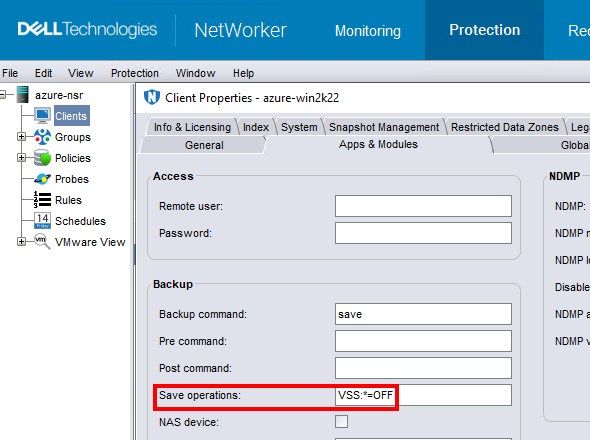
注意:僅對備份檔案系統資料的用戶端執行此操作。在沒有 VSS 的情況下執行備份會導致無法備份視窗
DISASTER_RECOVERY:\ 存儲集;表示無法進行 Windows VM 的裸機復原 (BMR)。
Affected Products
NetWorkerProducts
NetWorker FamilyArticle Properties
Article Number: 000210906
Article Type: Solution
Last Modified: 04 Mar 2026
Version: 3
Find answers to your questions from other Dell users
Support Services
Check if your device is covered by Support Services.