NetWorker: Troubleshooting Data Domain Capacity Issues
Summary: How to review the NetWorker environment and Data Domain (DD) capacity when the DD space consumption is growing.
This article applies to
This article does not apply to
This article is not tied to any specific product.
Not all product versions are identified in this article.
Symptoms
- Data Domain space usage is increasing, or there is less free space available than there used to be.
- Data Domain is running slowly or not responding as expected.
- Data Domain file system is showing near capacity or is 100% full.
- NetWorker devices may not be responding, or they may show offline. They may automatically unmount.
- NetWorker may not have available devices. The device may not be ready or "no matching devices" errors appear in the NetWorker Management Console (NMC) or logs.
- Backups for NetWorker fail - or wait for a device to be available
- You are asked to manually create a device for the pool the backup is running where devices had previously been configured.
Cause
NetWorker Potential Causes to consider:

Figure 1: DD File system management
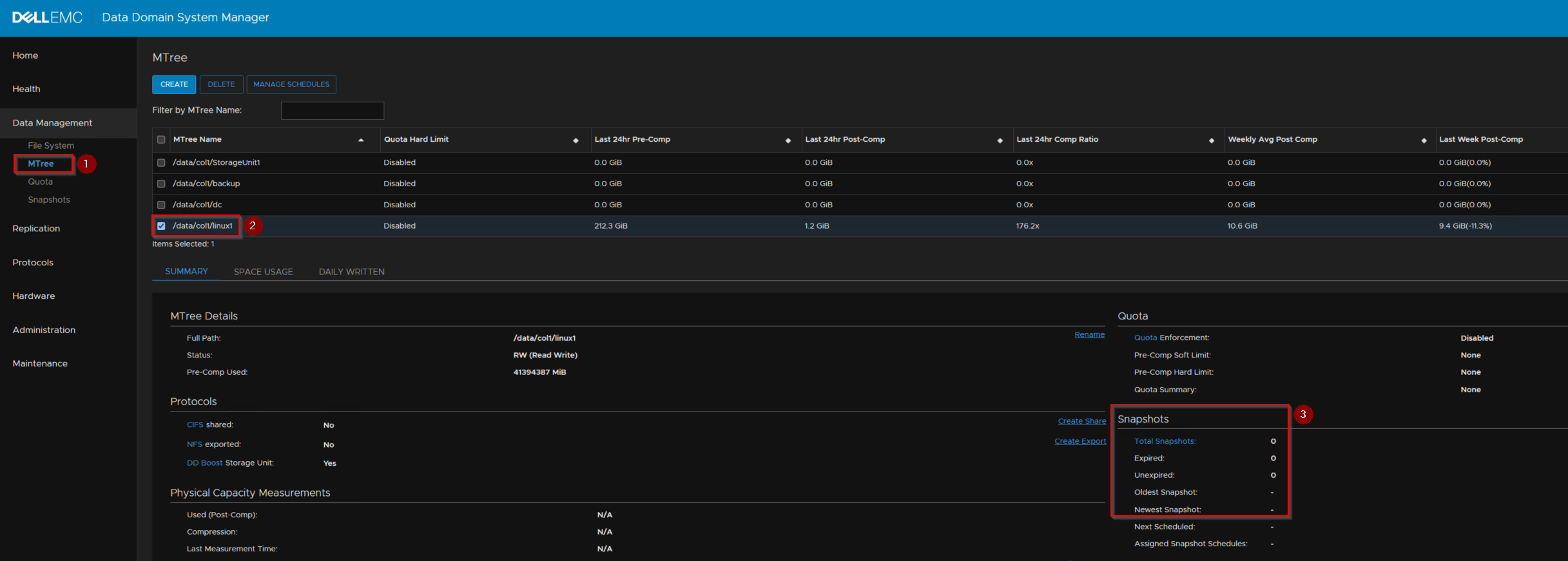
Figure 2: DD MTree management
- The policy browse and retention recently changed
- The devices are active simultaneously to when the SERVER BACKUP is scheduled to run.
- Are there any SSRECYCLE savesets?
mminfo -avot -q "ssrecycle=true,family=disk"
- A reminder that DISK is all disk (AFTD, optical, and DD)
- More FULL backups are running than are expected, or the system is designed for.
- The database administrator added another database that you are unaware of.
- An administrator added another DRIVE letter or file system under the / (root) which became part of the backup.
- Is the DD cleaning once or twice a week?
- DD command:
filesys clean show schedule
- DD web user interface:
Figure 1: DD File system management
- Are there any expired SNAPSHOTs in any of the MTREE (bins)?
- DD web user interface:
Figure 2: DD MTree management
Resolution
NetWorker is built to not purge savesets while a device is busy. If the SERVER PROTECTION > SERVER BACKUP is running, and there are savesets to purge, this does not happen until the devices are not in use.
Other options:
- Manually run:
nsrstage -Cvv -V <volume>
- Then manually run:
nsrim -X
This goes to the cleanable space on the DD (if there are saveset to expire). nsrim is run automatically whenever the Server Protection "expiration" action runs.
Other options:
- Manually purge the savesets. The SSID and the CLONEID are required.
nsrmm -d -y -S ssid/cloneid -X
Take care when deleting save sets from the NetWorker media database. Once the expiration (nsrim -X) task runs and a Data Domain cleaning cycle completes, the save sets are permanently deleted.
- For more details on manual CLI save set deletion, log in to Dell Support and search for article 22559, How to delete Multiple or Individual SSIDs?
- You can also create a 0KB file called recover_space_anytime in the:
UNIX:
/nsr/debug

Windows:
C:\program files\emc networker\nsr\debug
You may have a different clone browse and retention that may not be included and could potentially remove savesets earlier than expected (or original savesets).
Affected Products
NetWorker Family, Data Domain, NetWorkerArticle Properties
Article Number: 000211656
Article Type: Solution
Last Modified: 17 May 2026
Version: 7
Find answers to your questions from other Dell users
Support Services
Check if your device is covered by Support Services.