PowerProtect Data Manager: TSDM Backups "Unable to connect to target Data Domain host"
Summary: The PowerProtect Data Manager Transparent Snapshot Data Mover (TSDM) backups failing indicating it is unable to communicate with the target Data Domain Host. The communication issues are due to a Maximum Transmission Unit (MTU) mismatch between ESXi and Data Domain. ...
This article applies to
This article does not apply to
This article is not tied to any specific product.
Not all product versions are identified in this article.
Symptoms
The TSDM backups are failing to one or multiple PowerProtect Data Domains. The virtual machine (VM) Direct Engine backups complete with success.
- Error Codes:
ABV0040, ABV0016 - Protection Job Error:
Unable to successfully complete SDM Full Sync operation.  Unsuccessful after 1 attempts over 11m14.958797693s.  The vCenter task for 'SDM Snapshot Sync Full' completed with state 'error'.  TSDM Error Code: <TargetDataDomainUnreachable>, TSDM Error Message: <Unable to connect to target DataDomain host. Error message: Failed to connect to '192.168.1.1'. err='calling system(), returns nonzero'>., target=VM_Name

Unable to successfully complete SDM Full Sync operation.  Unsuccessful after 1 attempts over 11m14.958797693s.  The vCenter task for 'SDM Snapshot Sync Full' completed with state 'error'.  TSDM Error Code: <TargetDataDomainUnreachable>, TSDM Error Message: <Unable to connect to target DataDomain host. Error message: Failed to connect to '192.168.1.1'. err='calling system(), returns nonzero'>. (500)
PowerProtect Log Location: /opt/emc/vmdirect/runtime/logs/recycle/vpod/<date>/BackupVmSession-<SessionId>.log:
2025-01-10T18:00:20.807Z ERROR: [9bf47huh78e89623;987879j898817775] SDM Data Mover: SDM Full Sync: The vCenter task for 'SDM Snapshot Sync Full' completed with state 'error'. TSDM Error Code: <TargetDataDomainUnreachable>, TSDM Error Message: <Unable to connect to target DataDomain host. Error message: Failed to connect to '192.168.1.1'. err='calling system(), returns nonzero'>.ESXi Log Location: /var/run/log/tsdm.log:
2025-01-19T09:54:28.787Z In(30) tsdm[316937630]: error TSDM[0x000000bb79082700] [sub=DdBoostLogger]: ddBoostLogger.cpp:69 WriteDDBoostLog: [316937630:805189461760] ddp_connect_with_config_internal() failed, Hostname: 192.168.1.1, Err: 5040-ddcl_ost2_connect_ext(): RPC failure after reconnect
2025-01-19T09:54:28.787Z In(30) tsdm[316937630]: error TSDM[0x000000bb79082700] [sub=DdBoostLogger]: ddBoostLogger.cpp:69 WriteDDBoostLog: [316937630:805189461760] ddp_connect_with_config() failed, Hostname: 192.168.1.1, Err: 5040-ddcl_ost2_connect_ext(): RPC failure after reconnect
2025-01-19T09:54:28.787Z In(30) tsdm[316937630]: error TSDM[0x000000bb79082700] [sub=SdmDdLog]: ddBoostFacade.cpp:1405 CreateConnectStatus: {DdBoostFacade SdmOpId=[protectedEntity='5012343b-4f0f-ca79-1b1f-c15e2e245456',cycleSession='1766136789043548',traceId='be6f2h76fgr4e4er9;82e8cd25c4h786g6']} Failed to connect to '192.168.1.1'. err='calling system(), returns nonzero'
Cause
Backup failures occur when an MTU mismatch between ESXi and PowerProtect DD causes network fragmentation and interrupted data flow. This mismatch can occur on any network segment that is in the path between two hosts, in this case ESXi and PowerProtect DD.
If devices use different MTU sizes, packets can get fragmented or dropped, causing:
- Slow backup performance
- Timeouts or retries
- Backup job failures
MTU configuration and path‑MTU issues fall under the responsibility of the Network and Infrastructure team, as they manage ESXi networking, switches, firewalls, and DD network paths.
Resolution
The MTU size must be consistent along the path between two hosts, in this case ESXi and PowerProtect DD. See PowerProtect DD article - Data Domain: How to ensure that MTU is consistent along the path
Confirm MTU on ESXi VMkernel:
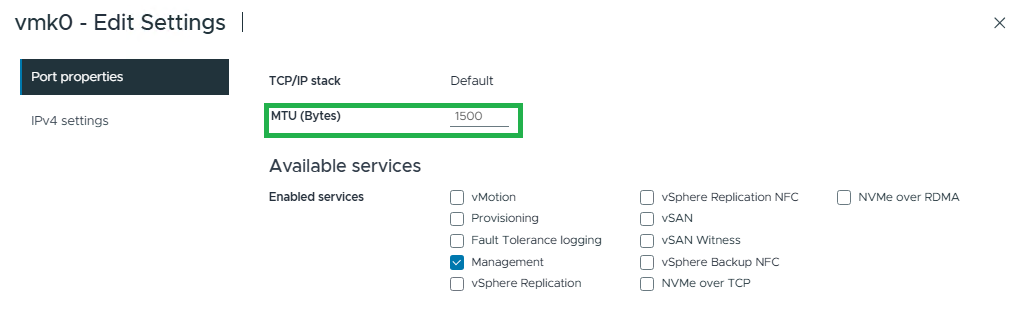
- Connect to vSphere->Select ESXi host->Configure->Networking->VMkernel adapters -> Select the VMkernel -> Edit.
Example output of 1500 MTU:
- Confirm over CLI -> SSH to the ESXi -> run command below.
esxcfg-vmknic -lExample output:

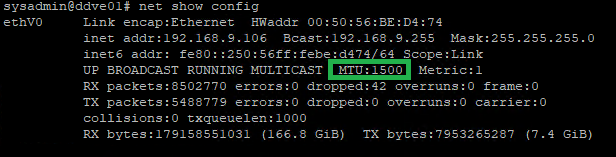
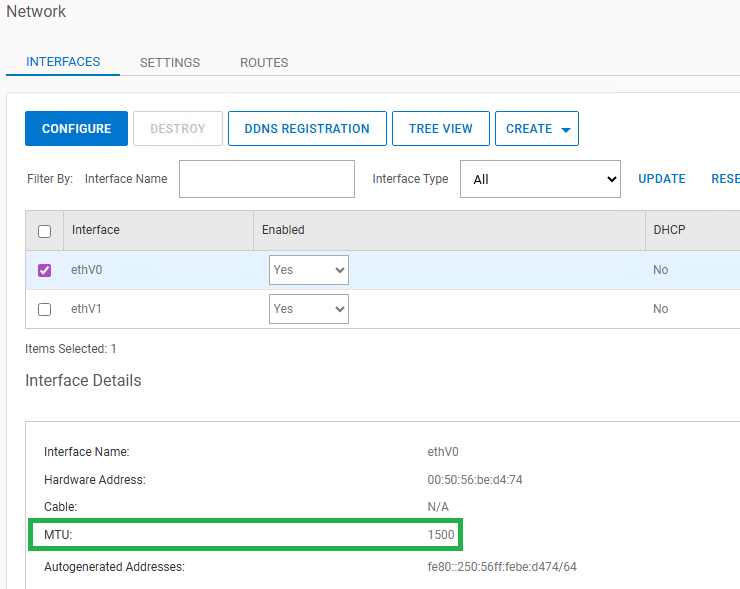
Confirm MTU on PowerProtect DD interface:
- Connect to PowerProtect DD over ssh and run command below.
net show configExample output:
- In the PowerProtect DD UI -> Hardware -> Ethernet -> Interfaces
Testing MTU
First to confirm that the ports are open, closed ports fail an MTU test.
Replace the following parameters to match your environment (including <>):<your_dd_interface> with your PowerProtect DD network interfaces as set on the Protection Policy.<your_vmk_ip> with your ESXi VMkernel IP
- Confirm general communication.
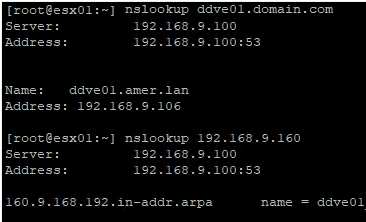
Use the DD interface as set on the PowerProtect Data Manager Protection Policy. If using PowerProtect DD Fully Qualified Domain name (FQDN), ESXi must be able to resolve the FQDN to the correct DD IP required for backup. Example ping and nslookup syntax:
ping <your_dd_interface>
nslookup <your_dd_interface>Example output:
ESXi NC using specific VMkernel (if not the default):
nc -s <your_vmk_ip> -zv <your_dd_interface> 2049Example output:

If unsure of VMkernel IP check:
- vSphere UI ->Select ESXI host->Configure->Networking->VMkernel adapter
- CLI:
esxcli network ip interface ipv4 get
- Verify MTU size for 9000 Jumbo frames between ESXI and DD.
Replace the following parameters to match your environment (including <>):
<your_dd_interface> with your PowerProtect DD network interfaces as set on the Protection Policy.
vmkping -d -s 8972 <your_dd_interface>
vmkping -d -s 8500 <your_dd_interface>- Verify MTU size for 1500 between ESXI and DD.
vmkping -d 1472 <your_dd_interface>Why 8972 or 1472?
These values are the ICMP payload sizes required to reach the MTU once the protocol overhead is added:
-
- 8 bytes for the ICMP header
- 20 bytes for the IP header
Payload + 28 = MTU
(For example, 1472 → 1500 MTU, 8972 → 9000 MTU)
Example output:

If the MTU vmkping tests fail, this indicates an MTU mismatch somewhere along the network path between the ESXI and DD. MTU configuration and path‑MTU issues fall under the responsibility of the Network and Infrastructure team, as they manage ESXi networking, switches, firewalls, and DD network paths.
If ESXi VMkernel and DD are set to 9000 but MTU ping fails, temporarily set VMkernel MTU to 1500 and run a TSDM backup. Even with 1500 at the source and 9000 at the destination, path MTU differences can still cause issues. As above, see PowerProtect DD article - Data Domain: How to ensure that MTU is consistent along the path
Products
Virtualization Solution ResourcesArticle Properties
Article Number: 000212314
Article Type: Solution
Last Modified: 17 Feb 2026
Version: 2
Find answers to your questions from other Dell users
Support Services
Check if your device is covered by Support Services.