SRM 4.8: Unable to force close or acknowledge alerts
Summary: In a Windows deployment of SRM when clicking force close or acknowledge to any alert in the SRM user interface results in a timeout error.
This article applies to
This article does not apply to
This article is not tied to any specific product.
Not all product versions are identified in this article.
Symptoms
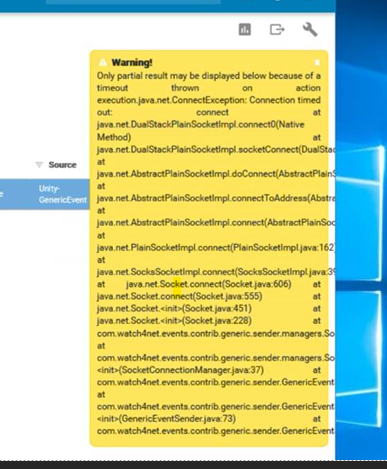
Post upgrade to 4.8 when attempting to select any action like force close or acknowledge an alert in the SRM user interface, it fails with a Connection timed out error:
Cause
Both ports 2042 and 2060 were closed on the Primary Backend.
Test-NetConnection is a PowerShell cmdlet that can be used on a Windows (or possibly other binary deployment) to diagnose network connectivity issues, this cmdlet will not be available on a vApp deployment. Run the commands shown below.
Test-NetConnectio test from the FE to the PBE to both ports failed:
Test-NetConnection <PBE FQDN> -Port 2042
WARNING: TCP connect to <PBE FQDN>:2042 failed
WARNING: Ping to pbe.server.fdqnl failed – Status: TimedOut

ComputerName : pbe.server.fdqn
RemoteAddress : 10.10.10.1
RemotePort : 2042
InterfaceAlias : Ethernet
SourceAddress : 10.10.10.1
PingSucceeded : False
PingReplyDetails (RTT) : 0 ms
TcpTestSucceeded : False


Test-NetConnection <PBE FQDN> -Port 2060
WARNING: TCP connect to <PBE FQDN>:2060 failed
WARNING: Ping to pbe.server.fdqnl failed – Status: TimedOut

ComputerName : pbe.server.fdqn
RemoteAddress : 10.10.10.1
RemotePort : 2060
InterfaceAlias : Ethernet
SourceAddress : 10.10.10.1
PingSucceeded : False
PingReplyDetails (RTT) : 0 ms
TcpTestSucceeded : False
Resolution
The alerts' action scripts use ports 2042 and 2060 when sending the requests from the Frontend to the Primary Backend in order to force close or acknowledge any alert.
To resolve this issue the following ports, 2042 and 2060, must be opened on the Primary Backend server.
Affected Products
SRM, SRMArticle Properties
Article Number: 000212949
Article Type: Solution
Last Modified: 04 Mar 2025
Version: 2
Find answers to your questions from other Dell users
Support Services
Check if your device is covered by Support Services.