PowerEdge: Verkkopalvelun käyttöönotto Red Hat Linux -järjestelmässä
Summary: Tämä on yleinen opas verkkopalvelun käyttöönottoon Red Hat Linux -järjestelmässä.
This article applies to
This article does not apply to
This article is not tied to any specific product.
Not all product versions are identified in this article.
Instructions
Joissakin tapauksissa verkkopalvelut on otettava käyttöön Red Hat Linux -järjestelmässä. Tällaisia ovat esimerkiksi DNS, DHCP, NTP, FTP, HTTP, EMail-palvelut ja niin edelleen.
Seuraavassa artikkelissa on yhteenveto kyseisten verkkopalvelujen käyttöönottovaiheista.
HUOMAUTUS: Kaikki tämän artikkelin lokit ovat peräisin VMware-ympäristön paikallisesta virtuaalilaboratoriosta.
Seuraavassa artikkelissa on yhteenveto kyseisten verkkopalvelujen käyttöönottovaiheista.
Lyhyt yhteenveto vaiheista
- Haku- ja asennuspalvelu (yum/rpm)
- Käynnistä ja ota palvelu käyttöön (systemctl)
- Palomuurin lupapalvelu (firewall-cmd)
- Hae ja muokkaa palvelun määritystiedostoja varmuuskopioituasi ensin oletusmääritystiedostot (*.conf, *.cnf, *.cfg jne.) Käytä sanaa "man" ohjeiden ja esimerkkien etsimiseen. Muokkaa määritystiedostoja komennolla vim. Tarkista syntaksi.
- Tarkista ja määritä tiedostojen käyttöoikeus- ja suojauskäytäntö (chmod/chown/setfacl/selinux)
- Käynnistä palvelu uudelleen ja tee vianmääritys (jos palvelun uudelleenkäynnistys epäonnistuu)
- Palvelun tilan testaaminen ja tarkistaminen (varmista, että tulos on odotettu)
DHCP-palvelun vaiheiden yhteenveto ja erityiset komennot
- Etsi ja asenna DHCP-palvelu
[root@servera ~]# yum search dhcp*
Last metadata expiration check: 0:13:07 ago on Thu 18 May 2023 06:54:40 AM GMT.
============================================================== Name Matched: dhcp* ===============================================================

dhcp-libs.x86_64 : Shared libraries used by ISC dhcp client and server
dhcp-libs.i686 : Shared libraries used by ISC dhcp client and server
dhcp-libs.x86_64 : Shared libraries used by ISC dhcp client and server
dhcp-relay.x86_64 : Provides the ISC DHCP relay agent
dhcp-client.x86_64 : Provides the ISC DHCP client daemon and dhclient-script
dhcp-common.noarch : Common files used by ISC dhcp client, server and relay agent
dhcp-client.x86_64 : Provides the ISC DHCP client daemon and dhclient-script
dhcp-common.noarch : Common files used by ISC dhcp client, server and relay agent
dhcp-server.x86_64 : Provides the ISC DHCP server      <-- this is the dhcp service installation package
[root@servera ~]#

[root@servera ~]# yum list dhcp-server
Last metadata expiration check: 0:15:12 ago on Thu 18 May 2023 06:54:40 AM GMT.
Available Packages      <-- this package is available, if it shows "Installed Packages", means the service already installed
dhcp-server.x86_64                 12:4.3.6-34.el8                 rhel-8.1-for-x86_64-baseos-rpms
[root@servera ~]#

[root@servera ~]# yum provides dhcp-server
Last metadata expiration check: 0:17:31 ago on Thu 18 May 2023 06:54:40 AM GMT.
dhcp-server-12:4.3.6-34.el8.x86_64 : Provides the ISC DHCP server
Repo        : rhel-8.1-for-x86_64-baseos-rpms      <-- this is the yum repository that provide the service package
Matched from:
Provide    : dhcp-server = 12:4.3.6-34.el8
[root@servera ~]#

[root@servera ~]# yum -y install dhcp-server
Last metadata expiration check: 0:20:30 ago on Thu 18 May 2023 06:54:40 AM GMT.
Dependencies resolved.
==============================================================================
 Package                       Architecture             Version                           Repository                                         Size
==============================================================================
Installing:
 dhcp-server                   x86_64                   12:4.3.6-34.el8                   rhel-8.1-for-x86_64-baseos-rpms                   530 k
Transaction Summary
==============================================================================
Install  1 Package
Total download size: 530 k
Installed size: 1.3 M
Downloading Packages:
dhcp-server-4.3.6-34.el8.x86_64.rpm                                                                               5.6 MB/s | 530 kB     00:00
-----------------------------------------------------------------------------------------------------------------------------------------------
Total                                                                                                             5.3 MB/s | 530 kB     00:00
Running transaction check
Transaction check succeeded.
Running transaction test
Transaction test succeeded.
Running transaction
  Preparing        :                                                                                                                          1/1
  Running scriptlet: dhcp-server-12:4.3.6-34.el8.x86_64                                                                                       1/1
  Installing       : dhcp-server-12:4.3.6-34.el8.x86_64                                                                                       1/1
  Running scriptlet: dhcp-server-12:4.3.6-34.el8.x86_64                                                                                       1/1
  Verifying        : dhcp-server-12:4.3.6-34.el8.x86_64                                                                                       1/1
Installed:
  dhcp-server-12:4.3.6-34.el8.x86_64
Complete!
[root@servera ~]#
- DHCP-palvelun käynnistäminen ja käyttöönotto
[root@servera ~]# rpm -ql dhcp-server | grep .service
/usr/lib/systemd/system/dhcpd.service      <-- find out the service name after installation
/usr/lib/systemd/system/dhcpd6.service
[root@servera ~]#

[root@servera ~]# systemctl list-unit-files | grep dhcp
dhcpd.service                              disabled      <-- service disable by default
dhcpd6.service                             disabled
[root@servera ~]#

[root@servera ~]# systemctl enable --now dhcpd      <-- start and enable dhcp service
Created symlink /etc/systemd/system/multi-user.target.wants/dhcpd.service → /usr/lib/systemd/system/dhcpd.service.
Job for dhcpd.service failed because the control process exited with error code.
See "systemctl status dhcpd.service" and "journalctl -xe" for details.
[root@servera ~]#

[root@servera ~]# systemctl status dhcpd      <-- check dhcp service status
● dhcpd.service - DHCPv4 Server Daemon
   Loaded: loaded (/usr/lib/systemd/system/dhcpd.service; enabled; vendor preset: disabled)      <-- service enabled
   Active: failed (Result: exit-code) since Thu 2023-05-18 07:24:16 GMT; 56s ago      <-- status is failed (Result: exit-code)
     Docs: man:dhcpd(8)      <-- you can get help from here, by "man dhcpd" and "man dhcpd.conf"
           man:dhcpd.conf(5)
  Process: 3963 ExecStart=/usr/sbin/dhcpd -f -cf /etc/dhcp/dhcpd.conf -user dhcpd -group dhcpd --no-pid $DHCPDARGS (code=exited, status=1/FAILURE)      <-- showed mistakes why failure
 Main PID: 3963 (code=exited, status=1/FAILURE)
May 18 07:24:16 servera dhcpd[3963]: have been made to the base software release in order to make
May 18 07:24:16 servera dhcpd[3963]: it work better with this distribution.
May 18 07:24:16 servera dhcpd[3963]:
May 18 07:24:16 servera dhcpd[3963]: Please report issues with this software via:
May 18 07:24:16 servera dhcpd[3963]: bugzilla-redhat-com
May 18 07:24:16 servera dhcpd[3963]:
May 18 07:24:16 servera dhcpd[3963]: exiting.
May 18 07:24:16 servera systemd[1]: dhcpd.service: Main process exited, code=exited, status=1/FAILURE
May 18 07:24:16 servera systemd[1]: dhcpd.service: Failed with result 'exit-code'.
May 18 07:24:16 servera systemd[1]: Failed to start DHCPv4 Server Daemon.
[root@servera ~]#
- Palomuurilupapalvelu
[root@servera ~]# firewall-cmd --permanent --add-service=dhcp
success
[root@servera ~]#

[root@servera ~]# firewall-cmd --reload
success
[root@servera ~]#

[root@servera ~]# firewall-cmd --list-all
public (active)
  target: default
  icmp-block-inversion: no
  interfaces: eth0 eth1
  sources:
  services: cockpit dhcp dhcpv6-client ssh
  ports:
  protocols:
  masquerade: no
  forward-ports:
  source-ports:
  icmp-blocks:
  rich rules:
[root@servera ~]#
- Hae ja muokkaa palvelukokoonpanotiedostoja
[root@servera ~]# rpm -qc dhcp-server
/etc/dhcp/dhcpd.conf      <-- this is the main configuration file
/etc/dhcp/dhcpd6.conf
/etc/openldap/schema/dhcp.schema
/etc/sysconfig/dhcpd      <-- this is another configuration file should review
/var/lib/dhcpd/dhcpd.leases
/var/lib/dhcpd/dhcpd6.leases
[root@servera ~]#

[root@servera ~]# cat /etc/dhcp/dhcpd.conf
#
# DHCP Server Configuration file.
#   see /usr/share/doc/dhcp-server/dhcpd.conf.example      <-- this is configuration example
#   see dhcpd.conf(5) man page
#
[root@servera ~]#

[root@servera ~]# cp /etc/dhcp/dhcpd.conf /etc/dhcp/dhcpd.conf.bak      <-- backup main configuration
[root@servera ~]#

[root@servera ~]# vim /etc/dhcp/dhcpd.conf      <-- edit the main configuration file
:r /usr/share/doc/dhcp-server/dhcpd.conf.example      <-- read and copy example to this main configuration file
Then make changes, get following result finally :
#
# dhcpd.conf
#
option domain-name "example-net";
option domain-name-servers 172.25.254.254;
default-lease-time 800;
max-lease-time 7200;
authoritative;
log-facility local7;
subnet 192.168.0.0 netmask 255.255.255.0 {
  range 192.168.0.200 192.168.0.254;
  option domain-name-servers 172.25.254.254;
  option domain-name "example-net";
  option routers 192.168.0.1;
  option broadcast-address 192.168.0.255;
  default-lease-time 800;
  max-lease-time 7200;
}
# assign one specific ip address to host serverb
host serverb {
  hardware ethernet 52:54:00:01:fa:0b;
  fixed-address 192.168.0.102;
}

[root@servera ~]# cat /etc/sysconfig/dhcpd
# WARNING: This file is NOT used anymore.
# If you are here to restrict what interfaces should dhcpd listen on,
# be aware that dhcpd listens *only* on interfaces for which it finds subnet
# declaration in dhcpd.conf. It means that explicitly enumerating interfaces
# also on command line should not be required in most cases.
# If you still insist on adding some command line options,
# copy dhcpd.service from /lib/systemd/system to /etc/systemd/system and modify
# it there.
# example:      <-- follow above guide to set dhcp running interface
# $ cp /usr/lib/systemd/system/dhcpd.service /etc/systemd/system/
# $ vi /etc/systemd/system/dhcpd.service
# $ ExecStart=/usr/sbin/dhcpd -f -cf /etc/dhcp/dhcpd.conf -user dhcpd -group dhcpd --no-pid <your_interface_name(s)>
# $ systemctl --system daemon-reload
# $ systemctl restart dhcpd.service
[root@servera ~]#

[root@servera ~]# vi /etc/systemd/system/dhcpd.service
...
[Service]
...
ExecStart=/usr/sbin/dhcpd -f -cf /etc/dhcp/dhcpd.conf -user dhcpd -group dhcpd --no-pid eth1      <-- set interface "eth1"
...
[root@servera ~]# dhcpd -t      <-- syntax check after configuration file modified
Internet Systems Consortium DHCP Server 4.3.6
Copyright 2004-2017 Internet Systems Consortium.
All rights reserved.
For info, please visit www-isc-org/software/dhcp/
ldap_gssapi_principal is not set,GSSAPI Authentication for LDAP will not be used
Not searching LDAP since ldap-server, ldap-port and ldap-base-dn were not specified in the config file
Config file: /etc/dhcp/dhcpd.conf
Database file: /var/lib/dhcpd/dhcpd.leases
PID file: /var/run/dhcpd.pid
Source compiled to use binary-leases
[root@servera ~]#

[root@servera ~]# echo $?
0      <-- it means there's no errors, all fine for syntax check by command "dhcpd -t"
[root@servera ~]#
- Tarkista ja määritä tiedostojen käyttöoikeus- ja suojauskäytäntö
Tietoja tiedoston käyttöoikeus- ja suojauskäytännöstä on, että DHCP-palveluun ei tarvitse tehdä muutoksia. Jos sinulla on erityisiä vaatimuksia, tee muutokset suunnitelmasi mukaisesti.
- Käynnistä palvelu uudelleen
[root@servera ~]# systemctl --system daemon-reload
[root@servera ~]#

[root@servera ~]# systemctl restart dhcpd.service
[root@servera ~]#

[root@servera ~]# systemctl status dhcpd
● dhcpd.service - DHCPv4 Server Daemon
   Loaded: loaded (/etc/systemd/system/dhcpd.service; enabled; vendor preset: disabled)
   Active: active (running) since Thu 2023-05-18 08:00:00 GMT; 16s ago      <-- status is active (running)
     Docs: man:dhcpd(8)
           man:dhcpd.conf(5)
 Main PID: 4514 (dhcpd)
   Status: "Dispatching packets..."
    Tasks: 1 (limit: 11251)
   Memory: 5.2M
   CGroup: /system.slice/dhcpd.service
           └─4514 /usr/sbin/dhcpd -f -cf /etc/dhcp/dhcpd.conf -user dhcpd -group dhcpd --no-pid eth1

May 18 08:00:00 servera systemd[1]: Started DHCPv4 Server Daemon.
May 18 08:00:12 servera dhcpd[4514]: DHCPDISCOVER from 52:54:00:01:fa:0d via eth1
May 18 08:00:12 servera dhcpd[4514]: DHCPDISCOVER from 52:54:00:02:fa:0d via eth1
May 18 08:00:13 servera dhcpd[4514]: DHCPOFFER on 192.168.0.200 to 52:54:00:01:fa:0d (serverd) via eth1
May 18 08:00:13 servera dhcpd[4514]: DHCPREQUEST for 192.168.0.200 (192.168.0.10) from 52:54:00:01:fa:0d (serverd) via eth1
May 18 08:00:13 servera dhcpd[4514]: DHCPACK on 192.168.0.200 to 52:54:00:01:fa:0d (serverd) via eth1
May 18 08:00:13 servera dhcpd[4514]: ICMP Echo Reply for 192.168.0.200 late or spurious.
May 18 08:00:13 servera dhcpd[4514]: DHCPOFFER on 192.168.0.201 to 52:54:00:02:fa:0d (serverd) via eth1
May 18 08:00:13 servera dhcpd[4514]: DHCPREQUEST for 192.168.0.201 (192.168.0.10) from 52:54:00:02:fa:0d (serverd) via eth1
May 18 08:00:13 servera dhcpd[4514]: DHCPACK on 192.168.0.201 to 52:54:00:02:fa:0d (serverd) via eth1
[root@servera ~]#

Notes:
If service fails to restart, you should do further trouble-shooting to resolve it.
From the below logs, you may find some valuable clues.
[root@server ~]# tail /var/log/messages
[root@server ~]# journalctl -u [service unit name]
- Palvelun tilan testaaminen ja tarkistaminen
From another host serverb to check if dhcp service working fine.
[root@serverb ~]# nmcli connection show | grep eth1
Wired connection 2  706e063c-ee02-349e-8311-2c9837611ec4  ethernet  eth1
[root@serverb ~]#

[root@serverb ~]# nmcli connection modify Wired\ connection\ 2 ipv4.method auto connection.autoconnect yes
[root@serverb ~]#

[root@serverb ~]# nmcli connection up Wired\ connection\ 2
Connection successfully activated (D-Bus active path: /org/freedesktop/NetworkManager/ActiveConnection/260)
[root@serverb ~]#

[root@serverb ~]# ip address show eth1
3: eth1: <BROADCAST,MULTICAST,UP,LOWER_UP> mtu 1500 qdisc fq_codel state UP group default qlen 1000
    link/ether 52:54:00:01:fa:0b brd ff:ff:ff:ff:ff:ff
    inet 192.168.0.102/24 brd 192.168.0.255 scope global dynamic noprefixroute eth1
       valid_lft 777sec preferred_lft 777sec
    inet6 fe80::dead:38b9:8837:8c6e/64 scope link noprefixroute
       valid_lft forever preferred_lft forever
[root@serverb ~]#

[root@serverb ~]# ping 192.168.0.10      <-- servera is reachable
PING 192.168.0.10 (192.168.0.10) 56(84) bytes of data.
64 bytes from 192.168.0.10: icmp_seq=1 ttl=64 time=3.21 ms
64 bytes from 192.168.0.10: icmp_seq=2 ttl=64 time=1.64 ms
64 bytes from 192.168.0.10: icmp_seq=3 ttl=64 time=1.19 ms
^C
--- 192.168.0.10 ping statistics ---
3 packets transmitted, 3 received, 0% packet loss, time 10ms
rtt min/avg/max/mdev = 1.189/2.013/3.210/0.867 ms
[root@serverb ~]#

[root@servera ~]# ip address show eth1
3: eth1: <BROADCAST,MULTICAST,UP,LOWER_UP> mtu 1500 qdisc fq_codel state UP group default qlen 1000
    link/ether 52:54:00:01:fa:0a brd ff:ff:ff:ff:ff:ff
    inet 192.168.0.10/24 brd 192.168.0.255 scope global noprefixroute eth1
       valid_lft forever preferred_lft forever
    inet6 fe80::8779:8d69:d3cf:3fab/64 scope link noprefixroute
       valid_lft forever preferred_lft forever
[root@servera ~]#
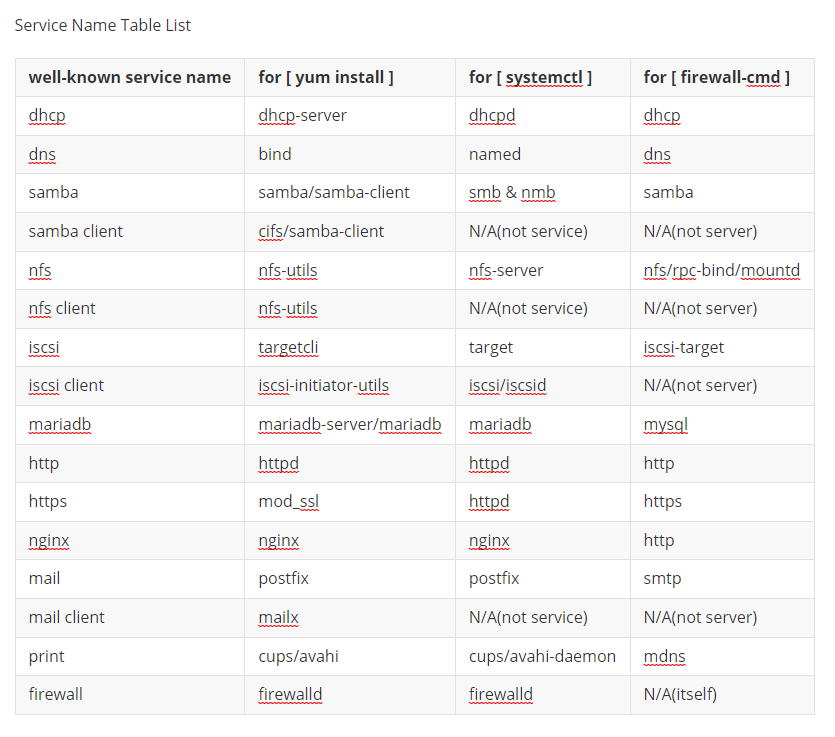
Alla on joitain tunnettuja palvelun nimitaulukon luetteloita:
Kuva 1: Palvelun nimi Taulukkoluettelo
HUOMAUTUS: Kaikki tämän artikkelin lokit ovat peräisin VMware-ympäristön paikallisesta virtuaalilaboratoriosta.
Affected Products
Red Hat Enterprise Linux Version 8Article Properties
Article Number: 000213739
Article Type: How To
Last Modified: 03 Aug 2026
Version: 5
Find answers to your questions from other Dell users
Support Services
Check if your device is covered by Support Services.