Dell Unity: Upgrading to Operating Environment 5.3 causes SSH protocol to be disabled-User Correctable
Summary: Upgrading to Unity Operating Environment (OE) 5.3 causes SSH protocol to be disabled.
This article applies to
This article does not apply to
This article is not tied to any specific product.
Not all product versions are identified in this article.
Symptoms
SSH protocol is changed to disabled after upgrading to Unity Operating Environment (OE) 5.3.
Cause
The SSH service is also upgraded when upgrading to Unity OE 5.3.
Upgrading the SSH services causes the protocol to return to the default state (disabled). This is not a malfunction but is working as designed.
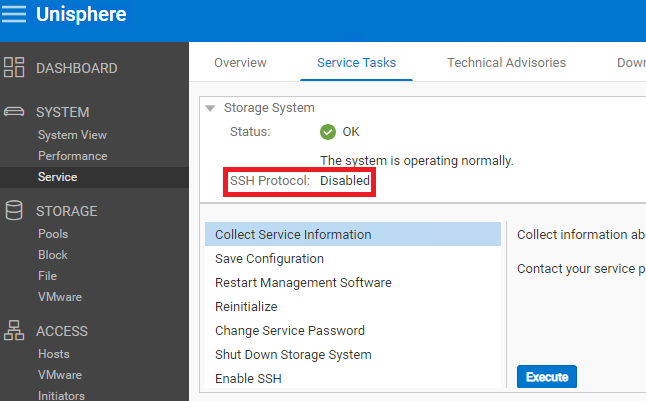
Figure 1: SSH Protocol returning to the default state (disabled).
Resolution
The resolution is to Enable SSH. View Dell article 22526, Dell EMC Unity: How to Enable or disable Secure Shell on the system (User Correctable) for instructions on enabling SSH in Unity.
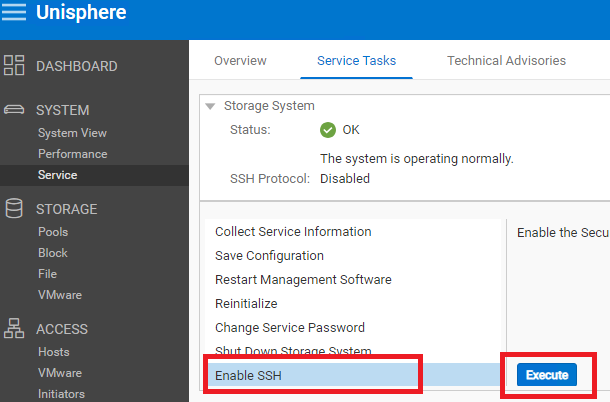
Figure 2: Enable SSH in Unity
Affected Products
Dell EMC Unity, Dell EMC Unity 300F, Dell EMC Unity 350F, Dell EMC Unity 400, Dell EMC Unity 400F, Dell EMC Unity 450F, Dell EMC Unity 500, Dell EMC Unity 500F, Dell EMC Unity 550F, Dell EMC Unity 600Products
Dell Unity 300, Dell EMC Unity XT 380, Dell EMC Unity XT 380F, Dell EMC Unity XT 480, Dell EMC Unity XT 480F, Dell EMC Unity 600F, Dell EMC Unity 650F, Dell EMC Unity XT 680, Dell EMC Unity XT 680F, Dell EMC Unity XT 880, Dell EMC Unity XT 880F
, Dell EMC Unity Family |Dell EMC Unity All Flash, Dell EMC Unity Family, Dell EMC Unity Hybrid, Dell EMC UnityVSA Professional Edition/Unity Cloud Edition
...
Article Properties
Article Number: 000214546
Article Type: Solution
Last Modified: 18 May 2026
Version: 5
Find answers to your questions from other Dell users
Support Services
Check if your device is covered by Support Services.