PowerStore: NAS Replication: File Not Ready
Summary: File not ready reasons /root cause when setting up Remote connection for PowerStore Async Replication.
This article applies to
This article does not apply to
This article is not tied to any specific product.
Not all product versions are identified in this article.
Symptoms
Attempting to setup a remote replication connection is successful.
The capabilities displayed are: Block, vVol and 'File Not Ready'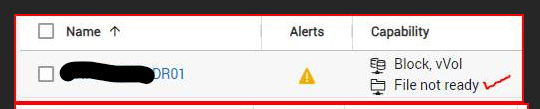
A PowerStore admin is then able to apply policies for Block /VVOL resources only.
The admin might not notice that the file capability is not available and may return later to find out that they are unable to replicate their NAS resources. A policy for file may not be selected on the NAS-Server Properties - Replication page.
Cause
There are multiple root causes for File(NAS) to be unavailable for replication:
1. This issue could occur if the DR PowerStore is configured as a block-only, non-unified array. In such cases file(NAS), may not be replicated to the DR PowerStore unless the array gets reinitialized as Unified.
2. This can also occur due to an incorrect network configuration.
File Mobility must be set up and configured properly on both the Source (production) and target (DR) PowerStore arrays. Connectivity between those arrays may be checked using ping -Interface IP Remote_IP from PowerStore CLI.
From the PowerStore Web UI manual pages:
Note: The file mobility network shares the same subnet as the management network and does not require a unique VLAN configuration. When you create the file mobility network the subnet settings (VLAN ID, Netmask/Prefix Length, Gateway, and MTU Size) are automatically filled and cannot be changed.
3. Lastly - in a scenario where an appliance acts as replication target from multiple other locations.
Above four PowerStore remote-connections, the fifth does not allow File capabilities.
This issue is due to a code problem related to certificate store for FILE only. See resolution section above for remediation.
Resolution
1. If the issue occurred because the DR system is configured as a block-only, non-unified array the solution is to reinitialize the DR array as Unified.
2. If the issue is due to the current network state, the PowerStore remote connection must be rediscovered in PowerStore Manager using the Remote Connection Page under More Actions: Verify And Update.

Alternatively, if no Block or vVol replications are already set up, the connection can be deleted and re-created.
3. When over four remote connections are configured, the fifth will not allow file -
Customers must upgrade their remote-appliance code to 3.5 or above to allow 5-8 active file-capable remote-connections..
2. If the issue is due to the current network state, the PowerStore remote connection must be rediscovered in PowerStore Manager using the Remote Connection Page under More Actions: Verify And Update.
Alternatively, if no Block or vVol replications are already set up, the connection can be deleted and re-created.
3. When over four remote connections are configured, the fifth will not allow file -
Customers must upgrade their remote-appliance code to 3.5 or above to allow 5-8 active file-capable remote-connections..
Additional Information
Another incident related to the file not ready can be found here:
PowerStore: After Source Replication Fail-Back succeeded the SDNAS Remote Systems remains with "File not ready" capability | Dell US
Affected Products
PowerStoreArticle Properties
Article Number: 000215168
Article Type: Solution
Last Modified: 01 Oct 2024
Version: 3
Find answers to your questions from other Dell users
Support Services
Check if your device is covered by Support Services.