VMware:除錯 ESXi MCE PSOD
Summary: 如何使用範例偵錯 ESXi 機器檢查例外 (MCE) 紫色診斷畫面 (PSOD)。
This article applies to
This article does not apply to
This article is not tied to any specific product.
Not all product versions are identified in this article.
Instructions
由於機器檢查異常 (MCE) 錯誤,ESXi 伺服器可能會停止並顯示紫色診斷畫面 (PSOD)。MCE 錯誤是由於硬體問題所導致。
MCE 紫色診斷畫面顯示多個項目。其中, MCi_STATUS 註冊在調試問題時很有用。
註冊詳情:
- 可使用
MCi_STATUS註冊包含有關計算機檢查錯誤的資訊。 - 寄存器顯示在”
S:」如下例所示:
MC: PCPU18 B:13 S:0xfe20004000011166 M:0x7246040086 A:0x38c989b100 5
比特及其意義:
| 63 | 62 | 61 | 60 | 59 | 58 | 57 | 53-56 | 38-52 | 32-37 | 16-31 | 0-15 |
| VALID 旗標 - 如果已設定,則資訊有效。 | 溢出標誌 - 如果設置,則可能表示多個 MCE 彼此相鄰。 | UNC 標誌 - 如果已設定,CPU 便無法修正錯誤。 | EN 旗標 | MISCV 旗標 - 如果已設定,則 MISC 註冊包含更多資訊。 | ADDRV - 如果已設定,則 ADDR 暫存器會包含發生錯誤的位置。 | PCC 旗標 - 如果已設定,則表示處理器可能已損毀。 | 架構 如果設置了位 11,否則為“其他資訊”。 | 架構 如果設置了位 10,則為“其他資訊”。 | 其他資訊 | CPU 特定型號的錯誤代碼 | 機器檢查錯誤代碼 |
要調試錯誤,低 16 位 MCi_STATUS 註冊很重要。這些位表示簡單或複合錯誤。
選項 1:使用自動工具

選項 2:使用手動步驟
- 簡單的錯誤可以快速除錯
0000 0000 0000 0000 -- No Error reported to this bank of error-reporting registers.
0000 0000 0000 0001 -- Unclassified - Error has not been classified.
0000 0000 0000 0010 -- Parity error in internal microcode ROM.
0000 0000 0000 0011 -- External error-BINIT# from another processor caused this processor MCE. Happens only if BINIT# observation enabled during power on.
0000 0000 0000 0100 -- Functional redundancy check master/slave error.
0000 0000 0000 0101 -- Internal parity error.
0000 0000 0000 0110 -- SMM handler tried to execute outside the ranges specified by SMRR.
0000 0100 0000 0000 -- Internal timer error.
0000 1110 0000 1011 -- I/O error.
0000 01xx xxxx xxxx -- Internal unclassified error. Atleast one X must be equal to 1.
- 複合錯誤
000F 0000 0000 11LL - Generic Cache Hierarchy error.
000F 0000 0001 TTLL - {TT}TLB{LL}_ERR. TLB errors.
000F 0000 1MMM CCCC - {MMM}_Channel{CCCC}_ERR - Memory controller errors.
000F 0001 RRRR TTLL - {TT}CACHE{LL}_{RRRR}_ERR - Cache Hierarchy errors.
000F 1PPT RRRR IILL - BUS{LL}_{PP}_{RRRR}_{II}_T_ERR - Bus and Interconnect errors.
- F - 表單旗標
0 – Normal Filtering
1 – Corrected Filtering
篩選意味著不會發佈此結構中對此條目的部分或全部後續更正。
- TT - 適用於上述 2 和 4。
指示交易類型:
00 - Instruction
01 - Data
10 - Generic
- LL - 適用於上述 1、2、4 和 5。
這表示記憶體階層中發生錯誤的層級。
00 - Level 0 - L0
01 - Level 1 - L1
10 - Level 2 - L2
11 - Generic – LG (It is shown only when processor cannot determine the hierarchy level)
- RRRR - 指示與錯誤關聯的操作類型。這些動作包括:
0000 - Generic Error - ERR
0001 - Generic Read - RD
0010 - Generic Write - WR
0011 - Data Read - DRD
0100 - Data Write - DWR
0101 - Instruction Fetch - IRD
0110 - Prefetch - PREFETCH
0111 - Eviction - EVICT
1000 - Snoop - SNOOP
- PP (參與) - 描述本地處理器在錯誤中的作用。
00 - SRC - Local processor originated request
01 - RES - Local processor responded to request
10 - OBS - Local processor observed error as third party
11 - Generic
- T (逾時) - 1 = 要求逾時。
- II (記憶體或 I/O)
00 - M - Memory Access
10 - IO - I/O
01 - Reserved
11 - Other transaction
- 記憶體控制器錯誤 - 由上述 MMM 和 CCCC 子欄位定義
- MMM - 記憶體錯誤
000 - GEN - Generic undefined request
001 - RD - Memory read error
010 - WR - Memory write error
011 - AC - Address/Command error
100 - MS - Memory Scrubbing error
101-111 - Reserved
- CCCC - 有錯誤的通道
0000-1110 - CHN - Channel number
1111 - Channel not specified
下面是如何分析 MCE 紫色診斷螢幕截圖的範例:
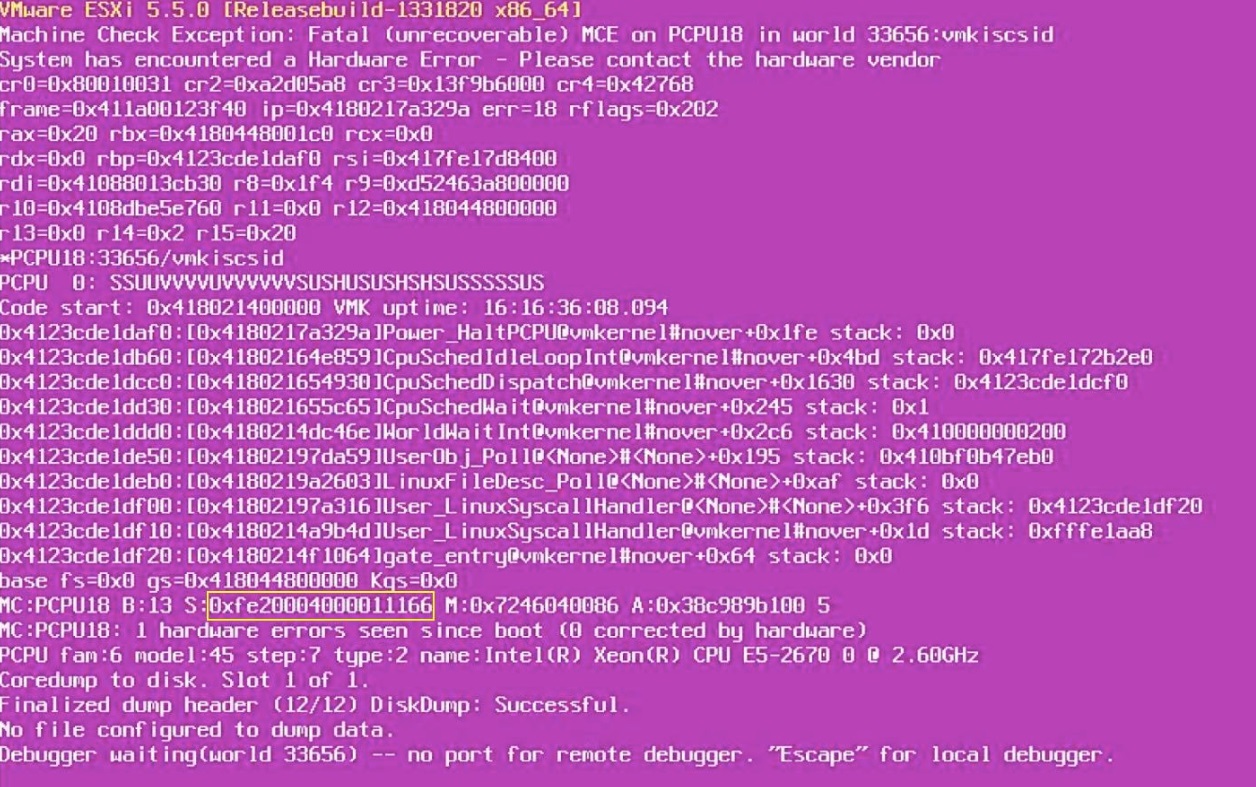
- 記下
MCi_STATUS寄存器值。這是:
0xfe20004000011166.
- 將其轉換為二進位:
1111 1110 0010 0000 0000 0000 0100 0000 0000 0000 0000 0001 0001 0001 0110 0110
- 取
MCi_STATUS註冊:
0001 0001 0110 0110
將其與複合錯誤進行比較。在這種情況下,這似乎是緩存層次結構錯誤(類型 4)。
- 套用值:
F = 1
RRRR = 0110 – Prefetch
TT = 01 – Transaction type - Data
LL = 10 – Level 2 cache
結論:
- 當處理器 L2 快取記憶體中的某些資料執行預先擷取作業時,似乎出現紫色診斷畫面。
- 因此,這可能是處理器上 L2 快取的問題。
- 因此,應先更換 CPU,然後再檢查問題是否已解決。如果問題再次出現,可以更換主機板。
Affected Products
VMware ESXi 6.7.X, VMware ESXi 7.x, VMware ESXi 8.xProducts
PowerFlex rack, ScaleIO, PowerEdge XR2, Poweredge C4140, PowerEdge C6420, PowerEdge C6520, PowerEdge C6525, PowerEdge C6615, PowerEdge C6620, PowerEdge FC640, PowerEdge M640, PowerEdge M640 (for PE VRTX), PowerEdge MX5016s, PowerEdge MX740C
, PowerEdge MX750c, PowerEdge MX760c, PowerEdge MX840C, PowerEdge R240, PowerEdge R250, PowerEdge R260, PowerEdge R340, PowerEdge R350, PowerEdge R360, PowerEdge R440, PowerEdge R450, PowerEdge R540, PowerEdge R550, PowerEdge R640, PowerEdge R6415, PowerEdge R650, PowerEdge R650xs, PowerEdge R6515, PowerEdge R6525, PowerEdge R660, PowerEdge R660xs, PowerEdge R6615, PowerEdge R6625, PowerEdge R740, PowerEdge R740XD, PowerEdge R740XD2, PowerEdge R7415, PowerEdge R7425, PowerEdge R750, PowerEdge R750XA, PowerEdge R750xs, PowerEdge R7515, PowerEdge R7525, PowerEdge R760, PowerEdge R760XA, PowerEdge R760xd2, PowerEdge R760xs, PowerEdge R7615, PowerEdge R7625, PowerEdge R840, PowerEdge R860, PowerEdge R940, PowerEdge R940xa, PowerEdge R960, PowerEdge T140, PowerEdge T150, PowerEdge T160, PowerEdge T340, PowerEdge T350, PowerEdge T360, PowerEdge T440, PowerEdge T550, PowerEdge T560, PowerEdge T640, PowerEdge XR11, PowerEdge XR12, PowerEdge XR4510c, PowerEdge XR4520c, PowerEdge XR8610t, PowerEdge XR8620t
...
Article Properties
Article Number: 000215212
Article Type: How To
Last Modified: 23 Jan 2026
Version: 7
Find answers to your questions from other Dell users
Support Services
Check if your device is covered by Support Services.