MAP ECS GeoDrive ontbreekt
Summary: De map ECS GeoDrive ontbreekt op de lokale schijf.
This article applies to
This article does not apply to
This article is not tied to any specific product.
Not all product versions are identified in this article.
Symptoms
De gebruiker ziet dat de map GeoDrive of een submap ontbreekt op de lokale schijf op de host.
De map heeft de data, maar deze is onzichtbaar/verborgen.
- Een map "map1" ontbreekt bijvoorbeeld in GeoDrive.

- Probeer een nieuwe map met dezelfde naam te maken, waarna u de prompt krijgt dat de map daadwerkelijk bestaat.
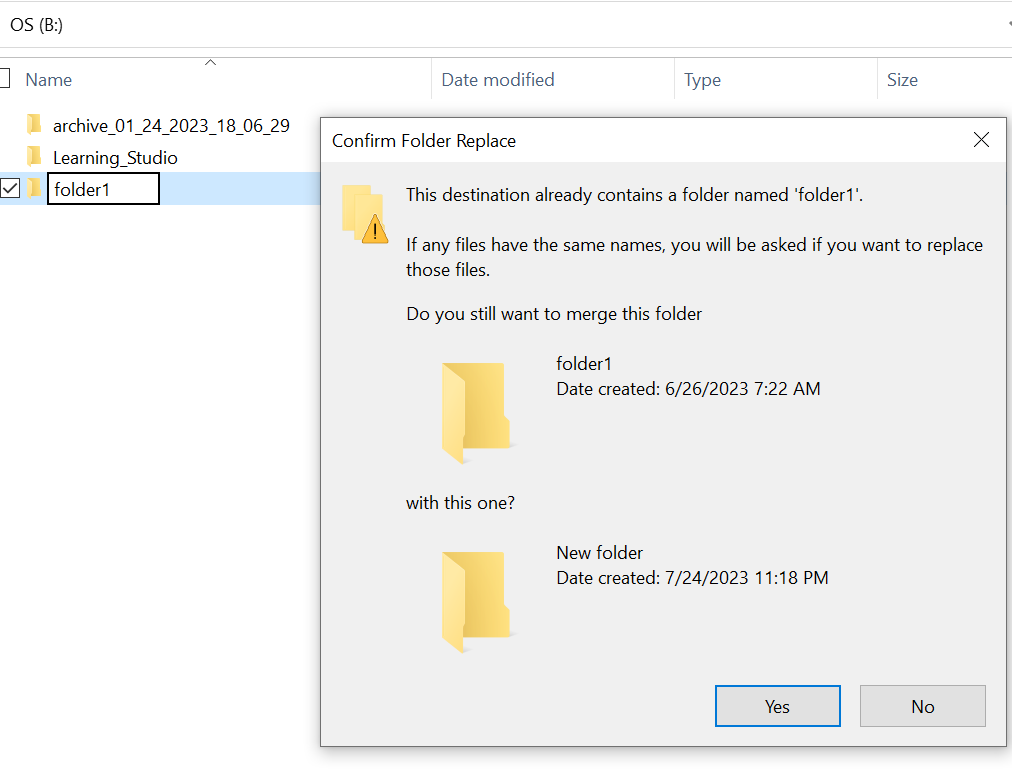
- Zoek met het pad naar de ontbrekende map in de verkenner. We moeten de inhoud kunnen zien.

Cause
Dit komt door de VERBORGEN en SYSTEEMkenmerken die zijn ingesteld op de map.
Resolution
Volg de onderstaande stappen.
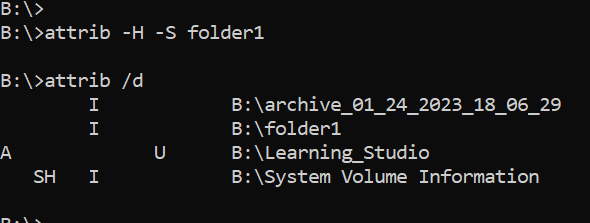
Nadat u deze opdracht hebt uitgevoerd, controleert u de lokale schijf opnieuw. De ontbrekende map zal weer normaal worden.
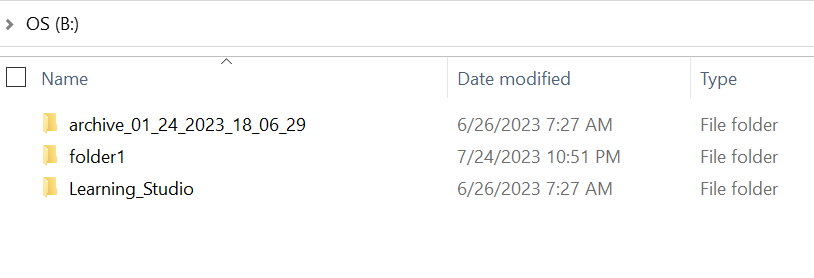
- Ga naar de Windows-opdrachtprompt op het hostsysteem.
- cd naar de bovenliggende map waar de map ontbreekt en voer "attrib /d" uit.
- U zou een lijst met mappen moeten zien en de ontbrekende map moet in de lijst staan.
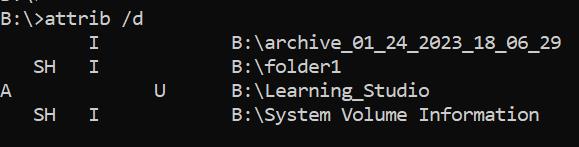
- De letters ervoor geven de kenmerken aan. U zou SH moeten zien vóór het bestand (SYSTEM en HIDDEN).
- Voer deze opdracht uit om de bovenstaande twee kenmerken te verwijderen: attrib -H -S folder_name
Additional Information
Er zijn tal van andere opties beschikbaar voor attrib-opdracht.
B:\>attrib /?
Displays or changes file attributes.

ATTRIB [+R | -R] [+A | -A] [+S | -S] [+H | -H] [+O | -O] [+I | -I] [+X | -X] [+P | -P] [+U | -U]
       [drive:][path][filename] [/S [/D]] [/L]

  +   Sets an attribute.
  -   Clears an attribute.
  R   Read-only file attribute.
  A   Archive file attribute.
  S   System file attribute.
  H   Hidden file attribute.
  O   Offline attribute.
  I   Not content indexed file attribute.
  X   No scrub file attribute.
  V   Integrity attribute.
  P   Pinned attribute.
  U   Unpinned attribute.
  B   SMR Blob attribute.
  [drive:][path][filename]
      Specifies a file or files for attrib to process.
  /S  Processes matching files in the current folder
      and all subfolders.
  /D  Processes folders as well.
  /L  Work on the attributes of the Symbolic Link versus
      the target of the Symbolic Link
Affected Products
ECS, Elastic Cloud StorageArticle Properties
Article Number: 000215245
Article Type: Solution
Last Modified: 18 May 2026
Version: 4
Find answers to your questions from other Dell users
Support Services
Check if your device is covered by Support Services.