PowerProtect Data Manager: DM5500 관리 네트워크 게이트웨이 액세스 불가
Summary:
Data Manager 어플라이언스 오류 코드 CONN0097 - 관리 네트워크 게이트웨이 액세스할 수 없습니다.
This article applies to
This article does not apply to
This article is not tied to any specific product.
Not all product versions are identified in this article.
Symptoms
오류 메시지:
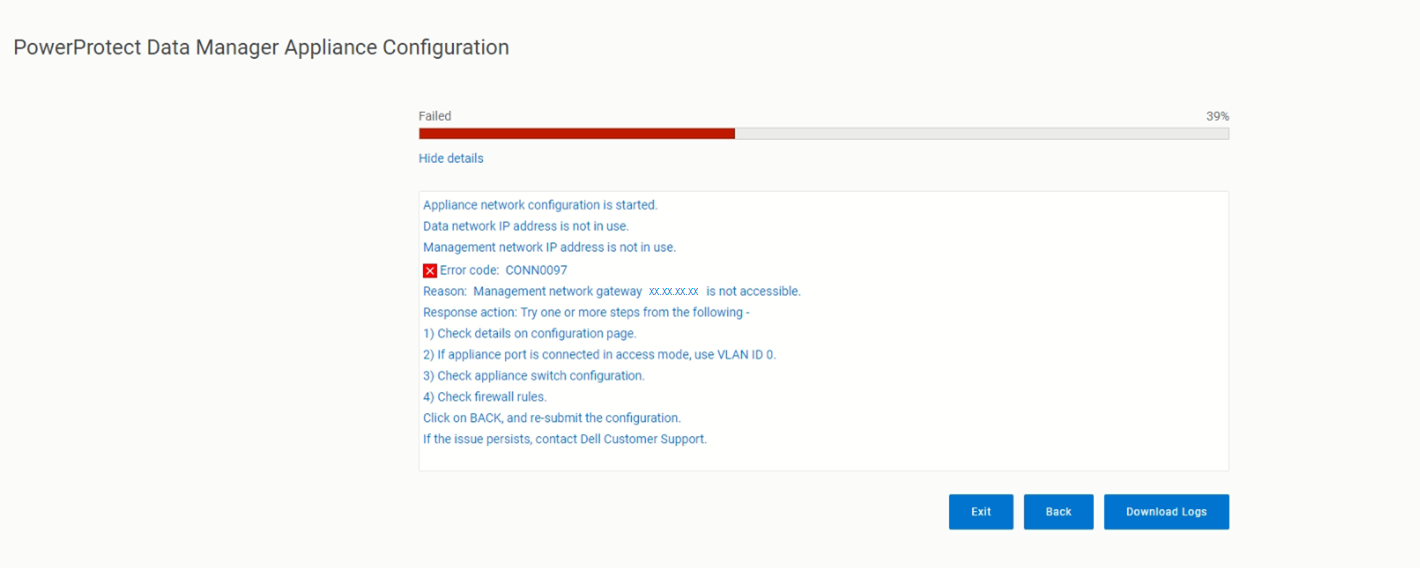
messageType:"ERROR",
    errorCause:{
        code:CONN0097
        reason: Management network gateway <ip address> is not accessible.
Cause
DM5500 어플라이언스를 배포하는 동안 검증 단계에서 진행하는 네트워킹 구성 컴파일 후 오류 메시지 코드 CONN0097 이 나타나면 제공된 IP에 연결할 수 없음을 의미합니다.
Resolution
로그에 따르면 두 가지 모두에서 구성이 실패했습니다. VLAN ID 0 네트워크 게이트웨이에 연결할 수 없기 때문입니다.
어플라이언스가 액세스 모드 또는 트렁크 모드의 스위치와 연결된 경우 포트를 올바른 VLAN으로 구성하거나 올바른 네트워크에 연결해야 합니다.
동일한 스위치 포트에서 다른 장비를 사용하여 이 네트워크 게이트웨이에 연결할 수 있는지 확인합니다. 다음 단계 중 하나 이상을 시도합니다.
- Configuration 페이지에서 세부 정보를 확인합니다.
- 어플라이언스 포트가 액세스 모드로 연결된 경우 다음을 사용합니다.
VLAN ID 0. - 어플라이언스 스위치 구성을 확인하십시오.
- 방화벽 규칙을 확인합니다.
BACK을 클릭하고 구성을 다시 제출합니다. 문제가 지속되면 Dell 지원에 문의하십시오.
Affected Products
PowerProtect Data Manager Appliance, PowerProtect Data Manager Software, PowerProtect DM5500Products
PowerProtect Data Manager Appliance, PowerProtect Data Manager Software, PowerProtect DM5500Article Properties
Article Number: 000215648
Article Type: Solution
Last Modified: 31 Mar 2026
Version: 3
Find answers to your questions from other Dell users
Support Services
Check if your device is covered by Support Services.