RACADM を使用した iDRAC9 ログインページでのセキュリティ通知の設定とカスタマイズ
Summary: この文書では、iDRAC9ログイン ページでセキュリティ バナー メッセージを設定または設定するためのローカルおよびリモートのracadmコマンドの両方について説明します。
This article applies to
This article does not apply to
This article is not tied to any specific product.
Not all product versions are identified in this article.
Instructions
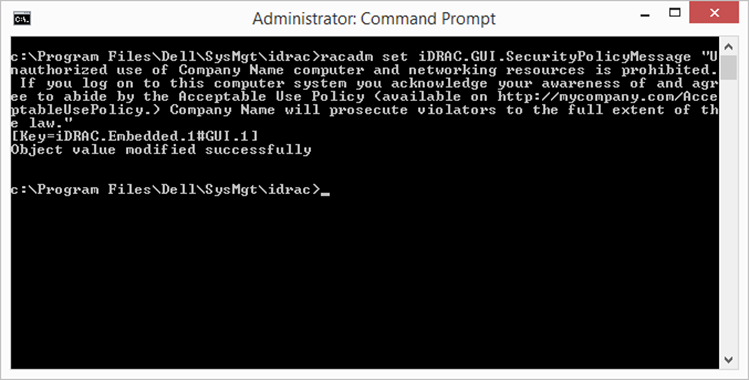
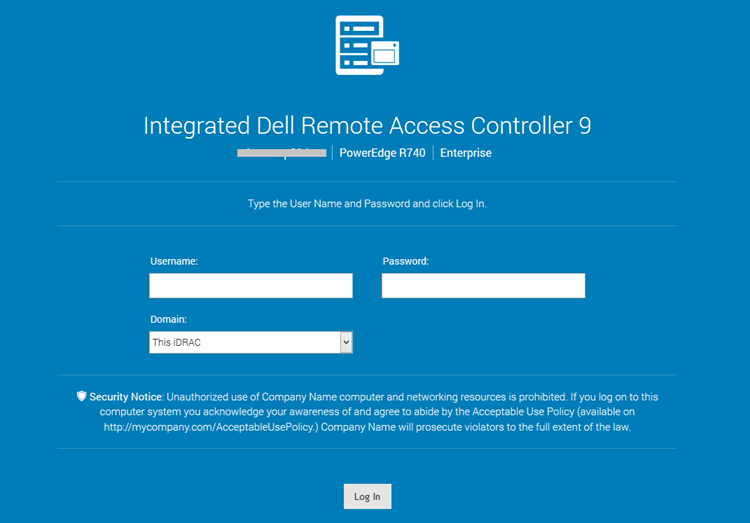
racadm を使用して iDRAC9 ログインページでセキュリティ通知のカスタムメッセージを設定するには、次の手順を実行します
。ローカルracadm:
-
racadm set iDRAC.GUI.SecurityPolicyMessage “Message Here.”
リモートracadm:
-
racadm -i -r set iDRAC.GUI.SecurityPolicyMessage “Message Here.”
Affected Products
iDRAC9Article Properties
Article Number: 000215764
Article Type: How To
Last Modified: 01 Jan 2025
Version: 3
Find answers to your questions from other Dell users
Support Services
Check if your device is covered by Support Services.