RACADM을 사용하여 iDRAC9 로그인 페이지에서 보안 공지 설정 및 사용자 지정
Summary: 이 문서에서는 iDRAC9 로그인 페이지에서 보안 배너 메시지를 설정하거나 구성하는 로컬 및 원격 racadm 명령을 모두 제공합니다.
This article applies to
This article does not apply to
This article is not tied to any specific product.
Not all product versions are identified in this article.
Instructions
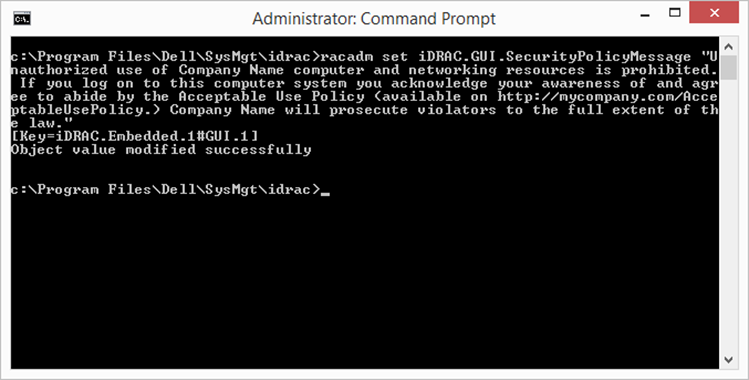
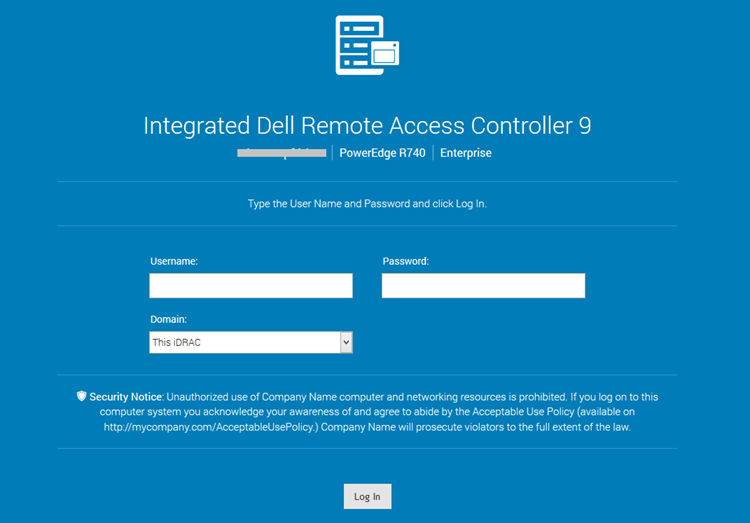
racadm을 사용하여 iDRAC9 로그인 페이지에서 보안 공지에 대한 사용자 지정 메시지를 설정하려면 다음
을 수행합니다.로컬 racadm:
-
racadm set iDRAC.GUI.SecurityPolicyMessage “Message Here.”
원격 RACADM:
-
racadm -i -r set iDRAC.GUI.SecurityPolicyMessage “Message Here.”
Affected Products
iDRAC9Article Properties
Article Number: 000215764
Article Type: How To
Last Modified: 01 Jan 2025
Version: 3
Find answers to your questions from other Dell users
Support Services
Check if your device is covered by Support Services.