Ustawianie i dostosowywanie zabezpieczeń na stronie logowania iDRAC9 przy użyciu RACADM
Summary: Ten artykuł zawiera zarówno lokalne, jak i zdalne polecenia racadm służące do ustawiania lub konfigurowania komunikatu baneru dotyczącego zabezpieczeń na stronie logowania do kontrolera iDRAC9. ...
This article applies to
This article does not apply to
This article is not tied to any specific product.
Not all product versions are identified in this article.
Instructions
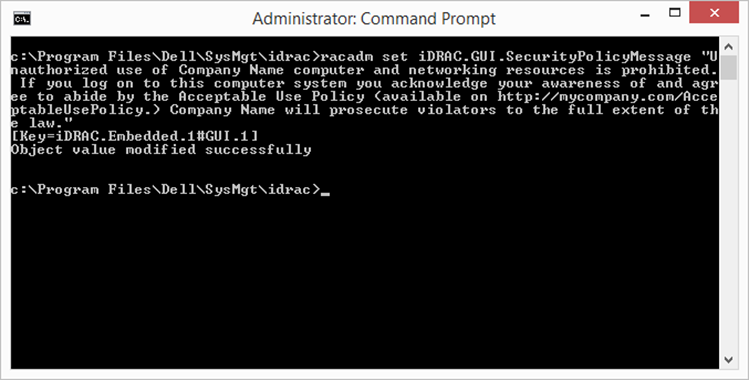
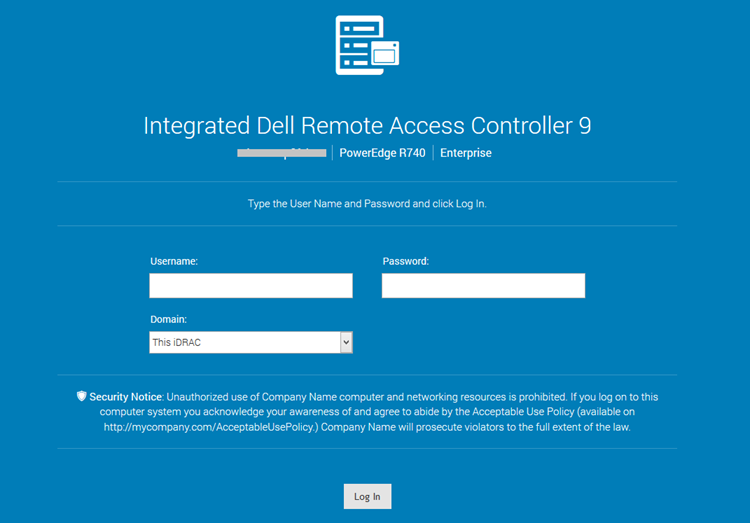
Aby ustawić niestandardowy komunikat dotyczący zabezpieczeń na stronie logowania do kontrolera iDRAC9 przy użyciu racadm:
Lokalne polecenie racadm:
-
racadm set iDRAC.GUI.SecurityPolicyMessage “Message Here.”
Zdalne narzędzie racadm:
-
racadm -i -r set iDRAC.GUI.SecurityPolicyMessage “Message Here.”
Affected Products
iDRAC9Article Properties
Article Number: 000215764
Article Type: How To
Last Modified: 01 Jan 2025
Version: 3
Find answers to your questions from other Dell users
Support Services
Check if your device is covered by Support Services.