Latitude 7x30 Rugged Extreme 平板電腦觸控螢幕無法正常運作
Summary: 瞭解 Latitude 7x30 Rugged Extreme 平板電腦觸控螢幕無法正常運作或正常運作。
This article applies to
This article does not apply to
This article is not tied to any specific product.
Not all product versions are identified in this article.
Symptoms
Latitude 7x30 Rugged Extreme 平板電腦可透過 eGalaxDr.Touch 應用程式支援多種觸控模式。當您嘗試使用觸控螢幕但無法運作時,請檢查是否選取了正確的模式。
每種模式都經過調整,可在特定條件下獲得最佳的觸摸性能。
例如,手指/被動手寫筆模式是使用手指或手寫筆的最佳模式。
若要變更或選取正確的觸控模式:
- 使用搜尋功能並輸入 touch,尋找 eGalaxDr.Touch 應用程式,然後選取觸控模式表以變更觸控模式。
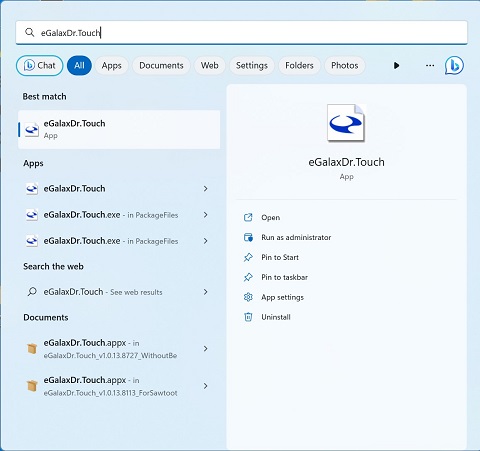
- 默認模式為 手指/被動手寫筆 模式;在此模式下,手指觸控和被動式手寫筆應能正常運作。

- 手套 模式適用於戴手套。在此模式下,手指觸控或被動式觸控筆可能無法正常運作。
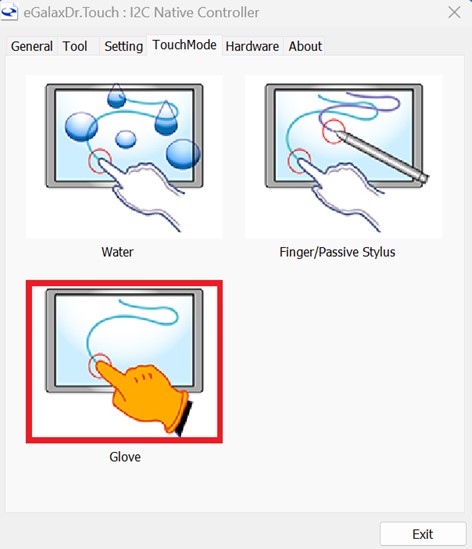
- 水 模式是將觸摸屏設置為潮濕的環境或觸摸屏上可能有水滴的環境中。在此模式下,手指觸控或被動式觸控筆可能無法正常運作。

受影響的平台:
- Latitude 7230 Rugged Extreme 平板電腦
- Latitude 7030 Rugged Extreme 平板電腦
Cause
選取了不正確的觸控模式。如果選取了不正確的模式,觸控螢幕可能無法正常運作。
Resolution
Affected Products
Latitude 7030 Rugged Extreme Tablet, Latitude 7230 Rugged Extreme TabletArticle Properties
Article Number: 000216091
Article Type: Solution
Last Modified: 18 May 2026
Version: 5
Find answers to your questions from other Dell users
Support Services
Check if your device is covered by Support Services.