PowerProtect Data ManagerのVMバックアップがコード AVB0016 SyncInProgressで失敗する
Summary: PowerProtect Data Manager仮想マシン(VM)のバックアップがコード AVB0016で失敗します。"SyncInProgress": "アクティブなスナップショットが存在するため、完全同期を開始できません。"
This article applies to
This article does not apply to
This article is not tied to any specific product.
Not all product versions are identified in this article.
Symptoms
PowerProtect Data Manager UIには、障害に関して次のメッセージが表示されます。
ABV0016: VM Direct engine 'localhost' is unable to back up the virtual machine 'VM1' on vCenter 'vcsa01' because of a vCenter API issue.

The VM Direct engine cannot complete the backup of this virtual machine because a vCenter API operation did not complete successfully.
To troubleshoot this issue:

     *Verify that the vCenter can be reached.
     *If the vCenter is busy, wait for some activities to complete and then retry the operation.
     *Verify that the virtual machine exists on the vCenter.
----
Read Less
The error cannot be retried. Unable to successfully complete SDM Delta Sync operation. Unsuccessful after 'xx' attempts over 5m0.627607105s The vCenter task for 'SDM Snapshot Sync deltaSync' completed with state 'error': DPD Sync in progress
障害1:
PowerProtect Data Manager vmdm.logに次のエラー メッセージが表示されます。
Result: {
  "sessionId" : "61e7c5f0-bb85-4474-a23f-95c990c917d6",
  "state" : "Failure",
  "logFile" : "/opt/emc/vmdirect/runtime/logs/vpod/BackupJobSessions-61e7c5f0-bb85-4474-a23f-95c990c917d6.log",
  "error" : "The error cannot be retried.  Unable to successfully complete SDM Delta Sync operation.  Unsuccessful after 70 attempts over 5m1.694291645s.  The vCenter task for 'SDM Snapshot Sync deltaSync' completed with state 'error':  DPD Sync in progress (500)",
  "proxyHostName" : "localhost",
  "errorCode" : "ABV0016"
dpd.log(ESXi上)に次のエラーが表示されます。
dpd.log:YYYY-MM-DDTHH:MM:SSZ error dpd[16520988] [Originator@6876 sub=Task opID=1d0ce776-e77a] Task 'Dp.Task.Sync.475.b2616635-352a-4726-986e-e42be7e94bac-1.52f20afe-9cef-83ec-b147-ce7acd07c2ca' failed with error: (dp.fault.SyncInProgress)
失敗2:
この障害の別のバリエーションは次のとおりです。
PowerProtect Data Manager vmdm.log:
Result: {
  "sessionId" : "126c6bcf-635f-4579-97d7-8dd831a22048",
  "state" : "Failure",
  "logFile" : "/opt/emc/vmdirect/runtime/logs/vpod/BackupJobSessions-126c6bcf-635f-4579-97d7-8dd831a22048.log",
  "error" : "Unable to successfully complete SDM Full Sync operation.  Unsuccessful after 39 attempts over 10m14.630663716s.  The vCenter task for 'SDM Snapshot Sync fullSync' completed with state 'error':  DPD Sync in progress (500)",
  "proxyHostName" : "localhost",
  "errorCode" : "ABV0016"
dpd.log(ESXiホスト)
YYYY-MM-DDTHH:MM:SSZ error dpd[2216236] [Originator@6876 sub=Snapshot opID=055f891e-8923] StartFullSyncIpc: Failed for disk '2d21e5b0-15a9-469e-1bbf-03d75e771c31': error 'Cannot start full sync due to existing active snapshot'
Cause
VMwareのデータ保護デーモン(DPD)サービスの問題。
Resolution
回避策の失敗1:
DPDがSyncInProgressメッセージを返すエラー1の場合は、次のように、影響を受けるESXiホストでDPDサービスを再起動します。
- vSphere UIから、影響を受けるVMを見つけて、そのVMが存在するESXiホストを見つけます。
- DPDサービスを再開します。
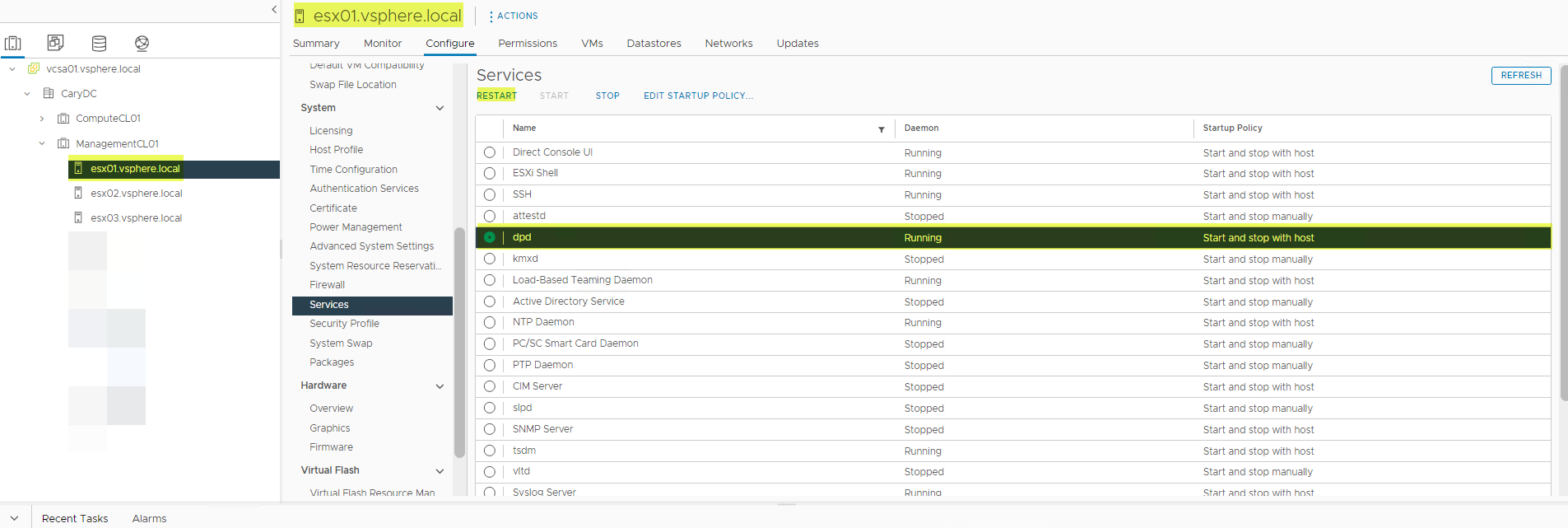
- DPDサービスの再起動時にエラーが発生する場合があります。その場合は、まずTSDMサービスを再起動してから、DPDサービスを再起動します。
- TSDMサービスを再起動します。
- 失敗したバックアップを再試行します。
対処方法
影響を受けるバージョン:
vSphere 7.0.3(すべて)、8.0.0
影響を受けるvSphereバージョンについては、vSphereの将来のリリースで修正される予定です。
障害2の回避策:
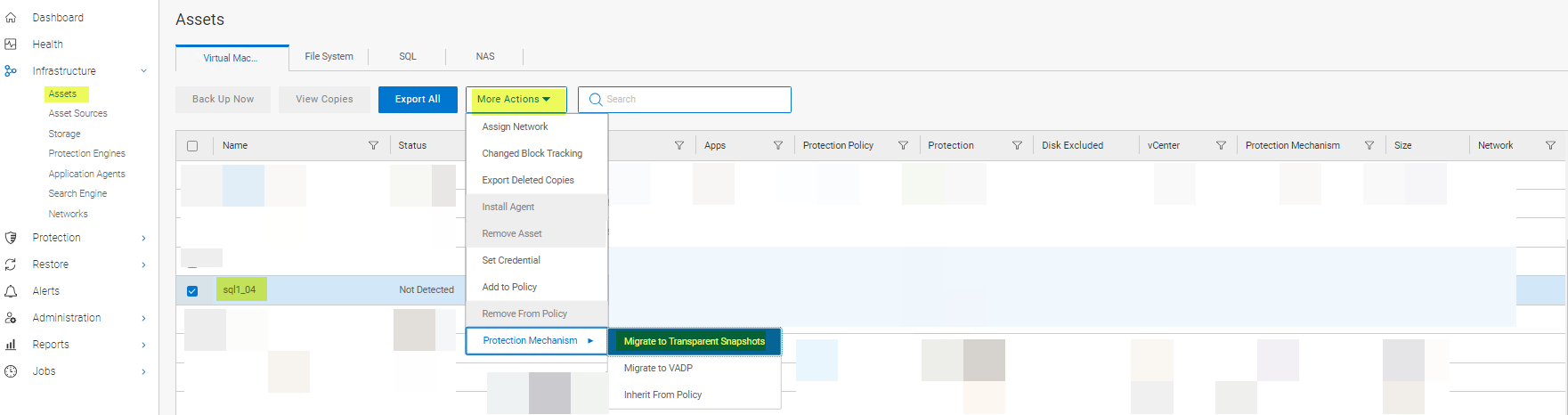
DPDが「Cannot start full sync due to existing active snapshot」というエラー2を返す場合の回避策は、LWDをリセットすることです。LWDは、次のようにリセットできます。
方法1:
-
次のように、VMの保護メカニズムをVAPDからLWDに戻します。
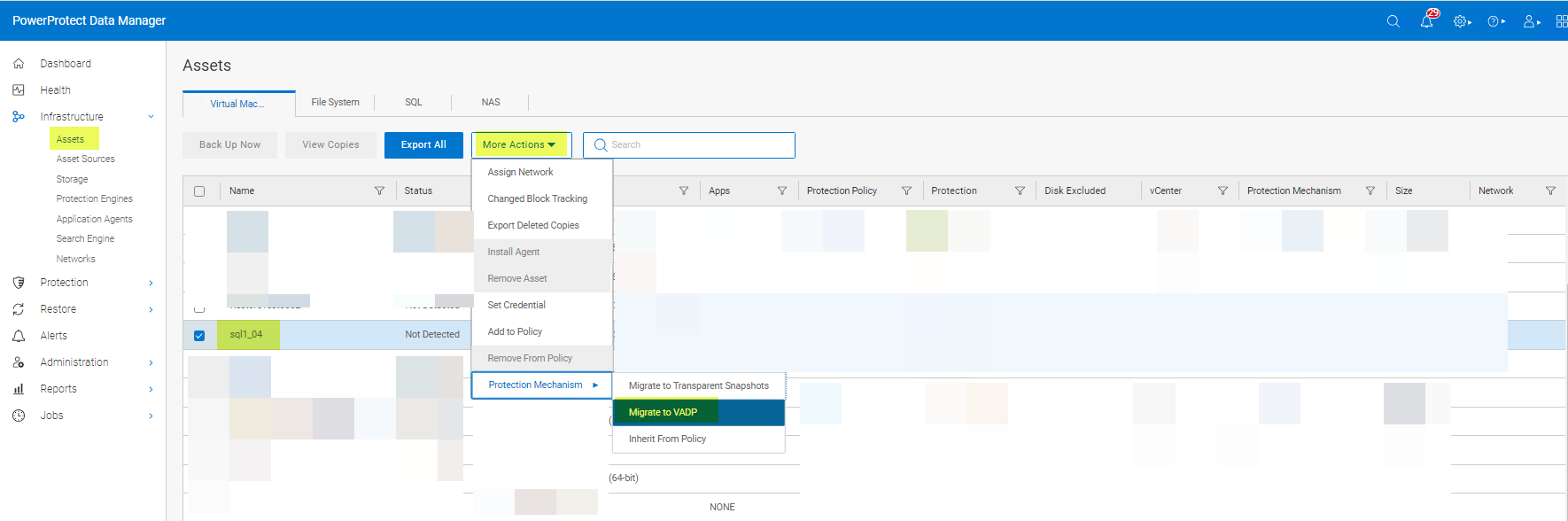
- 保護メカニズムをTransparent Snapshotに戻します。
方法2:
保護ポリシーからVMを削除し、再度追加します。PowerProtect Data ManagerのvVersionが19.12の場合は、方法1または方法3のいずれかを使用します。方法2は、PowerProtect Data Manager 19.12では機能しません。
方法3:
vmconfigツールを使用して、LWDを無効にして再度有効にします。
解決方法:
影響を受けるバージョン:
7.0.3(すべて)および8.0.0
この問題の根本原因については、現在もVMwareにより調査中です。
Affected Products
PowerProtect Data ManagerArticle Properties
Article Number: 000217246
Article Type: Solution
Last Modified: 16 Feb 2024
Version: 4
Find answers to your questions from other Dell users
Support Services
Check if your device is covered by Support Services.