RecoverPoint for VMs: Unable to Protect a VM with resourceId error
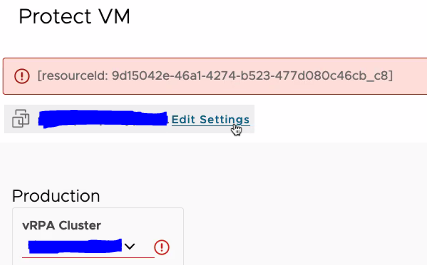
Summary: When attempting to protect a VM, the Protect VM wizard shows an error: [resourceId: xxxxxxxx-xxxx-xxxx-xxxx-xxxxxxxxxxxx_xx]
This article applies to
This article does not apply to
This article is not tied to any specific product.
Not all product versions are identified in this article.
Symptoms
See below images for reference.
Cause
The plug-in contains stale ESXi cluster information that may have been decommissioned but was not removed from RecoverPoint.
Example:

Resolution
In vCenter (check in all associated vCenters), go to the RecoverPoint plug-in > System > ESXi Clusters > Select the correct RecoverPoint cluster > remove the null(N/A) ESXi cluster by pressing the trash can icon on the right.

Affected Products
RecoverPoint for Virtual MachinesArticle Properties
Article Number: 000219566
Article Type: Solution
Last Modified: 20 Mar 2024
Version: 3
Find answers to your questions from other Dell users
Support Services
Check if your device is covered by Support Services.