NetWorker:CLIでNetWorkerクライアント ソフトウェア インベントリを実行する方法
Summary: この操作は、各クライアント マシンに個別にログインせずに、またはサード パーティ製ソフトウェアを使用せずに、NetWorkerサーバーから直接実行できます。
This article applies to
This article does not apply to
This article is not tied to any specific product.
Not all product versions are identified in this article.
Instructions
次のコマンドは、次の順序で実行する必要があります。
手順1:
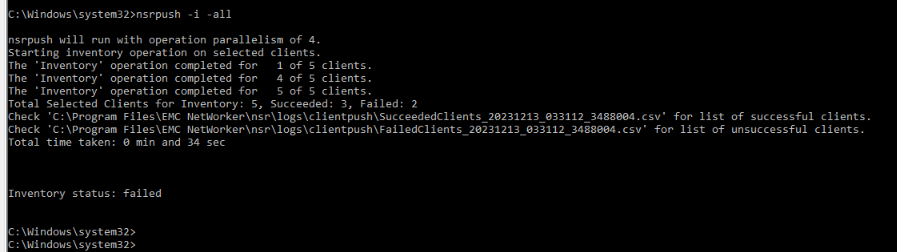
nsrpush -i -all
これにより、すべてのクライアントでインベントリが実行されます。このオプションを特定のホストに限定するには、オプション「-all「
インベントリ操作の成功/失敗のログは、エラーをトラブルシューティングするためのエラー メッセージとともに、NetWorkerサーバー上の次の場所にあります。
NetWorker-Installation-Path\nsr\logs\clientpush\
手順2:
nsrpush -s -t -all > output.txt
これにより、各クライアントにインストールされているすべてのNetWorkerパッケージが表形式で一覧表示され、ファイル「output.txt」に出力されます。このオプションを特定のホストに限定するには、オプション「-all」

Additional Information
によって提供される追加オプションの詳細 nsrpush NetWorkerコマンド リファレンス ガイドで確認できます。NetWorkerのドキュメントは、次の場所から入手できます。NetWorkerのサポート |Manuals & Documents(Dell サポート アカウントでサインインする必要があります)
Affected Products
NetWorkerArticle Properties
Article Number: 000220483
Article Type: How To
Last Modified: 06 Apr 2026
Version: 3
Find answers to your questions from other Dell users
Support Services
Check if your device is covered by Support Services.