NetWorker:如何在 CLI 中執行 NetWorker 用戶端軟體清查
Summary: 此作業可直接從 NetWorker 伺服器執行,無須個別登入每台用戶端機器,或不需要使用第三方軟體。
This article applies to
This article does not apply to
This article is not tied to any specific product.
Not all product versions are identified in this article.
Instructions
以下命令必須按以下順序運行:
步驟 1:
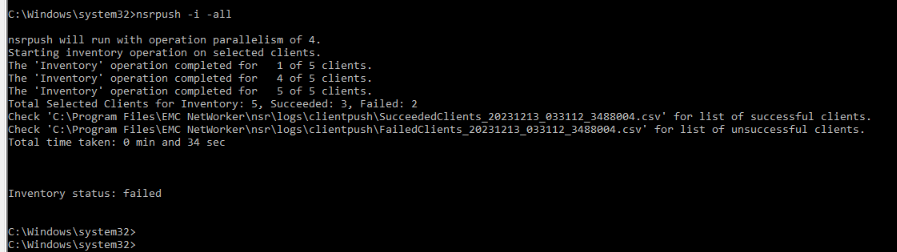
nsrpush -i -all
這會在所有用戶端上執行清查。這可以限制為特定的主機,方法是使用用戶端名稱而不是選項”-all「
您可以在 NetWorker 伺服器的以下位置找到成功/失敗清查作業的記錄,以及故障診斷錯誤的錯誤訊息:
NetWorker-Installation-Path\nsr\logs\clientpush\
步驟 2:
nsrpush -s -t -all > output.txt
這會以表格形式列出每個用戶端上安裝的所有 NetWorker 套件,並將輸出導向到檔案「output.txt」。這可以限制為特定的主機,方法是使用用戶端名稱而不是選項”-all」

Additional Information
更多關於提供的額外選項的詳細資訊 nsrpush 可從 NetWorker 命令參考指南中查看。NetWorker 文件可透過以下方式取得:NetWorker 支援 |手冊與文件 (您必須使用 Dell 支援帳戶登入)。
Affected Products
NetWorkerArticle Properties
Article Number: 000220483
Article Type: How To
Last Modified: 06 Apr 2026
Version: 3
Find answers to your questions from other Dell users
Support Services
Check if your device is covered by Support Services.