PowerEdge XE8640 mit H100: GPU-Leistungsproblem – Verlangsamung der HW-Strombremse – Aktiv
Summary: Ein Abfall der GPU-Leistung und das "nvsmi-q"-Protokoll können darauf hinweisen, dass die HW-Strombremse "Slowdown" aktiv ist.
This article applies to
This article does not apply to
This article is not tied to any specific product.
Not all product versions are identified in this article.
Instructions
In einigen Ausnahmefällen kann es vorkommen, dass NutzerInnen auf eine schlechte GPU-Performance stoßen und die nvsmi-q Das Protokoll kann darauf hinweisen, dass "HW Power Brake Slowdown" aktiv ist.nvidia-smi & GPU_burn Protokollausgabe,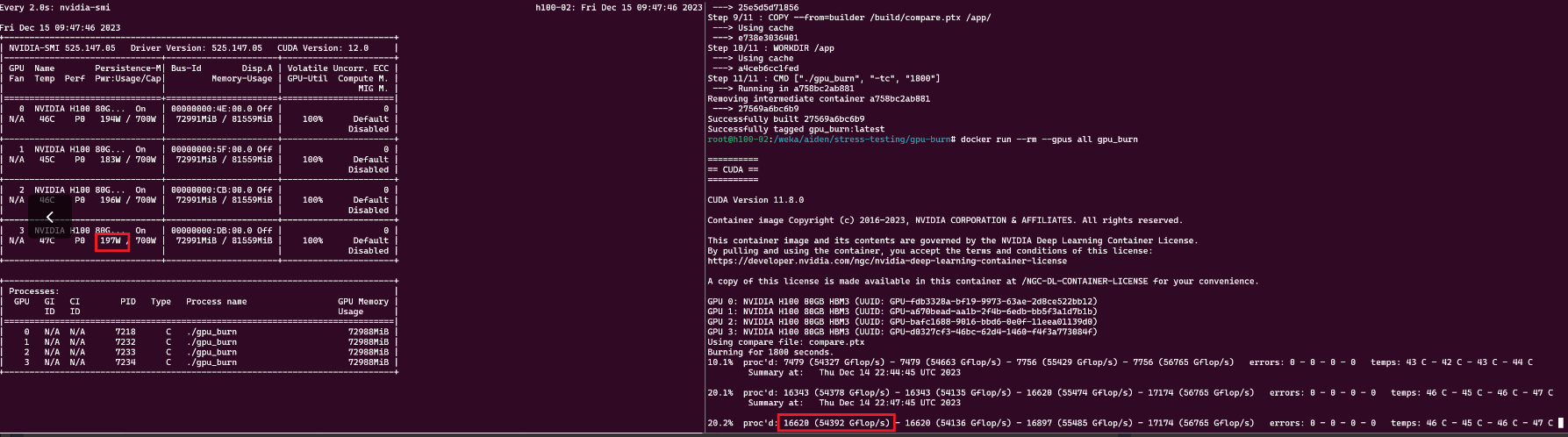
nvsmi-q Protokollausgabe
    Clocks Throttle Reasons
        Idle                              : Not Active
        Applications Clocks Setting       : Not Active
        SW Power Cap                      : Not Active
        HW Slowdown                       : Active
            HW Thermal Slowdown           : Not Active
            HW Power Brake Slowdown       : Active
        Sync Boost                        : Not Active
        SW Thermal Slowdown               : Not Active
        Display Clock Setting             : Not Active
nvidia-smi --query-gpu=index,timestamp,power.draw,clocks.sm [clocks.sm],clocks.mem,clocks.gr [clocks.gr] --format=csv -l 1
Lösung: Aktualisieren Sie BIOS, CPLD und iDRAC auf die neueste Version. Jüngste Fälle im Außendienst haben gezeigt, dass das Problem durch das Aktualisieren des CPLD auf Version 1.2.2 und des iDRAC auf Version 7.10.30 behoben wurde
** Ausschnitt nach der Aktualisierung **gpu_burn arbeitet mit ~ 300k Gflops, und nvidia-smi zeigt jede GPU ~700 W bei 100 % Auslastung an.
nvsmi-q Protokollausgabe nach BIOS-Update.
 Clocks Throttle Reasons
        Idle                              : Active
        Applications Clocks Setting       : Not Active
        SW Power Cap                      : Not Active
        HW Slowdown                       : Not Active
            HW Thermal Slowdown           : Not Active
            HW Power Brake Slowdown       : Not Active
        Sync Boost                        : Not Active
        SW Thermal Slowdown               : Not Active
        Display Clock Setting             : Not Active
nvidia-smi & GPU_burn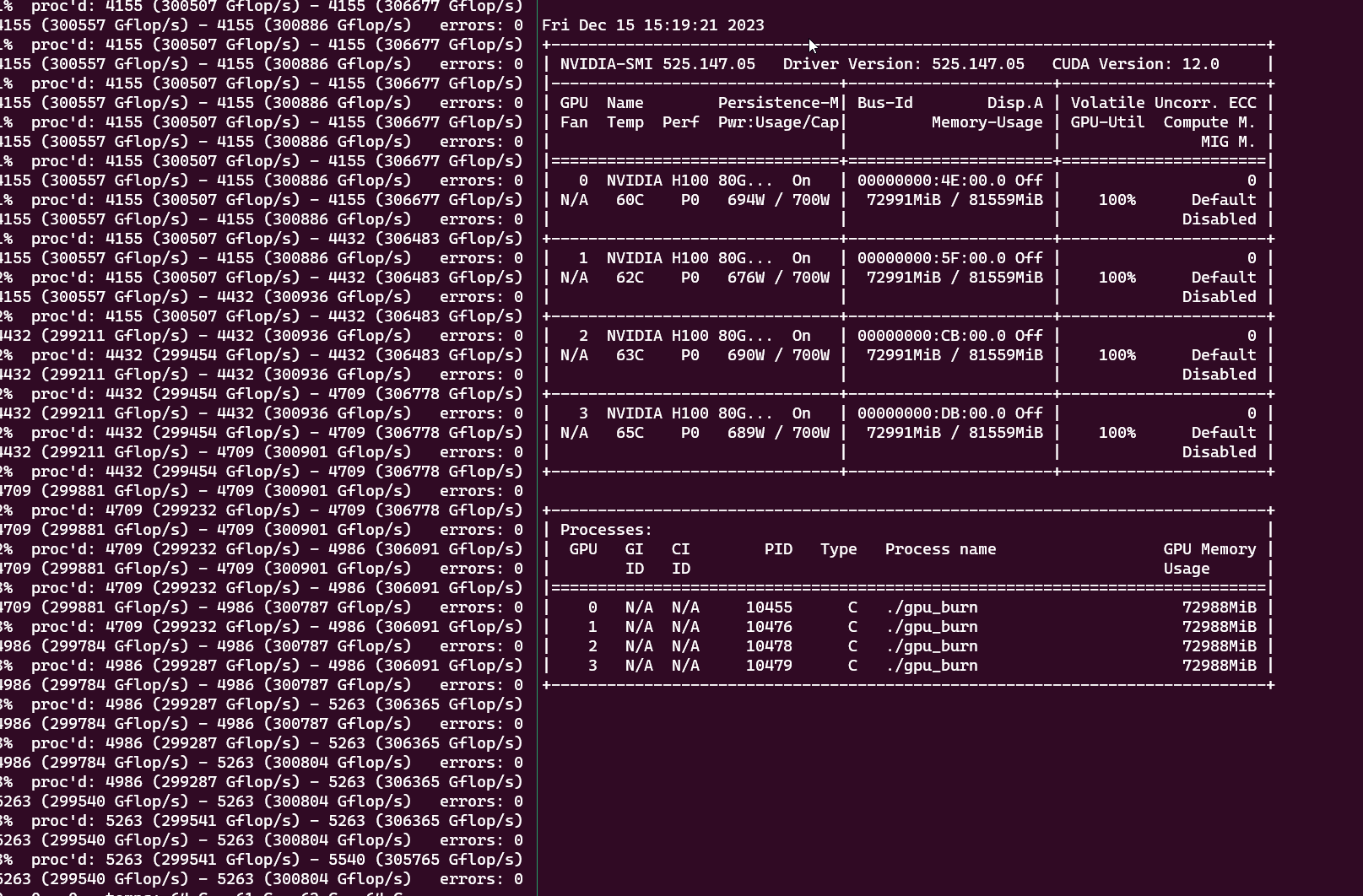
Affected Products
PowerEdge XE8640Products
XE ServersArticle Properties
Article Number: 000220508
Article Type: How To
Last Modified: 10 Apr 2025
Version: 5
Find answers to your questions from other Dell users
Support Services
Check if your device is covered by Support Services.