PowerEdge T360、R360:如果 LC 語言設為非英文,POST 在載入 BIOS 驅動程式頁面時停止回應
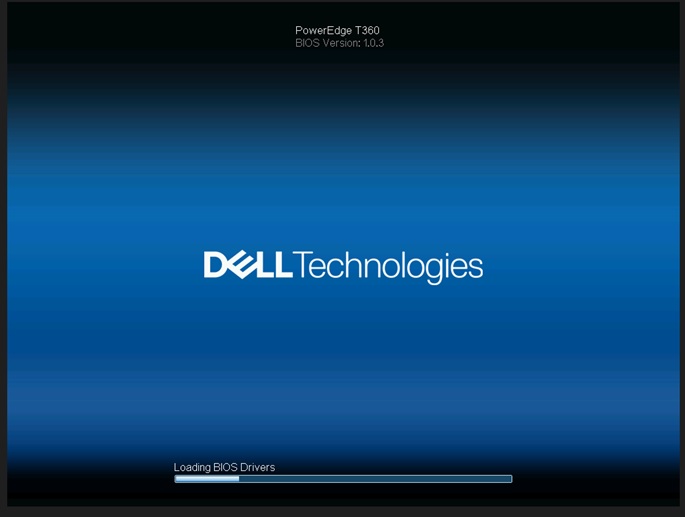
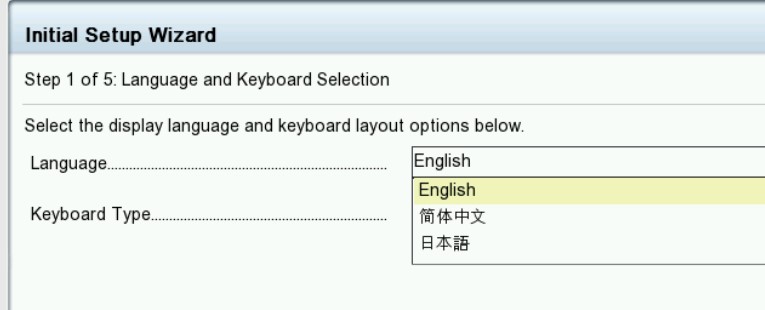
Summary: 如果生命週期 (LC) 語言設為非英文語言,系統會在「載入 BIOS 驅動程式」畫面上停止回應。
This article applies to
This article does not apply to
This article is not tied to any specific product.
Not all product versions are identified in this article.
Symptoms
系統會在「載入 BIOS 驅動程式」畫面停止。當 T360 和 R360 的生命週期語言設為非英文時,生命週期記錄會顯示PST0210事件。

Cause
BIOS 取得目前語言的字串。當前語言的字串未定義獲取ME類型“string”,因為生命週期設置為非英語。
Resolution
已在 BIOS 版本 1.1.2 或更新版本中
修正 因應措施:清除 NVRAM。
若要恢復功能,請將生命週期語言更改回默認英語。請參閱 Dell PowerEdge R360 (T360) 安裝與維修手冊第 9 章:跳線和連接器:
NVRAM_CLRhttps://www.dell.com/support/home/en-us/product-support/product/poweredge-r360/docs
修正 因應措施:清除 NVRAM。
若要恢復功能,請將生命週期語言更改回默認英語。請參閱 Dell PowerEdge R360 (T360) 安裝與維修手冊第 9 章:跳線和連接器:
NVRAM_CLRhttps://www.dell.com/support/home/en-us/product-support/product/poweredge-r360/docs
Affected Products
PowerEdge R360, PowerEdge T360Article Properties
Article Number: 000221245
Article Type: Solution
Last Modified: 19 May 2026
Version: 5
Find answers to your questions from other Dell users
Support Services
Check if your device is covered by Support Services.