VxRail: Nedlukning mislykkes ved validering
Summary: Klyngenedlukning mislykkes på grund af EAM-serviceproblemer.
This article applies to
This article does not apply to
This article is not tied to any specific product.
Not all product versions are identified in this article.
Symptoms
VxRail-nedlukning mislykkes ved validering med fejl:
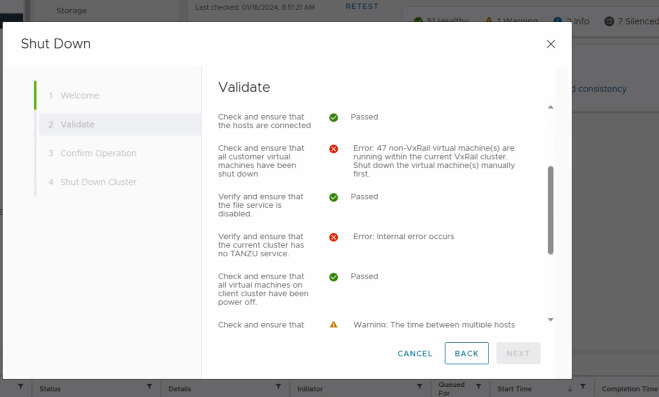
ERROR: Internal error occurs.

Verify and ensure that the current cluster has no Tanzu service.
Cause
Dette problem kan opstå på grund af:
- Årsag 1: Ikonet
vmware-eamTjenesten er nede. - Årsag 2: Certifikathåndteringsværktøjet kan ikke automatisk opdatere ESXi Agent Manager-certifikatet (EAM), når løsningsbrugercertifikater opdateres. WCP (Workload Control Plan) kræver, at EAM er funktionelt for at kunne starte.
Resolution
For årsag 1 skal du genstarte vmware-eam Ydelse:
#service-control --start vmware-eam
Hvis tjenesten ikke starter, skal du kontrollere, at starttypen er automatisk. Du kan ændre dette i brugergrænsefladen i vCenter Server Appliance Management Interface (VAMI).
For årsag 2 skal du følge VMware-artiklerne:
- Opgradering eller programrettelse af vCenter Server til 8.0 U2 mislykkes med forhåndskontrolfejlen "Opgradering af kilde-vSphere ESXi Agent Manager (EAM) kunne ikke hente EAM-URL'er, så de kan kontrolleres i forhold til systemer, som systemet har tillid til" (94934)
- WCP-tjenesten starter ikke efter udskiftning af vCenter Server-certifikater (80588)

Affected Products
VxRail, VxRail Appliance Series, VxRail SoftwareArticle Properties
Article Number: 000221378
Article Type: Solution
Last Modified: 23 Jun 2026
Version: 5
Find answers to your questions from other Dell users
Support Services
Check if your device is covered by Support Services.