Dell Networking SONiC-rutekort
Summary: Denne artikel handler om rutekort med et grundlæggende eksempel i Dell Networking SONiC.
This article applies to
This article does not apply to
This article is not tied to any specific product.
Not all product versions are identified in this article.
Instructions
| Forudsætninger Vi bruger standard interface navngivning til at demonstrere koncepterne. Se artiklen Dell Networking S-serien: Basic Interface Configuration - SONiC 4.0 for at få flere oplysninger om navngivning af grænseflade |
Indeks
Hvad er et rutekort.Match og indstil opgørelsesværdier.
Syntaks
for konfigurationOpret rutekort
Erklæring om
matchIndstil erklæring
Opkaldsopgørelse
Fjern rutekortkonfiguration
Bekræft rutekort
Eksempel på konfiguration
Hvad er et rutekort.
Route-Map bruges til redigering og styring af ruteindlæring i OSPF- eller BGP-routingprocessen. Det spiller også en rolle i generering af en standardrute inden for en OSPF-routingproces. I det væsentlige specificerer et rutekort, hvilke ruter fra en specificeret routingprotokol der må omfordeles til målruteprocessen.For at filtrere ruter til omfordeling skal du bruge rutekort med IP-præfikslister og eller AS-stiliste.
Tabellen nedenfor beskriver de handlinger, der udføres, når der findes flere matchkommandoer inden for en enkelt rutekortsekvens.
| Rutekorterklæring | Erklæring om præfiksliste | Rutematch/Intet match | Handling |
|---|---|---|---|
| Tillade | Tillade | Matche | Rute er tilladt og kan udføre, indstille eller kalde. |
| Tillade | Intet match | Fortsæt med næste rutekortsekvens | |
| Benægte | Matche | Fortsæt med næste rutekortsekvens | |
| Benægte | Intet match | Fortsæt med næste rutekortsekvens | |
| Benægte | Tillade | Matche | Rute nægtes. |
| Tillade | Intet match | Fortsæt med næste rutekortsekvens | |
| Benægte | Matche | Fortsæt med næste rutekortsekvens | |
| Benægte | Intet match | Fortsæt med næste rutekortsekvens |
Match og indstil opgørelsesværdier.
Hver rutekortsætning har to typer værdier:- En matchværdi vælger ruter, som denne sætning skal anvendes på.
- En angivet værdi ændrer de oplysninger, der skal videredistribueres til målprotokollen.
Hvis matchkriterierne mislykkes, gælder denne erklæring ikke for ruten, hvorefter DELL SONiC fortsætter med at evaluere ruten i forhold til den næste opgørelse i rutekortet. Scanning af rutekortet fortsætter, indtil der findes en erklæring, der matcher ruten, eller indtil slutningen af rutekortet er nået.
Et match eller en indstillet værdi i hver sætning kan overses eller gentages flere gange, hvis en af disse betingelser findes:
- Hvis der findes flere matchposter i en sætning, skal alle lykkes for en given rute, for at den pågældende rute stemmer overens med sætningen (der anvendes en logisk AND-algoritme)
- Hvis en matchpost ser flere objekter i en post, skal en af dem matche (der anvendes en logisk ELLER-algoritme)
- Hvis der ikke findes en matchpost, stemmer alle ruter overens med opgørelsen.
- Hvis en angivet post ikke findes i rutekorttilladelseserklæringen, omfordeles ruten uden ændring af dens aktuelle attributter.
- En rutekortsætning uden et match eller en sætpost udfører en handling. En tom tilladelseserklæring tillader en omfordeling af de resterende ruter uden ændringer.
- En tom afvisningssætning tillader ikke omfordeling af andre ruter, da dette er standardhandlingen, hvis et rutekort er fuldført scannet, men der ikke findes noget eksplicit match.
Syntaks for konfiguration
Opret rutekort
Opret et rutekort, der svarer til de ruteparametre, der er angivet i næste trin. Angiv en meddelelse om tilladelse eller afvis for at konfigurere, hvordan matchende ruter håndteres. Indtast løbenummeret for den rækkefølge, sætningen behandles i på kortet.Kommandosyntaks
admin@DELLSONiC :~$ sonic-cli
DELLSONiC # configure
DELLSONiC (config)# route-map map-name {permit | deny} {sequence-number}
|
Erklæring om match
I rutekortkonfigurationstilstand skal du indtaste en af disse matchsætninger for at vælge ruter.Kommandosyntaks
admin@DELLSONiC :~$ sonic-cli
DELLSONiC # configure
DELLSONiC (config)# route-map map-name {permit | deny} {sequence-number}
DELLSONiC(config-route-map)# match {match statement}
|
Possible Match Statements as-path Set routing policy match criteria as-path community Set routing policy match criteria to BGP community evpn Set routing policy match criteria to BGP Ethernet Virtual Private Network ext-community Set routing policy match criteria to BGP extended community interface Set routing policy match criteria to interface ip Set routing policy match criteria ipv6 Set routing policy match criteria local-preference Set routing policy match criteria to local-preference metric Set routing policy match criteria to metric origin Specify BGP origin peer Set routing policy match criteria to peer IP source-protocol Specify source protocol source-vrf Source VRF tag Redistributes routes in the routing table that match the specified tags. |
Indstil erklæring
I rutekortkonfigurationstilstand skal du indtaste en af disse indstillede sætninger for at ændre den angivne BGP-attribut i matchende ruter.Kommandosyntaks
admin@DELLSONiC :~$ sonic-cli
DELLSONiC # configure
DELLSONiC (config)# route-map map-name {permit | deny} {sequence-number}
DELLSONiC(config-route-map)# set {Set-statement}
|
Possible Set-Statement as-path Transform BGP AS-path attribute comm-list Set BGP community list (for deletion) community BGP community attribute extcommunity BGP extended community attribute ip IPv4 information ipv6 IPv6 information local-preference BGP local preference path attribute metric Set metric value action for the routing policy origin BGP origin code tag Tag value for routing protocol weight BGP weight for routing table |
Opkaldsopgørelse
"Call"-sætningen gør det muligt at kalde et andet rutekort, hvis matchbetingelsen er opfyldt.Kommandosyntaks
admin@DELLSONiC :~$ sonic-cli
DELLSONiC # configure
DELLSONiC (config)# route-map map-name {permit | deny} {sequence-number}
DELLSONiC (config-route-map)# call {route-map-name}
|
Fjern konfiguration
Sørg for at fjerne enhver rutekorttilknytning, før du fjerner rutekort.Hvis du vil fjerne en konfigureret værdi i en rutekortpost, skal du indtaste kommandoen "no version of the match" eller set".
Eksempel
admin@DELLSONiC :~$ sonic-cli
DELLSONiC # configure
DELLSONiC (config)# route-map map-name {permit | deny} {sequence-number}
DELLSONiC (config-route-map)# no match as-path
DELLSONiC (config-route-map)# no set origin
DELLSONiC (config-route-map)# no call
|
admin@DELLSONiC :~$ sonic-cli DELLSONiC # configure DELLSONiC (config)# no route-map map-name |
Bekræft rutekort
Brug kommandoer nedenfor til at bekræfte rutekortkonfigurationen.
DELLSONiC# show route-map |
DELLSONiC# show route-map {route-map-name} |
Brug nedenstående kommandoer til at finde rutekortet, der er anvendt på en nabo.
DELLSONiC# show bgp ipv4 unicast neighbors |
DELLSONiC# show bgp ipv6 unicast neighbors |
Du kan også greppe med politik i ovenstående kommandoer for at se et mindre output. DELLSONiC#show bgp ipv4 unicast neighbors <neighbor>| find policy |
Eksempelkonfiguration
Krav: Se nedenstående topologi. Tre tilbagekoblinger IP 1.1.1.1/32, 2.2.2.2/32 og 3.3.3.3/32 annonceres af DELL-SONiC-R1 til DELL-SONiC-R2 ved hjælp af BGP.Overvej at vi har brug for, at ruten til 1.1.1.1/32 annonceres som havende Origin-EGP, der skal modtages på DELL-SONiC-R3.
Strækningerne 2.2.2.2/32 og 3.3.3.3/32 bør ikke ændres.
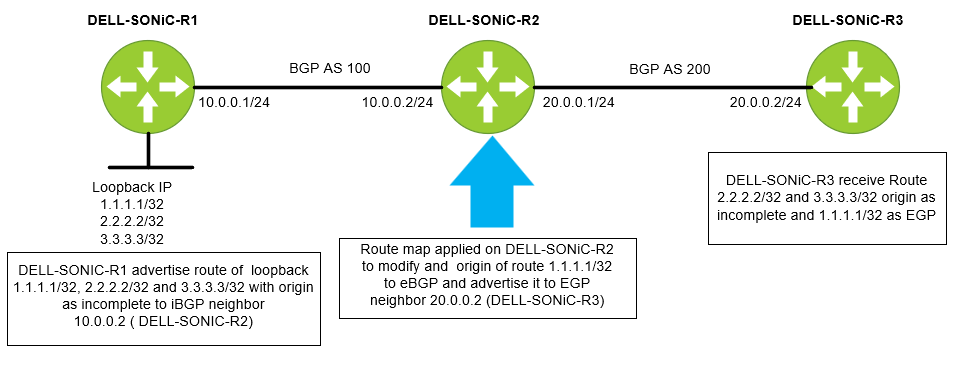
Lad os først konfigurere en præfiksliste. Lad os navngive præfikslisten IP-LIST-TO-MODIFY og tillade 1.1.1.1/32 præfiks.
DELL-SONiC-R2# configure DELL-SONiC-R2(config)# ip prefix-list IP-LIST-TO-MODIFY seq 1 permit 1.1.1.1/32 DELL-SONiC-R2(config)# exit DELL-SONiC-R2# |
DELL-SONiC-R2# show ip prefix-list
IP prefix list IP-LIST-TO-MODIFY:
     seq 1 permit 1.1.1.1/32
DELL-SONiC-R2# |
Lad os konfigurere rutekortet på DELL-SONiC-R2. Lad os navngive rutekortet MAP-TO-MODIFICATION
DELL-SONiC-R2# configure DELL-SONiC-R2(config)# route-map MAP-TO-MODIFICATION permit 1 DELL-SONiC-R2(config-route-map)# match ip address prefix-list IP-LIST-TO-MODIFY DELL-SONiC-R2(config-route-map)# set origin egp DELL-SONiC-R2(config-route-map)# exit DELL-SONiC-R2(config)# route-map MAP-TO-MODIFICATION permit 2 DELL-SONiC-R2(config-route-map)# exit DELL-SONiC-R2(config)# exit DELL-SONiC-R2# |
Lad os nedbryde konfigurationen for yderligere forklaring.
Here under sequence 1 the match condition is to match any IP in prefix list IP-LIST-TO-MODIFY where we already have specified 1.1.1.1/32. So when 1.1.1.1/32 IP matches the cation to be taken is set the origin code to egp. DELL-SONiC-R2# configure DELL-SONiC-R2(config)# route-map MAP-TO-MODIFICATION permit 1 DELL-SONiC-R2(config-route-map)# match ip address prefix-list IP-LIST-TO-MODIFY DELL-SONiC-R2(config-route-map)# set origin egp DELL-SONiC-R2(config-route-map)# exit |
The next sequence is to allow all other routes (2.2.2.2/32 and 3.3.3.3/32) without any modification. You can write a separate prefix list for this but for simplicity we are not defining any match entry. If a match entry is not present, all routes are considered match under the sequence. If no set action is specified the default action is redistribute the route without any modification. DELL-SONiC-R2(config)# route-map MAP-TO-MODIFICATION permit 2 DELL-SONiC-R2(config-route-map)# exit DELL-SONiC-R2(config)# exit DELL-SONiC-R2# |
Lad os kontrollere rutekortkonfigurationen.
DELL-SONiC-R2# show running-configuration route-map ! route-map MAP-TO-MODIFICATION permit 1 match ip address prefix-list IP-LIST-TO-MODIFY set origin egp ! route-map MAP-TO-MODIFICATION permit 2 DELL-SONiC-R2# |
DELL-SONiC-R2# show route-map
Route map MAP-TO-MODIFICATION:
   permit, sequence 1
    Match clauses:
      ip address prefix-list IP-LIST-TO-MODIFY
    Set clauses:
      route origin EGP
    Call clauses:
    Actions:
      Exit routemap
   permit, sequence 2
    Match clauses:
    Set clauses:
    Call clauses:
    Actions:
      Exit routemap
DELL-SONiC-R2# |
Lad os anvende rutekortet MAP-TO-MODIFICATION i udgående retning til naboen DELL-SONiC-R3 (20.0.0.2)
DELL-SONiC-R2(config)# router bgp 100 DELL-SONiC-R2(config-router-bgp)# neighbor 20.0.0.2 DELL-SONiC-R2(config-router-bgp-neighbor)# remote-as 200 DELL-SONiC-R2(config-router-bgp-neighbor)# no shutdown DELL-SONiC-R2(config-router-bgp-neighbor)# address-family ipv4 unicast DELL-SONiC-R2(config-router-bgp-neighbor-af)# route-map MAP-TO-MODIFICATION out ===>Apply the Route-map in outbound direction DELL-SONiC-R2(config-router-bgp-neighbor-af)# end DELL-SONiC-R2# |
Lad os kontrollere bgp-konfigurationen.
DELL-SONiC-R2# show running-configuration bgp ! router bgp 100 log-neighbor-changes timers 60 180 ! neighbor 10.0.0.1 remote-as 100 ! address-family ipv4 unicast activate ! neighbor 20.0.0.2 remote-as 200 ! address-family ipv4 unicast activate route-map MAP-TO-MODIFICATION out DELL-SONiC-R2# |
Vi kan se rutekortet MAP-TO-MODIFICATION anvendt på nabo 20.0.0.2.
DELL-SONiC-R2# show bgp ipv4 unicast neighbors 20.0.0.2

BGP neighbor is 20.0.0.2, remote AS 200, local AS 100, external link
  BGP version 4, remote router ID 20.0.0.2 , local router ID 20.0.0.1
  BGP state = Established, up for 00:35:59
  Last read 00:00:59, Last write 00:00:59
  Hold time is 180 seconds, keepalive interval is 60 seconds
  Minimum time between advertisement runs is 0 seconds
  Neighbor capabilities:
    4 Byte AS: advertised and received
    AddPath IPv4 Unicast Receive: advertised and received
    Route refresh: advertised and received
    Multiprotocol Extension: advertised and received
    Graceful restart: advertised and received
    Hostname capability advertised (name: DELL-SONiC-R2) received (name: DELL-SONiC-R3)
  Message statistics:
    InQ depth is 0
    OutQ depth is 0
                         Sent        Rcvd
    Opens:               2           2
    Notifications:       0           0
    Updates:             10          4
    Keepalive:           37          37
    Route Refresh:       0           0
    Capability:          0           0
    Total:               49          43

  For address family: IPv4 Unicast
    Address-family enabled
    Prefixes received 0
     Export policy:
    MAP-TO-MODIFICATION
  Connections established 2, dropped 1
  Last reset 00:36:00, Last reset reason Peer closed the session
  Local host: 20.0.0.1, Local port: 57552
  Foreign host: 20.0.0.2, Foreign port: 179
  BGP Connect Retry Timer in Seconds 30


DELL-SONiC-R2# |
Verifikation
Lad os se, hvordan ruterne 1.1.1.1/32, 2.2.2.2/32 og 3.3.3.3/32 ser ud på DELL-SONiC-R1, DELL-SONiC-R2, DELL-SONiC-R3.
På DELL-SONiC-R1
DELL-SONiC-R1# show bgp ipv4 unicast
BGP routing table information for VRF default
Router identifier 10.0.0.1, local AS number 100
Status codes: R - removed, S - stale, s - suppressed, * - valid
              h - history, d - damped, > - best, = - multipath, q - queued, r - RIB-failure
Origin codes: i - IGP, e - EGP, ? - incomplete
     Network             Next Hop                                 Metric      LocPref     Weight Path
*>   1.1.1.1/32          0.0.0.0                                  0                       32768      ?
*>   2.2.2.2/32          0.0.0.0                                  0                       32768      ?
*>   3.3.3.3/32          0.0.0.0                                  0                       32768      ?
*>   10.0.0.0/24         0.0.0.0                                  0                       32768      ?
DELL-SONiC-R1# |
DELL-SONiC-R1# show bgp ipv4 unicast 1.1.1.1
BGP routing table entry for 1.1.1.1/32
Paths: (1 available, best #1, table default)
  Local
    0.0.0.0 from 0.0.0.0 (10.0.0.1)
      Origin incomplete, metric 0, weight 32768, valid, best (First path received)
      Last update: 2024-02-21 17:15:48+0000
DELL-SONiC-R1#

DELL-SONiC-R1# show bgp ipv4 unicast 2.2.2.2
BGP routing table entry for 2.2.2.2/32
Paths: (1 available, best #1, table default)
  Local
    0.0.0.0 from 0.0.0.0 (10.0.0.1)
      Origin incomplete, metric 0, weight 32768, valid, best (First path received)
      Last update: 2024-02-21 17:15:48+0000
DELL-SONiC-R1#


We can see the Origin incomplete for 1.1.1.1/32 and 2.2.2.2/32
|
DELL-SONiC-R1# show ip route
Codes:  K - kernel route, C - connected, S - static, B - BGP, O - OSPF
        > - selected route, * - FIB route, q - queued route, r - rejected route
       Destination        Gateway                                                                    Dist/Metric   Last Update
--------------------------------------------------------------------------------------------------------------------------------
 C>*   1.1.1.1/32         Direct                          Loopback0                                  0/0           00:38:32 ago
 C>*   2.2.2.2/32         Direct                          Loopback1                                  0/0           00:38:32 ago
 C>*   3.3.3.3/32         Direct                          Loopback3                                  0/0           00:38:32 ago
C>* 10.0.0.0/24 Direct Eth1/1 0/0 00:38:32 ago |
På DELL-SONiC-R2
DELL-SONiC-R2# show bgp ipv4 unicast
BGP routing table information for VRF default
Router identifier 20.0.0.1, local AS number 100
Status codes: R - removed, S - stale, s - suppressed, * - valid
              h - history, d - damped, > - best, = - multipath, q - queued, r - RIB-failure
Origin codes: i - IGP, e - EGP, ? - incomplete
     Network             Next Hop                                 Metric      LocPref     Weight Path
*>   1.1.1.1/32          10.0.0.1                                 0           100         0          ?
*>   2.2.2.2/32          10.0.0.1                                 0           100         0          ?
*>   3.3.3.3/32          10.0.0.1                                 0           100         0          ?
*>   10.0.0.0/24         10.0.0.1                                 0           100         0          ?
DELL-SONiC-R2# |
DELL-SONiC-R2# show bgp ipv4 unicast 1.1.1.1
BGP routing table entry for 1.1.1.1/32
Paths: (1 available, best #1, table default)
  Local
    10.0.0.1 from 10.0.0.1 (10.0.0.1)
      Origin incomplete, metric 0, localpref 100, valid, internal, best (First path received)
      Last update: 2024-02-21 17:17:25+0000
DELL-SONiC-R2#

DELL-SONiC-R2# show bgp ipv4 unicast 2.2.2.2
BGP routing table entry for 2.2.2.2/32
Paths: (1 available, best #1, table default)
  Local
    10.0.0.1 from 10.0.0.1 (10.0.0.1)
      Origin incomplete, metric 0, localpref 100, valid, internal, best (First path received)
      Last update: 2024-02-21 17:17:26+0000
DELL-SONiC-R2#


We can see the Origin incomplete for 1.1.1.1/32 and 2.2.2.2/32.
|
DELL-SONiC-R2# show ip route
Codes:  K - kernel route, C - connected, S - static, B - BGP, O - OSPF
        > - selected route, * - FIB route, q - queued route, r - rejected route
       Destination        Gateway                                                                    Dist/Metric   Last Update
--------------------------------------------------------------------------------------------------------------------------------
 B>*   1.1.1.1/32         via 10.0.0.1                    Eth1/1                                     200/0         00:39:48 ago
 B>*   2.2.2.2/32         via 10.0.0.1                    Eth1/1                                     200/0         00:39:48 ago
 B>*   3.3.3.3/32         via 10.0.0.1                    Eth1/1                                     200/0         00:39:48 ago
 B     10.0.0.0/24        via 10.0.0.1                                                               200/0         00:39:48 ago
 C>*   10.0.0.0/24        Direct                          Eth1/1                                     0/0           00:40:08 ago
C>* 20.0.0.0/24 Direct Eth1/2 0/0 00:40:08 ago |
På DELL-SONiC-R3
DELL-SONiC-R3# show bgp ipv4 unicast
BGP routing table information for VRF default
Router identifier 20.0.0.2, local AS number 200
Status codes: R - removed, S - stale, s - suppressed, * - valid
              h - history, d - damped, > - best, = - multipath, q - queued, r - RIB-failure
Origin codes: i - IGP, e - EGP, ? - incomplete
     Network             Next Hop                                 Metric      LocPref     Weight Path
*>   1.1.1.1/32          20.0.0.1                                                         0      100 e
*>   2.2.2.2/32          20.0.0.1                                                         0      100 ?
*>   3.3.3.3/32          20.0.0.1                                                         0      100 ?
*>   10.0.0.0/24         20.0.0.1                                                         0      100 ?
DELL-SONiC-R3#

Note the e(highlighted in red). This means the origin is EGP for 1.1.1.1/32.
|
DELL-SONiC-R3# show bgp ipv4 unicast 1.1.1.1/32
BGP routing table entry for 1.1.1.1/32
Paths: (1 available, best #1, table default)
  100
    20.0.0.1 from 20.0.0.1 (20.0.0.1)
      Origin EGP, valid, best
      Last update: 2024-02-21 17:17:27+0000
DELL-SONiC-R3#

We can see 1.1.1.1/32 has Origin EGP.
|
Lets check 2.2.2.2/32 origin

DELL-SONiC-R3# show bgp ipv4 unicast 2.2.2.2
BGP routing table entry for 2.2.2.2/32
Paths: (1 available, best #1, table default)
  100
    20.0.0.1 from 20.0.0.1 (20.0.0.1)
      Origin incomplete, metric , valid, external, best (First path received)
      Last update: 2024-02-21 17:17:26+0000
DELL-SONiC-R3#

We can see Origin incomplete for 2.2.2.2/32. |
DELL-SONiC-R3# show ip route
Codes:  K - kernel route, C - connected, S - static, B - BGP, O - OSPF
        > - selected route, * - FIB route, q - queued route, r - rejected route
       Destination        Gateway                                                                    Dist/Metric   Last Update
--------------------------------------------------------------------------------------------------------------------------------
 B>*   1.1.1.1/32         via 20.0.0.1                    Eth1/2                                     20/0          00:41:27 ago
 B>*   2.2.2.2/32         via 20.0.0.1                    Eth1/2                                     20/0          00:41:27 ago
 B>*   3.3.3.3/32         via 20.0.0.1                    Eth1/2                                     20/0          00:41:27 ago
 B>*   10.0.0.0/24        via 20.0.0.1                    Eth1/2                                     20/0          00:41:27 ago
 C>*   20.0.0.0/24        Direct                          Eth1/2                                     0/0           00:41:39 ago
DELL-SONiC-R3#
|
Affected Products
Enterprise SONiC Distribution, PowerSwitch E3200-ON Series, PowerSwitch N3200-ON, PowerSwitch S5212F-ON, PowerSwitch S5224F-ON, PowerSwitch S5232F-ON, PowerSwitch S5248F-ON, PowerSwitch S5296F-ON, PowerSwitch Z9264F-ON, PowerSwitch Z9332F-ON
, PowerSwitch Z9432F-ON
...
Article Properties
Article Number: 000222196
Article Type: How To
Last Modified: 18 Feb 2026
Version: 9
Find answers to your questions from other Dell users
Support Services
Check if your device is covered by Support Services.