Dell Networking SONiC 라우팅 맵
Summary: 이 문서에서는 Dell Networking SONiC의 기본 예시와 함께 경로 맵에 대해 설명합니다.
This article applies to
This article does not apply to
This article is not tied to any specific product.
Not all product versions are identified in this article.
Instructions
| 필수 구성 요소 개념을 설명하기 위해 표준 인터페이스 이름 지정을 사용하고 있습니다. Dell Networking S-Series: 문서를 참조하십시오. 기본 인터페이스 구성 - Sonic 4.0을 참조하여 인터페이스 네이밍에 관한 자세한 정보를 알아보십시오. |
인덱스
경로 맵이란 무엇입니까?명령문 값을 일치시키고 설정합니다.
구성 구문
경로 맵
생성Match 문
SET문
Call 문
경로 맵 구성
제거경로 맵
확인샘플 구성
경로 맵이란 무엇입니까?
Route-Map은 OSPF 또는 BGP 라우팅 프로세스에서 경로 학습을 편집하고 제어하는 데 사용됩니다. 또한 OSPF 라우팅 프로세스 내에서 기본 경로를 생성하는 역할도 합니다. 기본적으로 route-map은 지정된 라우팅 프로토콜의 어떤 경로를 타겟 라우팅 프로세스로 재배포할 수 있는지 지정합니다.재배포를 위한 경로를 필터링하려면 IP 접두사 목록 및/또는 AS 경로 목록과 함께 경로 맵을 사용합니다.
아래 표에서는 단일 경로 맵 시퀀스 내에서 여러 match 명령이 발생할 때 수행되는 작업을 간략하게 설명합니다.
| Route-map 명령문 | 접두사 목록 문 | 경로 일치/일치하지 않음 | 동작 |
|---|---|---|---|
| Permit | Permit | 일치 | 경로가 허용되며 설정 또는 호출을 수행할 수 있습니다. |
| Permit | 일치하는 항목 없음 | 다음 경로 맵 시퀀스로 계속 진행합니다. | |
| Deny | 일치 | 다음 경로 맵 시퀀스로 계속 진행합니다. | |
| Deny | 일치하는 항목 없음 | 다음 경로 맵 시퀀스로 계속 진행합니다. | |
| Deny | Permit | 일치 | 경로가 거부되었습니다. |
| Permit | 일치하는 항목 없음 | 다음 경로 맵 시퀀스로 계속 진행합니다. | |
| Deny | 일치 | 다음 경로 맵 시퀀스로 계속 진행합니다. | |
| Deny | 일치하는 항목 없음 | 다음 경로 맵 시퀀스로 계속 진행합니다. |
명령문 값을 일치시키고 설정합니다.
각 route-map 명령문에는 두 가지 유형의 값이 있습니다.- 일치 값은 이 명령문을 적용해야 하는 경로를 선택합니다.
- 설정 값은 타겟 프로토콜로 재분배될 정보를 수정합니다.
일치 기준에 장애가 발생하면 이 명령문은 경로에 적용되지 않으며, DELL SONiC은 route-map의 다음 명령문에 대해 경로를 평가합니다. 경로 맵의 스캔은 경로와 일치하는 명령문이 발견되거나 경로 맵의 끝에 도달할 때까지 계속됩니다.
다음 조건 중 하나가 있는 경우 각 명령문의 일치 또는 설정 값이 여러 번 누락되거나 반복될 수 있습니다.
- 명령문에 여러 일치 항목이 있는 경우, 해당 경로가 명령문과 일치하려면 지정된 경로에 대해 모두 성공해야 합니다(논리적 AND 알고리즘이 적용됨)
- 일치 항목이 한 항목에서 여러 개체를 표시하는 경우 둘 중 하나가 일치해야 합니다(논리적 OR 알고리즘이 적용됨)
- 일치 항목이 없는 경우 모든 경로가 명령문과 일치합니다.
- 명령문에 설정된 항목이 route-map permit 없는 경우, 현재 속성을 수정하지 않고 경로가 재배포됩니다.
- match 또는 set 항목이 없는 route-map 명령문은 작업을 수행합니다. permit 문이 비어 있으면 나머지 경로를 수정하지 않고 재배포할 수 있습니다.
- 빈 deny 문은 경로 맵이 스캔을 완료했지만 명시적 일치를 찾을 수 없는 경우 기본 작업이므로 다른 경로의 재배포를 허용하지 않습니다.
구성 구문
경로 맵 생성
다음 단계에 나열된 경로 매개변수와 일치하는 경로 맵을 생성합니다. permit 또는 deny 명령문을 지정하여 일치하는 경로가 처리되는 방법을 구성합니다. 맵에서 명령문이 처리되는 순서의 시퀀스 번호를 입력합니다.명령 구문
admin@DELLSONiC :~$ sonic-cli
DELLSONiC # configure
DELLSONiC (config)# route-map map-name {permit | deny} {sequence-number}
|
Match 문
route-map 구성 모드에서 이러한 match 명령문을 입력하여 경로를 선택합니다.명령 구문
admin@DELLSONiC :~$ sonic-cli
DELLSONiC # configure
DELLSONiC (config)# route-map map-name {permit | deny} {sequence-number}
DELLSONiC(config-route-map)# match {match statement}
|
Possible Match Statements as-path Set routing policy match criteria as-path community Set routing policy match criteria to BGP community evpn Set routing policy match criteria to BGP Ethernet Virtual Private Network ext-community Set routing policy match criteria to BGP extended community interface Set routing policy match criteria to interface ip Set routing policy match criteria ipv6 Set routing policy match criteria local-preference Set routing policy match criteria to local-preference metric Set routing policy match criteria to metric origin Specify BGP origin peer Set routing policy match criteria to peer IP source-protocol Specify source protocol source-vrf Source VRF tag Redistributes routes in the routing table that match the specified tags. |
SET문
route-map 구성 모드에서 이러한 set 명령문을 입력하여 일치하는 경로에서 지정된 BGP 속성을 변경합니다.명령 구문
admin@DELLSONiC :~$ sonic-cli
DELLSONiC # configure
DELLSONiC (config)# route-map map-name {permit | deny} {sequence-number}
DELLSONiC(config-route-map)# set {Set-statement}
|
Possible Set-Statement as-path Transform BGP AS-path attribute comm-list Set BGP community list (for deletion) community BGP community attribute extcommunity BGP extended community attribute ip IPv4 information ipv6 IPv6 information local-preference BGP local preference path attribute metric Set metric value action for the routing policy origin BGP origin code tag Tag value for routing protocol weight BGP weight for routing table |
Call 문
"call" 명령문은 일치 조건이 충족되는 경우 다른 경로 맵을 호출할 수 있습니다.명령 구문
admin@DELLSONiC :~$ sonic-cli
DELLSONiC # configure
DELLSONiC (config)# route-map map-name {permit | deny} {sequence-number}
DELLSONiC (config-route-map)# call {route-map-name}
|
구성 제거
route-map을 제거하기 전에 경로 맵 연결을 제거해야 합니다.route-map 항목에서 구성된 값을 제거하려면 match 또는 set 명령의 no 버전을 입력합니다.
예제
admin@DELLSONiC :~$ sonic-cli
DELLSONiC # configure
DELLSONiC (config)# route-map map-name {permit | deny} {sequence-number}
DELLSONiC (config-route-map)# no match as-path
DELLSONiC (config-route-map)# no set origin
DELLSONiC (config-route-map)# no call
|
admin@DELLSONiC :~$ sonic-cli DELLSONiC # configure DELLSONiC (config)# no route-map map-name |
경로 맵 확인
아래 명령을 사용하여 경로 맵 컨피그레이션을 확인합니다.
DELLSONiC# show route-map |
DELLSONiC# show route-map {route-map-name} |
아래 명령을 사용하여 네이버에 적용된 경로 맵을 찾습니다.
DELLSONiC# show bgp ipv4 unicast neighbors |
DELLSONiC# show bgp ipv6 unicast neighbors |
위의 명령에서 정책으로 grep하여 더 작은 출력을 볼 수도 있습니다. DELLSONiC#show bgp ipv4 unicast neighbors <neighbor>| find policy |
샘플 구성
요구 사항: 아래 토폴로지를 참조하십시오. DELL-SONiC-R1은 BGP를 사용하여 3개의 루프백 IP 1.1.1.1/32, 2.2.2.2/32 및 3.3.3.3/32를 DELL-SONiC-R2에 보급합니다.DELL-SONiC-R3에서 수신할 원본 EGP가 있는 것으로 알리려면 1.1.1.1/32에 대한 경로가 필요하다고 가정합니다.
경로 2.2.2.2/32 및 3.3.3.3/32는 변경하면 안 됩니다.
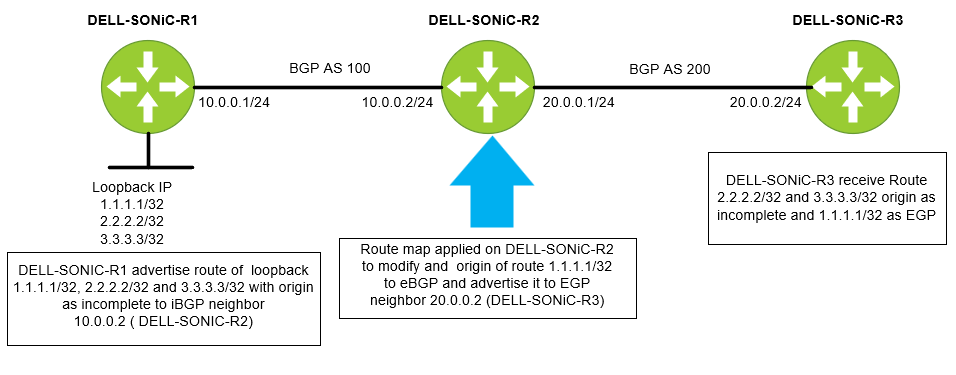
먼저 접두사 목록을 구성해 보겠습니다. 접두사 목록의 이름을 IP-LIST-TO-MODIFY로 지정하고 1.1.1.1/32 접두사를 허용하겠습니다.
DELL-SONiC-R2# configure DELL-SONiC-R2(config)# ip prefix-list IP-LIST-TO-MODIFY seq 1 permit 1.1.1.1/32 DELL-SONiC-R2(config)# exit DELL-SONiC-R2# |
DELL-SONiC-R2# show ip prefix-list
IP prefix list IP-LIST-TO-MODIFY:
     seq 1 permit 1.1.1.1/32
DELL-SONiC-R2# |
에서 경로 맵을 구성해 보겠습니다. DELL-SONiC-R2파일의 무결성을 확인합니다. 경로 맵의 이름을 MAP-TO-MODIFICATION
DELL-SONiC-R2# configure DELL-SONiC-R2(config)# route-map MAP-TO-MODIFICATION permit 1 DELL-SONiC-R2(config-route-map)# match ip address prefix-list IP-LIST-TO-MODIFY DELL-SONiC-R2(config-route-map)# set origin egp DELL-SONiC-R2(config-route-map)# exit DELL-SONiC-R2(config)# route-map MAP-TO-MODIFICATION permit 2 DELL-SONiC-R2(config-route-map)# exit DELL-SONiC-R2(config)# exit DELL-SONiC-R2# |
추가 설명을 위해 구성을 분석해 보겠습니다.
Here under sequence 1 the match condition is to match any IP in prefix list IP-LIST-TO-MODIFY where we already have specified 1.1.1.1/32. So when 1.1.1.1/32 IP matches the cation to be taken is set the origin code to egp. DELL-SONiC-R2# configure DELL-SONiC-R2(config)# route-map MAP-TO-MODIFICATION permit 1 DELL-SONiC-R2(config-route-map)# match ip address prefix-list IP-LIST-TO-MODIFY DELL-SONiC-R2(config-route-map)# set origin egp DELL-SONiC-R2(config-route-map)# exit |
The next sequence is to allow all other routes (2.2.2.2/32 and 3.3.3.3/32) without any modification. You can write a separate prefix list for this but for simplicity we are not defining any match entry. If a match entry is not present, all routes are considered match under the sequence. If no set action is specified the default action is redistribute the route without any modification. DELL-SONiC-R2(config)# route-map MAP-TO-MODIFICATION permit 2 DELL-SONiC-R2(config-route-map)# exit DELL-SONiC-R2(config)# exit DELL-SONiC-R2# |
route-map 컨피그레이션을 확인하겠습니다.
DELL-SONiC-R2# show running-configuration route-map ! route-map MAP-TO-MODIFICATION permit 1 match ip address prefix-list IP-LIST-TO-MODIFY set origin egp ! route-map MAP-TO-MODIFICATION permit 2 DELL-SONiC-R2# |
DELL-SONiC-R2# show route-map
Route map MAP-TO-MODIFICATION:
   permit, sequence 1
    Match clauses:
      ip address prefix-list IP-LIST-TO-MODIFY
    Set clauses:
      route origin EGP
    Call clauses:
    Actions:
      Exit routemap
   permit, sequence 2
    Match clauses:
    Set clauses:
    Call clauses:
    Actions:
      Exit routemap
DELL-SONiC-R2# |
아웃바운드 방향의 route-map MAP-TO-MODIFICATION을 이웃 DELL-SONiC-R3(20.0.0.2)에 적용해 보겠습니다.
DELL-SONiC-R2(config)# router bgp 100 DELL-SONiC-R2(config-router-bgp)# neighbor 20.0.0.2 DELL-SONiC-R2(config-router-bgp-neighbor)# remote-as 200 DELL-SONiC-R2(config-router-bgp-neighbor)# no shutdown DELL-SONiC-R2(config-router-bgp-neighbor)# address-family ipv4 unicast DELL-SONiC-R2(config-router-bgp-neighbor-af)# route-map MAP-TO-MODIFICATION out ===>Apply the Route-map in outbound direction DELL-SONiC-R2(config-router-bgp-neighbor-af)# end DELL-SONiC-R2# |
bgp 구성을 확인해보겠습니다.
DELL-SONiC-R2# show running-configuration bgp ! router bgp 100 log-neighbor-changes timers 60 180 ! neighbor 10.0.0.1 remote-as 100 ! address-family ipv4 unicast activate ! neighbor 20.0.0.2 remote-as 200 ! address-family ipv4 unicast activate route-map MAP-TO-MODIFICATION out DELL-SONiC-R2# |
인접 디바이스 20.0.0.2에 적용된 Route-map MAP-TO-MODIFICATION을 볼 수 있습니다.
DELL-SONiC-R2# show bgp ipv4 unicast neighbors 20.0.0.2

BGP neighbor is 20.0.0.2, remote AS 200, local AS 100, external link
  BGP version 4, remote router ID 20.0.0.2 , local router ID 20.0.0.1
  BGP state = Established, up for 00:35:59
  Last read 00:00:59, Last write 00:00:59
  Hold time is 180 seconds, keepalive interval is 60 seconds
  Minimum time between advertisement runs is 0 seconds
  Neighbor capabilities:
    4 Byte AS: advertised and received
    AddPath IPv4 Unicast Receive: advertised and received
    Route refresh: advertised and received
    Multiprotocol Extension: advertised and received
    Graceful restart: advertised and received
    Hostname capability advertised (name: DELL-SONiC-R2) received (name: DELL-SONiC-R3)
  Message statistics:
    InQ depth is 0
    OutQ depth is 0
                         Sent        Rcvd
    Opens:               2           2
    Notifications:       0           0
    Updates:             10          4
    Keepalive:           37          37
    Route Refresh:       0           0
    Capability:          0           0
    Total:               49          43

  For address family: IPv4 Unicast
    Address-family enabled
    Prefixes received 0
     Export policy:
    MAP-TO-MODIFICATION
  Connections established 2, dropped 1
  Last reset 00:36:00, Last reset reason Peer closed the session
  Local host: 20.0.0.1, Local port: 57552
  Foreign host: 20.0.0.2, Foreign port: 179
  BGP Connect Retry Timer in Seconds 30


DELL-SONiC-R2# |
확인
DELL-SONiC-R1, DELL-SONiC-R2, DELL-SONiC-R3에서 경로 1.1.1.1/32, 2.2.2.2/32 및 3.3.3.3/32가 어떻게 보이는지 살펴보겠습니다.
DELL-SONiC-R1에서
DELL-SONiC-R1# show bgp ipv4 unicast
BGP routing table information for VRF default
Router identifier 10.0.0.1, local AS number 100
Status codes: R - removed, S - stale, s - suppressed, * - valid
              h - history, d - damped, > - best, = - multipath, q - queued, r - RIB-failure
Origin codes: i - IGP, e - EGP, ? - incomplete
     Network             Next Hop                                 Metric      LocPref     Weight Path
*>   1.1.1.1/32          0.0.0.0                                  0                       32768      ?
*>   2.2.2.2/32          0.0.0.0                                  0                       32768      ?
*>   3.3.3.3/32          0.0.0.0                                  0                       32768      ?
*>   10.0.0.0/24         0.0.0.0                                  0                       32768      ?
DELL-SONiC-R1# |
DELL-SONiC-R1# show bgp ipv4 unicast 1.1.1.1
BGP routing table entry for 1.1.1.1/32
Paths: (1 available, best #1, table default)
  Local
    0.0.0.0 from 0.0.0.0 (10.0.0.1)
      Origin incomplete, metric 0, weight 32768, valid, best (First path received)
      Last update: 2024-02-21 17:15:48+0000
DELL-SONiC-R1#

DELL-SONiC-R1# show bgp ipv4 unicast 2.2.2.2
BGP routing table entry for 2.2.2.2/32
Paths: (1 available, best #1, table default)
  Local
    0.0.0.0 from 0.0.0.0 (10.0.0.1)
      Origin incomplete, metric 0, weight 32768, valid, best (First path received)
      Last update: 2024-02-21 17:15:48+0000
DELL-SONiC-R1#


We can see the Origin incomplete for 1.1.1.1/32 and 2.2.2.2/32
|
DELL-SONiC-R1# show ip route
Codes:  K - kernel route, C - connected, S - static, B - BGP, O - OSPF
        > - selected route, * - FIB route, q - queued route, r - rejected route
       Destination        Gateway                                                                    Dist/Metric   Last Update
--------------------------------------------------------------------------------------------------------------------------------
 C>*   1.1.1.1/32         Direct                          Loopback0                                  0/0           00:38:32 ago
 C>*   2.2.2.2/32         Direct                          Loopback1                                  0/0           00:38:32 ago
 C>*   3.3.3.3/32         Direct                          Loopback3                                  0/0           00:38:32 ago
C>* 10.0.0.0/24 Direct Eth1/1 0/0 00:38:32 ago |
DELL-SONiC-R2에서
DELL-SONiC-R2# show bgp ipv4 unicast
BGP routing table information for VRF default
Router identifier 20.0.0.1, local AS number 100
Status codes: R - removed, S - stale, s - suppressed, * - valid
              h - history, d - damped, > - best, = - multipath, q - queued, r - RIB-failure
Origin codes: i - IGP, e - EGP, ? - incomplete
     Network             Next Hop                                 Metric      LocPref     Weight Path
*>   1.1.1.1/32          10.0.0.1                                 0           100         0          ?
*>   2.2.2.2/32          10.0.0.1                                 0           100         0          ?
*>   3.3.3.3/32          10.0.0.1                                 0           100         0          ?
*>   10.0.0.0/24         10.0.0.1                                 0           100         0          ?
DELL-SONiC-R2# |
DELL-SONiC-R2# show bgp ipv4 unicast 1.1.1.1
BGP routing table entry for 1.1.1.1/32
Paths: (1 available, best #1, table default)
  Local
    10.0.0.1 from 10.0.0.1 (10.0.0.1)
      Origin incomplete, metric 0, localpref 100, valid, internal, best (First path received)
      Last update: 2024-02-21 17:17:25+0000
DELL-SONiC-R2#

DELL-SONiC-R2# show bgp ipv4 unicast 2.2.2.2
BGP routing table entry for 2.2.2.2/32
Paths: (1 available, best #1, table default)
  Local
    10.0.0.1 from 10.0.0.1 (10.0.0.1)
      Origin incomplete, metric 0, localpref 100, valid, internal, best (First path received)
      Last update: 2024-02-21 17:17:26+0000
DELL-SONiC-R2#


We can see the Origin incomplete for 1.1.1.1/32 and 2.2.2.2/32.
|
DELL-SONiC-R2# show ip route
Codes:  K - kernel route, C - connected, S - static, B - BGP, O - OSPF
        > - selected route, * - FIB route, q - queued route, r - rejected route
       Destination        Gateway                                                                    Dist/Metric   Last Update
--------------------------------------------------------------------------------------------------------------------------------
 B>*   1.1.1.1/32         via 10.0.0.1                    Eth1/1                                     200/0         00:39:48 ago
 B>*   2.2.2.2/32         via 10.0.0.1                    Eth1/1                                     200/0         00:39:48 ago
 B>*   3.3.3.3/32         via 10.0.0.1                    Eth1/1                                     200/0         00:39:48 ago
 B     10.0.0.0/24        via 10.0.0.1                                                               200/0         00:39:48 ago
 C>*   10.0.0.0/24        Direct                          Eth1/1                                     0/0           00:40:08 ago
C>* 20.0.0.0/24 Direct Eth1/2 0/0 00:40:08 ago |
DELL-SONiC-R3의 경우
DELL-SONiC-R3# show bgp ipv4 unicast
BGP routing table information for VRF default
Router identifier 20.0.0.2, local AS number 200
Status codes: R - removed, S - stale, s - suppressed, * - valid
              h - history, d - damped, > - best, = - multipath, q - queued, r - RIB-failure
Origin codes: i - IGP, e - EGP, ? - incomplete
     Network             Next Hop                                 Metric      LocPref     Weight Path
*>   1.1.1.1/32          20.0.0.1                                                         0      100 e
*>   2.2.2.2/32          20.0.0.1                                                         0      100 ?
*>   3.3.3.3/32          20.0.0.1                                                         0      100 ?
*>   10.0.0.0/24         20.0.0.1                                                         0      100 ?
DELL-SONiC-R3#

Note the e(highlighted in red). This means the origin is EGP for 1.1.1.1/32.
|
DELL-SONiC-R3# show bgp ipv4 unicast 1.1.1.1/32
BGP routing table entry for 1.1.1.1/32
Paths: (1 available, best #1, table default)
  100
    20.0.0.1 from 20.0.0.1 (20.0.0.1)
      Origin EGP, valid, best
      Last update: 2024-02-21 17:17:27+0000
DELL-SONiC-R3#

We can see 1.1.1.1/32 has Origin EGP.
|
Lets check 2.2.2.2/32 origin

DELL-SONiC-R3# show bgp ipv4 unicast 2.2.2.2
BGP routing table entry for 2.2.2.2/32
Paths: (1 available, best #1, table default)
  100
    20.0.0.1 from 20.0.0.1 (20.0.0.1)
      Origin incomplete, metric , valid, external, best (First path received)
      Last update: 2024-02-21 17:17:26+0000
DELL-SONiC-R3#

We can see Origin incomplete for 2.2.2.2/32. |
DELL-SONiC-R3# show ip route
Codes:  K - kernel route, C - connected, S - static, B - BGP, O - OSPF
        > - selected route, * - FIB route, q - queued route, r - rejected route
       Destination        Gateway                                                                    Dist/Metric   Last Update
--------------------------------------------------------------------------------------------------------------------------------
 B>*   1.1.1.1/32         via 20.0.0.1                    Eth1/2                                     20/0          00:41:27 ago
 B>*   2.2.2.2/32         via 20.0.0.1                    Eth1/2                                     20/0          00:41:27 ago
 B>*   3.3.3.3/32         via 20.0.0.1                    Eth1/2                                     20/0          00:41:27 ago
 B>*   10.0.0.0/24        via 20.0.0.1                    Eth1/2                                     20/0          00:41:27 ago
 C>*   20.0.0.0/24        Direct                          Eth1/2                                     0/0           00:41:39 ago
DELL-SONiC-R3#
|
Affected Products
Enterprise SONiC Distribution, PowerSwitch E3200-ON Series, PowerSwitch N3200-ON, PowerSwitch S5212F-ON, PowerSwitch S5224F-ON, PowerSwitch S5232F-ON, PowerSwitch S5248F-ON, PowerSwitch S5296F-ON, PowerSwitch Z9264F-ON, PowerSwitch Z9332F-ON
, PowerSwitch Z9432F-ON
...
Article Properties
Article Number: 000222196
Article Type: How To
Last Modified: 18 Feb 2026
Version: 9
Find answers to your questions from other Dell users
Support Services
Check if your device is covered by Support Services.