Dell Networking SONiC Yol Haritası
Summary: Bu makale, Dell Networking SONIC teki temel bir örnekle Yol Haritasını açıklamaktadır.
This article applies to
This article does not apply to
This article is not tied to any specific product.
Not all product versions are identified in this article.
Instructions
| Önkoşullar Kavramları göstermek için standart arabirim adlandırması kullanıyoruz. Dell Networking S Serisi: Arayüz adlandırma hakkında daha fazla bilgi için Temel Arayüz Yapılandırması - SONiC 4.0 |
Dizin
Rota Haritası nedir.İfade değerlerini eşleştirin ve ayarlayın.
Yapılandırma Söz Dizimi
Rota haritası
oluşturEşleşme Bildirimi
Set Deyimi
Çağrı Bildirimi
Rota haritası yapılandırmasını
kaldırmaRota haritasını
doğrulayınÖrnek yapılandırma
Rota Haritası nedir.
Rota Haritası, OSPF veya BGP yönlendirme sürecinde rota öğrenimini düzenlemek ve kontrol etmek için kullanılır. Ayrıca, OSPF yönlendirme işlemi içinde varsayılan bir yol oluşturmada da rol oynar. Temel olarak, bir rota haritası, belirli bir yönlendirme protokolünden hangi yolların hedef yönlendirme işlemine yeniden dağıtılmasına izin verildiğini belirtir.Yeniden dağıtım için rotaları filtrelemek için, IP ön ek listeleri ve/veya AS Yol Listesi ile rota haritalarını kullanın.
Aşağıdaki tabloda, tek bir rota haritası dizisinde birden fazla eşleştirme komutuyla karşılaşıldığında yapılan eylemler özetlenmiştir.
| Rota Haritası Bildirimi | Prefix list Statement | Rota Eşleşmesi/Eşleşme Yok | İşlem |
|---|---|---|---|
| İzin | İzin | Maç | Rotaya izin verilir ve ayarlama veya arama yapabilir. |
| İzin | Eşleşme Yok | Bir sonraki rota haritası sırasına göre devam edin | |
| Deny (Reddet) | Maç | Bir sonraki rota haritası sırasına göre devam edin | |
| Deny (Reddet) | Eşleşme Yok | Bir sonraki rota haritası sırasına göre devam edin | |
| Deny (Reddet) | İzin | Maç | Rota reddedildi. |
| İzin | Eşleşme Yok | Bir sonraki rota haritası sırasına göre devam edin | |
| Deny (Reddet) | Maç | Bir sonraki rota haritası sırasına göre devam edin | |
| Deny (Reddet) | Eşleşme Yok | Bir sonraki rota haritası sırasına göre devam edin |
İfade değerlerini eşleştirin ve ayarlayın.
Her yol haritası deyiminin iki tür değeri vardır:- Eşleşme değeri, bu ifadenin uygulanacağı yolları seçer.
- Ayarlanmış bir değer, hedef protokolde yeniden dağıtılacak bilgileri değiştirir.
Eşleşme kriterleri başarısız olursa bu ifade rota için geçerli değildir. Bu durumda DELL SONiC, rotayı rota haritasındaki bir sonraki ifadeyle karşılaştırarak değerlendirmeye devam eder. Rota haritasının taranması, rota ile eşleşen bir ifade bulunana veya rota haritasının sonuna ulaşılana kadar devam eder.
Aşağıdaki koşullardan herhangi biri mevcutsa, her deyimdeki bir eşleşme veya ayarlanan değer birkaç kez kaçırılabilir veya tekrarlanabilir:
- Bir deyimde birden fazla eşleşme girişi varsa, bu yolun deyimle eşleşmesi için belirli bir yol için hepsinin başarılı olması gerekir (mantıksal bir AND algoritması uygulanır)
- Bir eşleştirme girdisi bir girdide birden fazla nesne görüyorsa, bunlardan biri eşleşmelidir (mantıksal bir OR algoritması uygulanır)
- Bir eşleşme girişi yoksa, tüm yollar deyimle eşleşir.
- Rota haritası izin bildiriminde bir küme girişi yoksa, rota geçerli özniteliklerinde değişiklik yapılmadan yeniden dağıtılır.
- Eşleşme veya küme girişi olmayan bir yol haritası deyimi bir eylem gerçekleştirir. Boş bir izin bildirimi, kalan rotaların değiştirilmeden yeniden dağıtılmasına izin verir.
- Boş bir deny deyimi, diğer rotaların yeniden dağıtımına izin vermez; çünkü bu, bir rota haritası taranarak tamamlanırsa ancak açık bir eşleşme bulunamazsa varsayılan eylemdir.
Yapılandırma Söz Dizimi
Rota haritası oluştur
Sonraki adımda listelenen rota parametreleriyle eşleşecek bir rota haritası oluşturun. Eşleşen yolların nasıl işleneceğini yapılandırmak için bir izin veya ret deyimi belirtin. İfadenin haritada işlendiği sıranın sıra numarasını girin.Komut Söz Dizimi
admin@DELLSONiC :~$ sonic-cli
DELLSONiC # configure
DELLSONiC (config)# route-map map-name {permit | deny} {sequence-number}
|
Eşleşme Bildirimi
Rota haritası yapılandırma modunda, rotaları seçmek için bu eşleşme ifadelerinden herhangi birini girin.Komut Söz Dizimi
admin@DELLSONiC :~$ sonic-cli
DELLSONiC # configure
DELLSONiC (config)# route-map map-name {permit | deny} {sequence-number}
DELLSONiC(config-route-map)# match {match statement}
|
Possible Match Statements as-path Set routing policy match criteria as-path community Set routing policy match criteria to BGP community evpn Set routing policy match criteria to BGP Ethernet Virtual Private Network ext-community Set routing policy match criteria to BGP extended community interface Set routing policy match criteria to interface ip Set routing policy match criteria ipv6 Set routing policy match criteria local-preference Set routing policy match criteria to local-preference metric Set routing policy match criteria to metric origin Specify BGP origin peer Set routing policy match criteria to peer IP source-protocol Specify source protocol source-vrf Source VRF tag Redistributes routes in the routing table that match the specified tags. |
Set Deyimi
Yol eşleme yapılandırma modunda, eşleşen yollarda belirtilen BGP özniteliğini değiştirmek için bu set deyimlerinden herhangi birini girin.Komut Söz Dizimi
admin@DELLSONiC :~$ sonic-cli
DELLSONiC # configure
DELLSONiC (config)# route-map map-name {permit | deny} {sequence-number}
DELLSONiC(config-route-map)# set {Set-statement}
|
Possible Set-Statement as-path Transform BGP AS-path attribute comm-list Set BGP community list (for deletion) community BGP community attribute extcommunity BGP extended community attribute ip IPv4 information ipv6 IPv6 information local-preference BGP local preference path attribute metric Set metric value action for the routing policy origin BGP origin code tag Tag value for routing protocol weight BGP weight for routing table |
Çağrı Bildirimi
"Çağrı" ifadesi, eşleşme koşulu karşılanırsa başka bir rota haritasının çağrılmasına izin verir.Komut Söz Dizimi
admin@DELLSONiC :~$ sonic-cli
DELLSONiC # configure
DELLSONiC (config)# route-map map-name {permit | deny} {sequence-number}
DELLSONiC (config-route-map)# call {route-map-name}
|
Yapılandırmayı Kaldır
Yol haritasını kaldırmadan önce tüm yol haritası ilişkilendirmelerini kaldırdığınızdan emin olun.Rota haritası girişindeki yapılandırılmış bir değeri kaldırmak için eşleşme veya kümenin sürümü yok komutunu girin.
Örnek
admin@DELLSONiC :~$ sonic-cli
DELLSONiC # configure
DELLSONiC (config)# route-map map-name {permit | deny} {sequence-number}
DELLSONiC (config-route-map)# no match as-path
DELLSONiC (config-route-map)# no set origin
DELLSONiC (config-route-map)# no call
|
admin@DELLSONiC :~$ sonic-cli DELLSONiC # configure DELLSONiC (config)# no route-map map-name |
Rota haritasını doğrulayın
Yönlendirme haritası yapılandırmasını doğrulamak için aşağıdaki komutları kullanın.
DELLSONiC# show route-map |
DELLSONiC# show route-map {route-map-name} |
Bir komşuya uygulanan yol haritasını bulmak için aşağıdaki komutları kullanın.
DELLSONiC# show bgp ipv4 unicast neighbors |
DELLSONiC# show bgp ipv6 unicast neighbors |
Daha küçük bir çıktı görmek için yukarıdaki komutlarda policy ile grep de yapabilirsiniz. DELLSONiC#show bgp ipv4 unicast neighbors <neighbor>| find policy |
Örnek yapılandırma
Gereksinim: Aşağıdaki topolojiye bakın. Üç geri döngü IP 1.1.1.1/32, 2.2.2.2/32 ve 3.3.3.3/32, DELL-SONiC-R1 tarafından BGP kullanılarak DELL-SONiC-R2 için bildirilir.DELL-SONiC-R3 te alınacak Kaynak EGP'ye sahip olarak bildirilmek üzere 1.1.1.1/32'ye giden rotaya ihtiyacımız olduğunu düşünün.
2.2.2.2/32 ve 3.3.3.3/32 güzergahları değiştirilmemelidir.
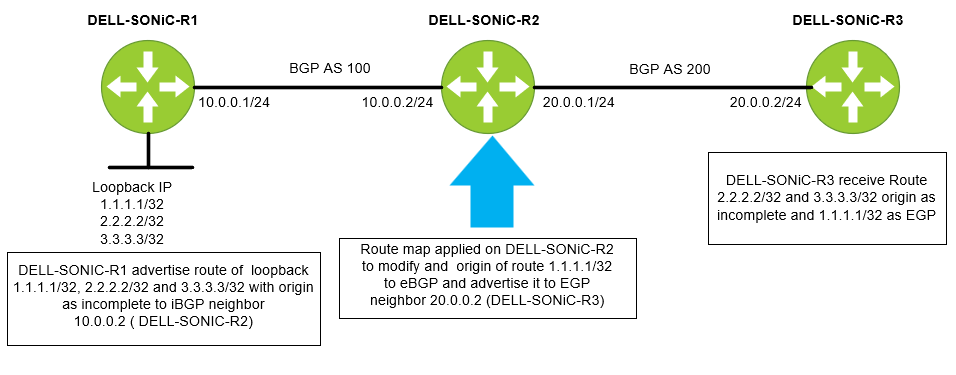
Önce bir önek listesi yapılandıralım. Önek listesini IP-LIST-TO-MODIFY olarak adlandıralım ve 1.1.1.1/32 önekine izin verelim.
DELL-SONiC-R2# configure DELL-SONiC-R2(config)# ip prefix-list IP-LIST-TO-MODIFY seq 1 permit 1.1.1.1/32 DELL-SONiC-R2(config)# exit DELL-SONiC-R2# |
DELL-SONiC-R2# show ip prefix-list
IP prefix list IP-LIST-TO-MODIFY:
     seq 1 permit 1.1.1.1/32
DELL-SONiC-R2# |
Yol haritasını şu adreste yapılandıralım: DELL-SONiC-R2. Yol haritasına MAP-TO-MODIFICATION adınıverelim
DELL-SONiC-R2# configure DELL-SONiC-R2(config)# route-map MAP-TO-MODIFICATION permit 1 DELL-SONiC-R2(config-route-map)# match ip address prefix-list IP-LIST-TO-MODIFY DELL-SONiC-R2(config-route-map)# set origin egp DELL-SONiC-R2(config-route-map)# exit DELL-SONiC-R2(config)# route-map MAP-TO-MODIFICATION permit 2 DELL-SONiC-R2(config-route-map)# exit DELL-SONiC-R2(config)# exit DELL-SONiC-R2# |
Daha fazla açıklama için yapılandırmayı inceleyelim.
Here under sequence 1 the match condition is to match any IP in prefix list IP-LIST-TO-MODIFY where we already have specified 1.1.1.1/32. So when 1.1.1.1/32 IP matches the cation to be taken is set the origin code to egp. DELL-SONiC-R2# configure DELL-SONiC-R2(config)# route-map MAP-TO-MODIFICATION permit 1 DELL-SONiC-R2(config-route-map)# match ip address prefix-list IP-LIST-TO-MODIFY DELL-SONiC-R2(config-route-map)# set origin egp DELL-SONiC-R2(config-route-map)# exit |
The next sequence is to allow all other routes (2.2.2.2/32 and 3.3.3.3/32) without any modification. You can write a separate prefix list for this but for simplicity we are not defining any match entry. If a match entry is not present, all routes are considered match under the sequence. If no set action is specified the default action is redistribute the route without any modification. DELL-SONiC-R2(config)# route-map MAP-TO-MODIFICATION permit 2 DELL-SONiC-R2(config-route-map)# exit DELL-SONiC-R2(config)# exit DELL-SONiC-R2# |
Rota haritası yapılandırmasını doğrulayalım.
DELL-SONiC-R2# show running-configuration route-map ! route-map MAP-TO-MODIFICATION permit 1 match ip address prefix-list IP-LIST-TO-MODIFY set origin egp ! route-map MAP-TO-MODIFICATION permit 2 DELL-SONiC-R2# |
DELL-SONiC-R2# show route-map
Route map MAP-TO-MODIFICATION:
   permit, sequence 1
    Match clauses:
      ip address prefix-list IP-LIST-TO-MODIFY
    Set clauses:
      route origin EGP
    Call clauses:
    Actions:
      Exit routemap
   permit, sequence 2
    Match clauses:
    Set clauses:
    Call clauses:
    Actions:
      Exit routemap
DELL-SONiC-R2# |
Komşu DELL-SONiC-R3'e (20.0.0.2) giden yönde MAP-TO-MODIFICATION yol haritasını uygulayalım
DELL-SONiC-R2(config)# router bgp 100 DELL-SONiC-R2(config-router-bgp)# neighbor 20.0.0.2 DELL-SONiC-R2(config-router-bgp-neighbor)# remote-as 200 DELL-SONiC-R2(config-router-bgp-neighbor)# no shutdown DELL-SONiC-R2(config-router-bgp-neighbor)# address-family ipv4 unicast DELL-SONiC-R2(config-router-bgp-neighbor-af)# route-map MAP-TO-MODIFICATION out ===>Apply the Route-map in outbound direction DELL-SONiC-R2(config-router-bgp-neighbor-af)# end DELL-SONiC-R2# |
BGP yapılandırmasını doğrulayalım.
DELL-SONiC-R2# show running-configuration bgp ! router bgp 100 log-neighbor-changes timers 60 180 ! neighbor 10.0.0.1 remote-as 100 ! address-family ipv4 unicast activate ! neighbor 20.0.0.2 remote-as 200 ! address-family ipv4 unicast activate route-map MAP-TO-MODIFICATION out DELL-SONiC-R2# |
Komşu 20.0.0.2'de uygulanan Rota haritası HARİTASI-DEĞİŞİKLİK'i görebiliriz.
DELL-SONiC-R2# show bgp ipv4 unicast neighbors 20.0.0.2

BGP neighbor is 20.0.0.2, remote AS 200, local AS 100, external link
  BGP version 4, remote router ID 20.0.0.2 , local router ID 20.0.0.1
  BGP state = Established, up for 00:35:59
  Last read 00:00:59, Last write 00:00:59
  Hold time is 180 seconds, keepalive interval is 60 seconds
  Minimum time between advertisement runs is 0 seconds
  Neighbor capabilities:
    4 Byte AS: advertised and received
    AddPath IPv4 Unicast Receive: advertised and received
    Route refresh: advertised and received
    Multiprotocol Extension: advertised and received
    Graceful restart: advertised and received
    Hostname capability advertised (name: DELL-SONiC-R2) received (name: DELL-SONiC-R3)
  Message statistics:
    InQ depth is 0
    OutQ depth is 0
                         Sent        Rcvd
    Opens:               2           2
    Notifications:       0           0
    Updates:             10          4
    Keepalive:           37          37
    Route Refresh:       0           0
    Capability:          0           0
    Total:               49          43

  For address family: IPv4 Unicast
    Address-family enabled
    Prefixes received 0
     Export policy:
    MAP-TO-MODIFICATION
  Connections established 2, dropped 1
  Last reset 00:36:00, Last reset reason Peer closed the session
  Local host: 20.0.0.1, Local port: 57552
  Foreign host: 20.0.0.2, Foreign port: 179
  BGP Connect Retry Timer in Seconds 30


DELL-SONiC-R2# |
Doğrulama
DELL-SONiC-R1, DELL-SONiC-R2, DELL-SONiC-R3 te 1.1.1.1/32, 2.2.2.2/32 ve 3.3.3.3/32 yollarının nasıl göründüğünü görelim.
DELL-SONiC-R1 üzerinde
DELL-SONiC-R1# show bgp ipv4 unicast
BGP routing table information for VRF default
Router identifier 10.0.0.1, local AS number 100
Status codes: R - removed, S - stale, s - suppressed, * - valid
              h - history, d - damped, > - best, = - multipath, q - queued, r - RIB-failure
Origin codes: i - IGP, e - EGP, ? - incomplete
     Network             Next Hop                                 Metric      LocPref     Weight Path
*>   1.1.1.1/32          0.0.0.0                                  0                       32768      ?
*>   2.2.2.2/32          0.0.0.0                                  0                       32768      ?
*>   3.3.3.3/32          0.0.0.0                                  0                       32768      ?
*>   10.0.0.0/24         0.0.0.0                                  0                       32768      ?
DELL-SONiC-R1# |
DELL-SONiC-R1# show bgp ipv4 unicast 1.1.1.1
BGP routing table entry for 1.1.1.1/32
Paths: (1 available, best #1, table default)
  Local
    0.0.0.0 from 0.0.0.0 (10.0.0.1)
      Origin incomplete, metric 0, weight 32768, valid, best (First path received)
      Last update: 2024-02-21 17:15:48+0000
DELL-SONiC-R1#

DELL-SONiC-R1# show bgp ipv4 unicast 2.2.2.2
BGP routing table entry for 2.2.2.2/32
Paths: (1 available, best #1, table default)
  Local
    0.0.0.0 from 0.0.0.0 (10.0.0.1)
      Origin incomplete, metric 0, weight 32768, valid, best (First path received)
      Last update: 2024-02-21 17:15:48+0000
DELL-SONiC-R1#


We can see the Origin incomplete for 1.1.1.1/32 and 2.2.2.2/32
|
DELL-SONiC-R1# show ip route
Codes:  K - kernel route, C - connected, S - static, B - BGP, O - OSPF
        > - selected route, * - FIB route, q - queued route, r - rejected route
       Destination        Gateway                                                                    Dist/Metric   Last Update
--------------------------------------------------------------------------------------------------------------------------------
 C>*   1.1.1.1/32         Direct                          Loopback0                                  0/0           00:38:32 ago
 C>*   2.2.2.2/32         Direct                          Loopback1                                  0/0           00:38:32 ago
 C>*   3.3.3.3/32         Direct                          Loopback3                                  0/0           00:38:32 ago
C>* 10.0.0.0/24 Direct Eth1/1 0/0 00:38:32 ago |
DELL-SONiC-R2 üzerinde
DELL-SONiC-R2# show bgp ipv4 unicast
BGP routing table information for VRF default
Router identifier 20.0.0.1, local AS number 100
Status codes: R - removed, S - stale, s - suppressed, * - valid
              h - history, d - damped, > - best, = - multipath, q - queued, r - RIB-failure
Origin codes: i - IGP, e - EGP, ? - incomplete
     Network             Next Hop                                 Metric      LocPref     Weight Path
*>   1.1.1.1/32          10.0.0.1                                 0           100         0          ?
*>   2.2.2.2/32          10.0.0.1                                 0           100         0          ?
*>   3.3.3.3/32          10.0.0.1                                 0           100         0          ?
*>   10.0.0.0/24         10.0.0.1                                 0           100         0          ?
DELL-SONiC-R2# |
DELL-SONiC-R2# show bgp ipv4 unicast 1.1.1.1
BGP routing table entry for 1.1.1.1/32
Paths: (1 available, best #1, table default)
  Local
    10.0.0.1 from 10.0.0.1 (10.0.0.1)
      Origin incomplete, metric 0, localpref 100, valid, internal, best (First path received)
      Last update: 2024-02-21 17:17:25+0000
DELL-SONiC-R2#

DELL-SONiC-R2# show bgp ipv4 unicast 2.2.2.2
BGP routing table entry for 2.2.2.2/32
Paths: (1 available, best #1, table default)
  Local
    10.0.0.1 from 10.0.0.1 (10.0.0.1)
      Origin incomplete, metric 0, localpref 100, valid, internal, best (First path received)
      Last update: 2024-02-21 17:17:26+0000
DELL-SONiC-R2#


We can see the Origin incomplete for 1.1.1.1/32 and 2.2.2.2/32.
|
DELL-SONiC-R2# show ip route
Codes:  K - kernel route, C - connected, S - static, B - BGP, O - OSPF
        > - selected route, * - FIB route, q - queued route, r - rejected route
       Destination        Gateway                                                                    Dist/Metric   Last Update
--------------------------------------------------------------------------------------------------------------------------------
 B>*   1.1.1.1/32         via 10.0.0.1                    Eth1/1                                     200/0         00:39:48 ago
 B>*   2.2.2.2/32         via 10.0.0.1                    Eth1/1                                     200/0         00:39:48 ago
 B>*   3.3.3.3/32         via 10.0.0.1                    Eth1/1                                     200/0         00:39:48 ago
 B     10.0.0.0/24        via 10.0.0.1                                                               200/0         00:39:48 ago
 C>*   10.0.0.0/24        Direct                          Eth1/1                                     0/0           00:40:08 ago
C>* 20.0.0.0/24 Direct Eth1/2 0/0 00:40:08 ago |
DELL-SONiC-R3 üzerinde
DELL-SONiC-R3# show bgp ipv4 unicast
BGP routing table information for VRF default
Router identifier 20.0.0.2, local AS number 200
Status codes: R - removed, S - stale, s - suppressed, * - valid
              h - history, d - damped, > - best, = - multipath, q - queued, r - RIB-failure
Origin codes: i - IGP, e - EGP, ? - incomplete
     Network             Next Hop                                 Metric      LocPref     Weight Path
*>   1.1.1.1/32          20.0.0.1                                                         0      100 e
*>   2.2.2.2/32          20.0.0.1                                                         0      100 ?
*>   3.3.3.3/32          20.0.0.1                                                         0      100 ?
*>   10.0.0.0/24         20.0.0.1                                                         0      100 ?
DELL-SONiC-R3#

Note the e(highlighted in red). This means the origin is EGP for 1.1.1.1/32.
|
DELL-SONiC-R3# show bgp ipv4 unicast 1.1.1.1/32
BGP routing table entry for 1.1.1.1/32
Paths: (1 available, best #1, table default)
  100
    20.0.0.1 from 20.0.0.1 (20.0.0.1)
      Origin EGP, valid, best
      Last update: 2024-02-21 17:17:27+0000
DELL-SONiC-R3#

We can see 1.1.1.1/32 has Origin EGP.
|
Lets check 2.2.2.2/32 origin

DELL-SONiC-R3# show bgp ipv4 unicast 2.2.2.2
BGP routing table entry for 2.2.2.2/32
Paths: (1 available, best #1, table default)
  100
    20.0.0.1 from 20.0.0.1 (20.0.0.1)
      Origin incomplete, metric , valid, external, best (First path received)
      Last update: 2024-02-21 17:17:26+0000
DELL-SONiC-R3#

We can see Origin incomplete for 2.2.2.2/32. |
DELL-SONiC-R3# show ip route
Codes:  K - kernel route, C - connected, S - static, B - BGP, O - OSPF
        > - selected route, * - FIB route, q - queued route, r - rejected route
       Destination        Gateway                                                                    Dist/Metric   Last Update
--------------------------------------------------------------------------------------------------------------------------------
 B>*   1.1.1.1/32         via 20.0.0.1                    Eth1/2                                     20/0          00:41:27 ago
 B>*   2.2.2.2/32         via 20.0.0.1                    Eth1/2                                     20/0          00:41:27 ago
 B>*   3.3.3.3/32         via 20.0.0.1                    Eth1/2                                     20/0          00:41:27 ago
 B>*   10.0.0.0/24        via 20.0.0.1                    Eth1/2                                     20/0          00:41:27 ago
 C>*   20.0.0.0/24        Direct                          Eth1/2                                     0/0           00:41:39 ago
DELL-SONiC-R3#
|
Affected Products
Enterprise SONiC Distribution, PowerSwitch E3200-ON Series, PowerSwitch N3200-ON, PowerSwitch S5212F-ON, PowerSwitch S5224F-ON, PowerSwitch S5232F-ON, PowerSwitch S5248F-ON, PowerSwitch S5296F-ON, PowerSwitch Z9264F-ON, PowerSwitch Z9332F-ON
, PowerSwitch Z9432F-ON
...
Article Properties
Article Number: 000222196
Article Type: How To
Last Modified: 18 Feb 2026
Version: 9
Find answers to your questions from other Dell users
Support Services
Check if your device is covered by Support Services.