Dell Networking SONiC 路由圖
Summary: 本文透過 Dell Networking SONiC 中的基本範例說明路由對應。
This article applies to
This article does not apply to
This article is not tied to any specific product.
Not all product versions are identified in this article.
Instructions
| 事前準備作業 我們使用標準介面命名來演示概念。請參閱文章 Dell Networking S 系列:基本介面組態 - SONiC 4.0 以取得介面命名的詳細資訊 |
索引
什麼是路線圖。匹配並設置語句值。
組態語法
建立路由圖
符合聲明
Set 語句
呼叫聲明
移除路由映射組態
驗證路由地圖
範例組態
什麼是路線圖。
路由映射用於編輯和控制 OSPF 或 BGP 路由過程中的路由學習。它還在 OSPF 路由進程中生成預設路由方面發揮作用。從本質上講,路由映射指定允許將指定路由協定中的哪些路由重新分發到目標路由進程中。若要篩選路由以進行重新分發,請使用帶有IP前綴清單和/或 AS 路徑清單的路由映射。
下表概述了在單個路由映射序列中遇到多個匹配命令時執行的操作。
| 路由映射語句 | 首碼清單語句 | 路由匹配/不匹配 | 動作 |
|---|---|---|---|
| Permit | Permit | 符合 | 允許路由,可以執行設置或呼叫。 |
| Permit | 無相符項目 | 繼續進行下一個路由映射序列 | |
| Deny | 符合 | 繼續進行下一個路由映射序列 | |
| Deny | 無相符項目 | 繼續進行下一個路由映射序列 | |
| Deny | Permit | 符合 | 路由被拒絕。 |
| Permit | 無相符項目 | 繼續進行下一個路由映射序列 | |
| Deny | 符合 | 繼續進行下一個路由映射序列 | |
| Deny | 無相符項目 | 繼續進行下一個路由映射序列 |
匹配並設置語句值。
每個路由映射語句都有兩種類型的值:- 匹配值選擇應應用此語句的路由。
- 設置值修改要重新分發到目標協議中的資訊。
如果符合標準失敗,則此陳述式不適用於路由,則 DELL SONiC 將繼續根據路由圖中的下一條陳述來評估路由。路由映射的掃描將繼續進行,直到找到與路由匹配的語句或到達路由映射的末尾。
如果存在以下條件之一,則可以錯過或重複每個語句中的匹配值或集值數次:
- 如果語句中存在多個匹配條目,則給定路由的所有條目都必須成功,該路由才能與語句匹配(應用邏輯 AND 演演演算法)
- 如果匹配條目在一個條目中看到多個物件,則其中一個物件都應匹配(應用邏輯 OR 演演演算法)
- 如果不存在匹配條目,則所有路由都與該語句匹配。
- 如果路由映射允許語句中不存在設置條目,則在不修改其當前屬性的情況下重新分發路由。
- 沒有匹配項或設置條目的路由映射語句確實會執行操作。空許可證語句允許在不修改的情況下重新分配其餘路線。
- 空的拒絕語句不允許重新分發其他路由,因為如果路由映射已完成掃描但未找到顯式匹配,則這是預設操作。
組態語法
建立路由圖
創建路由映射以匹配下一步中列出的路由參數。指定允許或拒絕語句以配置匹配路由的處理方式。輸入在映射中處理語句的順序的序列號。命令語法
admin@DELLSONiC :~$ sonic-cli
DELLSONiC # configure
DELLSONiC (config)# route-map map-name {permit | deny} {sequence-number}
|
符合聲明
在路由映射配置模式下,輸入這些匹配語句中的任何一個以選擇路由。命令語法
admin@DELLSONiC :~$ sonic-cli
DELLSONiC # configure
DELLSONiC (config)# route-map map-name {permit | deny} {sequence-number}
DELLSONiC(config-route-map)# match {match statement}
|
Possible Match Statements as-path Set routing policy match criteria as-path community Set routing policy match criteria to BGP community evpn Set routing policy match criteria to BGP Ethernet Virtual Private Network ext-community Set routing policy match criteria to BGP extended community interface Set routing policy match criteria to interface ip Set routing policy match criteria ipv6 Set routing policy match criteria local-preference Set routing policy match criteria to local-preference metric Set routing policy match criteria to metric origin Specify BGP origin peer Set routing policy match criteria to peer IP source-protocol Specify source protocol source-vrf Source VRF tag Redistributes routes in the routing table that match the specified tags. |
Set 語句
在路由映射配置模式下,輸入這些設置語句中的任何一個,以更改匹配路由中指定的 BGP 屬性。命令語法
admin@DELLSONiC :~$ sonic-cli
DELLSONiC # configure
DELLSONiC (config)# route-map map-name {permit | deny} {sequence-number}
DELLSONiC(config-route-map)# set {Set-statement}
|
Possible Set-Statement as-path Transform BGP AS-path attribute comm-list Set BGP community list (for deletion) community BGP community attribute extcommunity BGP extended community attribute ip IPv4 information ipv6 IPv6 information local-preference BGP local preference path attribute metric Set metric value action for the routing policy origin BGP origin code tag Tag value for routing protocol weight BGP weight for routing table |
呼叫聲明
“call”語句允許在滿足匹配條件時調用另一個路由映射。命令語法
admin@DELLSONiC :~$ sonic-cli
DELLSONiC # configure
DELLSONiC (config)# route-map map-name {permit | deny} {sequence-number}
DELLSONiC (config-route-map)# call {route-map-name}
|
移除組態
請務必先移除與路由圖相關聯,再移除路由圖。要刪除路由映射條目中的配置值,請輸入匹配或設置的無版本命令。
範例
admin@DELLSONiC :~$ sonic-cli
DELLSONiC # configure
DELLSONiC (config)# route-map map-name {permit | deny} {sequence-number}
DELLSONiC (config-route-map)# no match as-path
DELLSONiC (config-route-map)# no set origin
DELLSONiC (config-route-map)# no call
|
admin@DELLSONiC :~$ sonic-cli DELLSONiC # configure DELLSONiC (config)# no route-map map-name |
驗證路由地圖
使用以下命令驗證路由圖組態。
DELLSONiC# show route-map |
DELLSONiC# show route-map {route-map-name} |
使用以下命令查找應用於鄰居的路由映射。
DELLSONiC# show bgp ipv4 unicast neighbors |
DELLSONiC# show bgp ipv6 unicast neighbors |
您也可以在上述命令中使用 grep 原則,以查看較小的輸出。 DELLSONiC#show bgp ipv4 unicast neighbors <neighbor>| find policy |
範例組態
需求:請參閱下面的拓撲。三個迴路 DELL-SONiC-R1 使用 BGP 向 DELL-SONiC-R2 宣告 IP 1.1.1.1/32、2.2.2.2/32 和 3.3.3.3/32。假設我們需要將至 1.1.1.1/32 的路由宣傳為具有在 DELL-SONiC-R3 上接收來源 EGP。
不應更改路由 2.2.2.2/32 和 3.3.3.3/32。
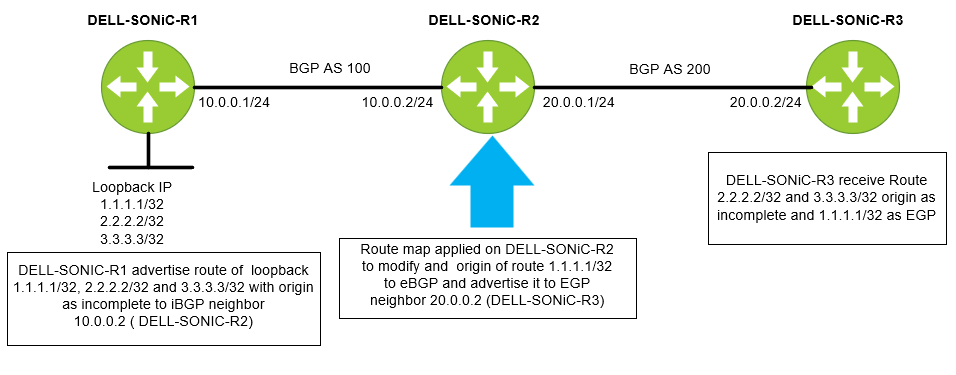
讓我們首先配置一個前綴清單。我們將前綴清單命名為 IP-LIST-TO-MOD,並允許 1.1.1.1/32 前綴。
DELL-SONiC-R2# configure DELL-SONiC-R2(config)# ip prefix-list IP-LIST-TO-MODIFY seq 1 permit 1.1.1.1/32 DELL-SONiC-R2(config)# exit DELL-SONiC-R2# |
DELL-SONiC-R2# show ip prefix-list
IP prefix list IP-LIST-TO-MODIFY:
     seq 1 permit 1.1.1.1/32
DELL-SONiC-R2# |
讓我們在 DELL-SONiC-R2。讓我們將路線圖命名為「映射到修改」
DELL-SONiC-R2# configure DELL-SONiC-R2(config)# route-map MAP-TO-MODIFICATION permit 1 DELL-SONiC-R2(config-route-map)# match ip address prefix-list IP-LIST-TO-MODIFY DELL-SONiC-R2(config-route-map)# set origin egp DELL-SONiC-R2(config-route-map)# exit DELL-SONiC-R2(config)# route-map MAP-TO-MODIFICATION permit 2 DELL-SONiC-R2(config-route-map)# exit DELL-SONiC-R2(config)# exit DELL-SONiC-R2# |
讓我們分解配置以進一步解釋。
Here under sequence 1 the match condition is to match any IP in prefix list IP-LIST-TO-MODIFY where we already have specified 1.1.1.1/32. So when 1.1.1.1/32 IP matches the cation to be taken is set the origin code to egp. DELL-SONiC-R2# configure DELL-SONiC-R2(config)# route-map MAP-TO-MODIFICATION permit 1 DELL-SONiC-R2(config-route-map)# match ip address prefix-list IP-LIST-TO-MODIFY DELL-SONiC-R2(config-route-map)# set origin egp DELL-SONiC-R2(config-route-map)# exit |
The next sequence is to allow all other routes (2.2.2.2/32 and 3.3.3.3/32) without any modification. You can write a separate prefix list for this but for simplicity we are not defining any match entry. If a match entry is not present, all routes are considered match under the sequence. If no set action is specified the default action is redistribute the route without any modification. DELL-SONiC-R2(config)# route-map MAP-TO-MODIFICATION permit 2 DELL-SONiC-R2(config-route-map)# exit DELL-SONiC-R2(config)# exit DELL-SONiC-R2# |
讓我們驗證一下路由映射配置。
DELL-SONiC-R2# show running-configuration route-map ! route-map MAP-TO-MODIFICATION permit 1 match ip address prefix-list IP-LIST-TO-MODIFY set origin egp ! route-map MAP-TO-MODIFICATION permit 2 DELL-SONiC-R2# |
DELL-SONiC-R2# show route-map
Route map MAP-TO-MODIFICATION:
   permit, sequence 1
    Match clauses:
      ip address prefix-list IP-LIST-TO-MODIFY
    Set clauses:
      route origin EGP
    Call clauses:
    Actions:
      Exit routemap
   permit, sequence 2
    Match clauses:
    Set clauses:
    Call clauses:
    Actions:
      Exit routemap
DELL-SONiC-R2# |
我們會將連出方向的路由對應變更套用至鄰近的 DELL-SONiC-R3 (20.0.0.2)
DELL-SONiC-R2(config)# router bgp 100 DELL-SONiC-R2(config-router-bgp)# neighbor 20.0.0.2 DELL-SONiC-R2(config-router-bgp-neighbor)# remote-as 200 DELL-SONiC-R2(config-router-bgp-neighbor)# no shutdown DELL-SONiC-R2(config-router-bgp-neighbor)# address-family ipv4 unicast DELL-SONiC-R2(config-router-bgp-neighbor-af)# route-map MAP-TO-MODIFICATION out ===>Apply the Route-map in outbound direction DELL-SONiC-R2(config-router-bgp-neighbor-af)# end DELL-SONiC-R2# |
讓我們驗證 bgp 配置。
DELL-SONiC-R2# show running-configuration bgp ! router bgp 100 log-neighbor-changes timers 60 180 ! neighbor 10.0.0.1 remote-as 100 ! address-family ipv4 unicast activate ! neighbor 20.0.0.2 remote-as 200 ! address-family ipv4 unicast activate route-map MAP-TO-MODIFICATION out DELL-SONiC-R2# |
我們可以看到路由映射映射到修改應用於鄰居 20.0.0.2。
DELL-SONiC-R2# show bgp ipv4 unicast neighbors 20.0.0.2

BGP neighbor is 20.0.0.2, remote AS 200, local AS 100, external link
  BGP version 4, remote router ID 20.0.0.2 , local router ID 20.0.0.1
  BGP state = Established, up for 00:35:59
  Last read 00:00:59, Last write 00:00:59
  Hold time is 180 seconds, keepalive interval is 60 seconds
  Minimum time between advertisement runs is 0 seconds
  Neighbor capabilities:
    4 Byte AS: advertised and received
    AddPath IPv4 Unicast Receive: advertised and received
    Route refresh: advertised and received
    Multiprotocol Extension: advertised and received
    Graceful restart: advertised and received
    Hostname capability advertised (name: DELL-SONiC-R2) received (name: DELL-SONiC-R3)
  Message statistics:
    InQ depth is 0
    OutQ depth is 0
                         Sent        Rcvd
    Opens:               2           2
    Notifications:       0           0
    Updates:             10          4
    Keepalive:           37          37
    Route Refresh:       0           0
    Capability:          0           0
    Total:               49          43

  For address family: IPv4 Unicast
    Address-family enabled
    Prefixes received 0
     Export policy:
    MAP-TO-MODIFICATION
  Connections established 2, dropped 1
  Last reset 00:36:00, Last reset reason Peer closed the session
  Local host: 20.0.0.1, Local port: 57552
  Foreign host: 20.0.0.2, Foreign port: 179
  BGP Connect Retry Timer in Seconds 30


DELL-SONiC-R2# |
驗證
我們來看看路由 1.1.1.1/32、2.2.2.2/32 和 3.3.3.3/32 在 DELL-SONiC-R1、DELL-SONiC-R2、DELL-SONiC-R3 上的樣子。
在 DELL-SONiC-R1 上
DELL-SONiC-R1# show bgp ipv4 unicast
BGP routing table information for VRF default
Router identifier 10.0.0.1, local AS number 100
Status codes: R - removed, S - stale, s - suppressed, * - valid
              h - history, d - damped, > - best, = - multipath, q - queued, r - RIB-failure
Origin codes: i - IGP, e - EGP, ? - incomplete
     Network             Next Hop                                 Metric      LocPref     Weight Path
*>   1.1.1.1/32          0.0.0.0                                  0                       32768      ?
*>   2.2.2.2/32          0.0.0.0                                  0                       32768      ?
*>   3.3.3.3/32          0.0.0.0                                  0                       32768      ?
*>   10.0.0.0/24         0.0.0.0                                  0                       32768      ?
DELL-SONiC-R1# |
DELL-SONiC-R1# show bgp ipv4 unicast 1.1.1.1
BGP routing table entry for 1.1.1.1/32
Paths: (1 available, best #1, table default)
  Local
    0.0.0.0 from 0.0.0.0 (10.0.0.1)
      Origin incomplete, metric 0, weight 32768, valid, best (First path received)
      Last update: 2024-02-21 17:15:48+0000
DELL-SONiC-R1#

DELL-SONiC-R1# show bgp ipv4 unicast 2.2.2.2
BGP routing table entry for 2.2.2.2/32
Paths: (1 available, best #1, table default)
  Local
    0.0.0.0 from 0.0.0.0 (10.0.0.1)
      Origin incomplete, metric 0, weight 32768, valid, best (First path received)
      Last update: 2024-02-21 17:15:48+0000
DELL-SONiC-R1#


We can see the Origin incomplete for 1.1.1.1/32 and 2.2.2.2/32
|
DELL-SONiC-R1# show ip route
Codes:  K - kernel route, C - connected, S - static, B - BGP, O - OSPF
        > - selected route, * - FIB route, q - queued route, r - rejected route
       Destination        Gateway                                                                    Dist/Metric   Last Update
--------------------------------------------------------------------------------------------------------------------------------
 C>*   1.1.1.1/32         Direct                          Loopback0                                  0/0           00:38:32 ago
 C>*   2.2.2.2/32         Direct                          Loopback1                                  0/0           00:38:32 ago
 C>*   3.3.3.3/32         Direct                          Loopback3                                  0/0           00:38:32 ago
C>* 10.0.0.0/24 Direct Eth1/1 0/0 00:38:32 ago |
在 DELL-SONiC-R2 上
DELL-SONiC-R2# show bgp ipv4 unicast
BGP routing table information for VRF default
Router identifier 20.0.0.1, local AS number 100
Status codes: R - removed, S - stale, s - suppressed, * - valid
              h - history, d - damped, > - best, = - multipath, q - queued, r - RIB-failure
Origin codes: i - IGP, e - EGP, ? - incomplete
     Network             Next Hop                                 Metric      LocPref     Weight Path
*>   1.1.1.1/32          10.0.0.1                                 0           100         0          ?
*>   2.2.2.2/32          10.0.0.1                                 0           100         0          ?
*>   3.3.3.3/32          10.0.0.1                                 0           100         0          ?
*>   10.0.0.0/24         10.0.0.1                                 0           100         0          ?
DELL-SONiC-R2# |
DELL-SONiC-R2# show bgp ipv4 unicast 1.1.1.1
BGP routing table entry for 1.1.1.1/32
Paths: (1 available, best #1, table default)
  Local
    10.0.0.1 from 10.0.0.1 (10.0.0.1)
      Origin incomplete, metric 0, localpref 100, valid, internal, best (First path received)
      Last update: 2024-02-21 17:17:25+0000
DELL-SONiC-R2#

DELL-SONiC-R2# show bgp ipv4 unicast 2.2.2.2
BGP routing table entry for 2.2.2.2/32
Paths: (1 available, best #1, table default)
  Local
    10.0.0.1 from 10.0.0.1 (10.0.0.1)
      Origin incomplete, metric 0, localpref 100, valid, internal, best (First path received)
      Last update: 2024-02-21 17:17:26+0000
DELL-SONiC-R2#


We can see the Origin incomplete for 1.1.1.1/32 and 2.2.2.2/32.
|
DELL-SONiC-R2# show ip route
Codes:  K - kernel route, C - connected, S - static, B - BGP, O - OSPF
        > - selected route, * - FIB route, q - queued route, r - rejected route
       Destination        Gateway                                                                    Dist/Metric   Last Update
--------------------------------------------------------------------------------------------------------------------------------
 B>*   1.1.1.1/32         via 10.0.0.1                    Eth1/1                                     200/0         00:39:48 ago
 B>*   2.2.2.2/32         via 10.0.0.1                    Eth1/1                                     200/0         00:39:48 ago
 B>*   3.3.3.3/32         via 10.0.0.1                    Eth1/1                                     200/0         00:39:48 ago
 B     10.0.0.0/24        via 10.0.0.1                                                               200/0         00:39:48 ago
 C>*   10.0.0.0/24        Direct                          Eth1/1                                     0/0           00:40:08 ago
C>* 20.0.0.0/24 Direct Eth1/2 0/0 00:40:08 ago |
在 DELL-SONiC-R3 上
DELL-SONiC-R3# show bgp ipv4 unicast
BGP routing table information for VRF default
Router identifier 20.0.0.2, local AS number 200
Status codes: R - removed, S - stale, s - suppressed, * - valid
              h - history, d - damped, > - best, = - multipath, q - queued, r - RIB-failure
Origin codes: i - IGP, e - EGP, ? - incomplete
     Network             Next Hop                                 Metric      LocPref     Weight Path
*>   1.1.1.1/32          20.0.0.1                                                         0      100 e
*>   2.2.2.2/32          20.0.0.1                                                         0      100 ?
*>   3.3.3.3/32          20.0.0.1                                                         0      100 ?
*>   10.0.0.0/24         20.0.0.1                                                         0      100 ?
DELL-SONiC-R3#

Note the e(highlighted in red). This means the origin is EGP for 1.1.1.1/32.
|
DELL-SONiC-R3# show bgp ipv4 unicast 1.1.1.1/32
BGP routing table entry for 1.1.1.1/32
Paths: (1 available, best #1, table default)
  100
    20.0.0.1 from 20.0.0.1 (20.0.0.1)
      Origin EGP, valid, best
      Last update: 2024-02-21 17:17:27+0000
DELL-SONiC-R3#

We can see 1.1.1.1/32 has Origin EGP.
|
Lets check 2.2.2.2/32 origin

DELL-SONiC-R3# show bgp ipv4 unicast 2.2.2.2
BGP routing table entry for 2.2.2.2/32
Paths: (1 available, best #1, table default)
  100
    20.0.0.1 from 20.0.0.1 (20.0.0.1)
      Origin incomplete, metric , valid, external, best (First path received)
      Last update: 2024-02-21 17:17:26+0000
DELL-SONiC-R3#

We can see Origin incomplete for 2.2.2.2/32. |
DELL-SONiC-R3# show ip route
Codes:  K - kernel route, C - connected, S - static, B - BGP, O - OSPF
        > - selected route, * - FIB route, q - queued route, r - rejected route
       Destination        Gateway                                                                    Dist/Metric   Last Update
--------------------------------------------------------------------------------------------------------------------------------
 B>*   1.1.1.1/32         via 20.0.0.1                    Eth1/2                                     20/0          00:41:27 ago
 B>*   2.2.2.2/32         via 20.0.0.1                    Eth1/2                                     20/0          00:41:27 ago
 B>*   3.3.3.3/32         via 20.0.0.1                    Eth1/2                                     20/0          00:41:27 ago
 B>*   10.0.0.0/24        via 20.0.0.1                    Eth1/2                                     20/0          00:41:27 ago
 C>*   20.0.0.0/24        Direct                          Eth1/2                                     0/0           00:41:39 ago
DELL-SONiC-R3#
|
Affected Products
Enterprise SONiC Distribution, PowerSwitch E3200-ON Series, PowerSwitch N3200-ON, PowerSwitch S5212F-ON, PowerSwitch S5224F-ON, PowerSwitch S5232F-ON, PowerSwitch S5248F-ON, PowerSwitch S5296F-ON, PowerSwitch Z9264F-ON, PowerSwitch Z9332F-ON
, PowerSwitch Z9432F-ON
...
Article Properties
Article Number: 000222196
Article Type: How To
Last Modified: 18 Feb 2026
Version: 9
Find answers to your questions from other Dell users
Support Services
Check if your device is covered by Support Services.