PowerEdge: XE9640: NVMe Drive Not Detected After Running SCV
Summary: PowerEdge XE9640: Non-Volatile Memory Express (NVMe) drives are reported as not detected after running Secured Component Verification (SCV) in Windows Preinstallation Environment (Windows PE). ...
This article applies to
This article does not apply to
This article is not tied to any specific product.
Not all product versions are identified in this article.
Symptoms
PowerEdge XE9640 system reports the NVMe drives are not detected after running Secured Component Verification (SCV) in Windows Preinstallation Environment (Windows PE) and rebooting.
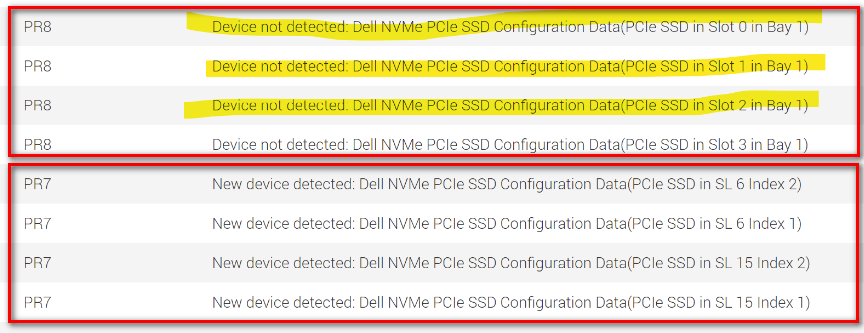
For example, NVMe drives in slots 0 to 3 are reported as not detected in the Dell Lifecycle Controller logs.
A hardware inventory example is below:
For example, NVMe drives in slots 0 to 3 are reported as not detected in the Dell Lifecycle Controller logs.
Figure 1: NVMe drives in slots 0 to 3 are reported as not detected in the life cycle logs.
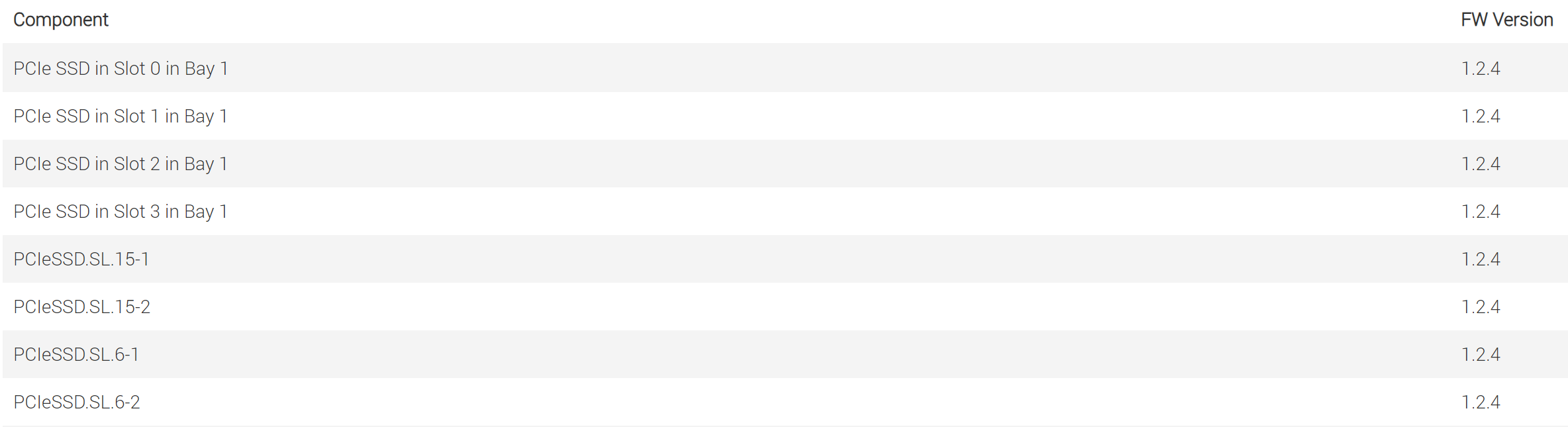
A hardware inventory example is below:
Figure 2: Hardware inventory
Cause
If the Windows PE ISO is created by using SCV script, and the installed Windows Assessment and Deployment Kit (ADK) is newer than 10.0.19041.1, the ADK may not be compatible with the version of Windows PE, since the scripts have no hard check for the ADK version installed.
Resolution
There are two options to address this situation:
- Install the compatible Windows PE and ADK
- Download the official release of Windows PE, instead of using the SCV script to create the Windows PE ISO
Here are the ADK and Windows PE versions that passed testing:
- Windows 10 2004: 10.0.19041.1
- Windows 11 22H2: 10.0.22621.3085
Workaround:
A cold reboot or AC power cycle of the system resolves the issue.
Affected Products
PowerEdge XE9640Article Properties
Article Number: 000223052
Article Type: Solution
Last Modified: 20 May 2026
Version: 6
Find answers to your questions from other Dell users
Support Services
Check if your device is covered by Support Services.