NetWorker:SQLバックアップが失敗します - nsrsqlsv: SSLプロバイダー: 証明書チェーンは信頼されていない認証局によって発行されました
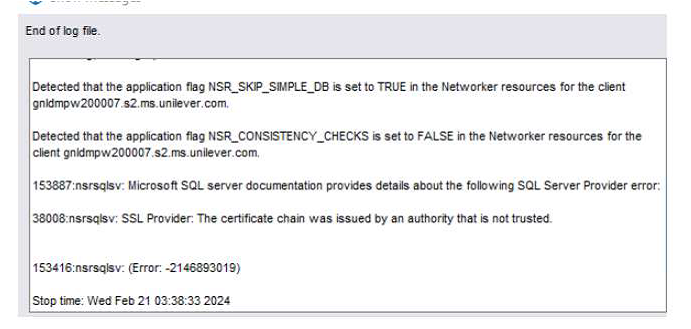
Summary: NMM(NetWorker Module for Microsoft)SQL Serverデータベースのバックアップが失敗します。 報告されるエラーは「nsrsqlsv: SSLプロバイダー: 証明書チェーンは信頼されていない認証局によって発行されました。
This article applies to
This article does not apply to
This article is not tied to any specific product.
Not all product versions are identified in this article.
Symptoms
この問題の症状は次のとおりです。
- NMM(NetWorker Module for Microsoft)SQL Serverデータベースのバックアップが失敗します。
- レポートされたエラーは次のとおりです。
"nsrsqlsv: SSL provider: The certificate chain was issued by an authority that is not trusted." - SQL Serverのシステム イベント ログに、次のエラーが1つ以上含まれています。
Log Name:      System
Source:        Schannel
Date:          <DATE>
Event ID:      36882
Task Category: None
Level:         Error
Keywords:
User:          SYSTEM
Computer:      <SQL Server Name>
Description:
The certificate received from the remote server was issued by an untrusted certificate authority.
Because of this, none of the data contained in the certificate can be validated.
The SSL connection request has failed. The attached data contains the server certificate.


Log Name:      System
Source:        Schannel
Date:          <DATE>
Event ID:      36884
Task Category: None
Level:         Error
Keywords:
User:          SYSTEM
Computer:      <SQL Server Name>
Description:
The certificate received from the remote server does not contain the expected name.
It is therefore not possible to determine whether we are connecting to the correct server.
The server name we were expecting is <servername>.
The TLS connection request has failed. The attached data contains the server certificate.


Log Name:      System
Source:        Schannel
Date:          <DATE>
Event ID:      36888
Task Category: None
Level:         Error
Keywords:
User:          SYSTEM
Computer:      <SQL Server Name>
Description:
A fatal alert was generated and sent to the remote endpoint.
This may result in termination of the connection.
The TLS protocol defined fatal error code is 48. The Windows SChannel error state is 552.
Cause
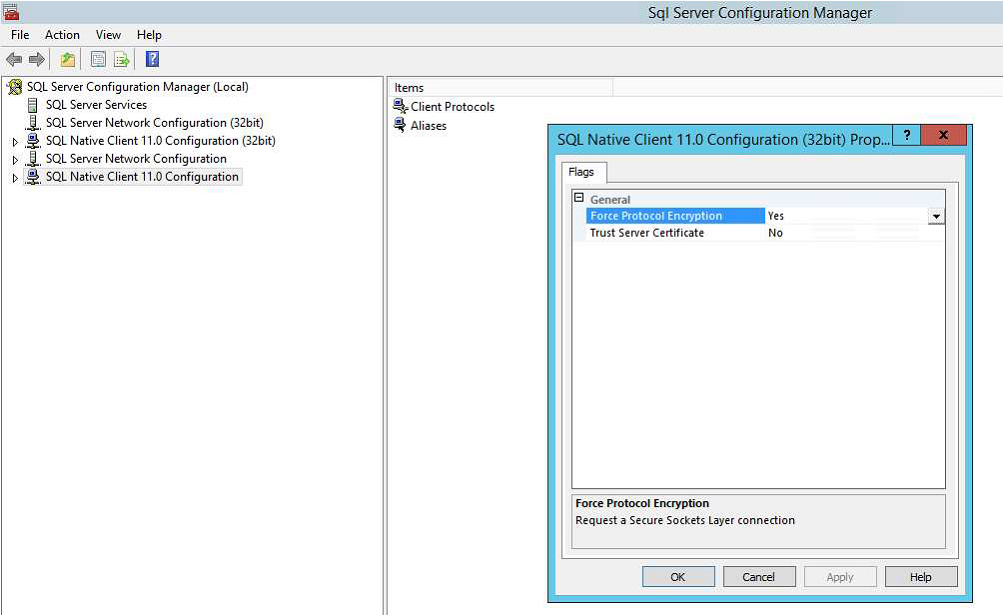
この問題の根本原因は、SQL Server Configuration ManagerのSQL Native Client構成で有効になっている「プロトコル暗号化の強制」機能によるものです。
SQL Server の [プロトコル暗号化の強制] 設定では、SSL 暗号化の使用が強制されます
SSL暗号化では、信頼できる認証局(CA)によって発行された交換証明書がこのマシンで使用可能である必要があります。
この証明書がないと、接続に失敗します。
Resolution
この問題を解決するには、次の手順に従います。
- SQL Server構成マネージャーを開きます
- [S QL Native Client 11.0 Configuration ]を右クリックし、[ プロパティ]を選択します。
- [プロトコル暗号化の強制] の値を [いいえ] に設定し、[OK] を選択します。
- SQL Native Client 11.0構成(32ビット)構成についても同じ手順を実行します
- SQL Serverを再起動します。
- SQL Serverが稼働したら、問題が解決されたことを確認します。
Article Properties
Article Number: 000223807
Article Type: Solution
Last Modified: 20 Jan 2026
Version: 2
Find answers to your questions from other Dell users
Support Services
Check if your device is covered by Support Services.