ECS: Behavior to Expect when System in Temporary Site Outage
Summary: Expected behavior on ADO buckets when the system is in Temporary Site Outage (TSO)
This article applies to
This article does not apply to
This article is not tied to any specific product.
Not all product versions are identified in this article.
Instructions
Virtual Data Center (VDC)
Temporary Site Outage (TSO)
Access During Outage (ADO)
Sustained loss of heartbeat for 15 minutes
Possible causes: Network issues, power loss at site or may be manually invoked in some customer impacting situations if data cannot be read from a specific VDC site.
ADO is a feature that can be enabled at the bucket level. It allows the bucket to be available during a temporary site outage. TSO causes ECS to go into an eventually consistent state. Accesses during outage object create/update/delete operations are in an eventually consistent state.
ECS gives a choice however between consistency and availability. ADO-enabled buckets are eventually consistent while allowing data availability. To maintain strong consistency but at the cost of access during an outage, do not have ADO enabled.
To help follow the flow above:
Before TSO
In this scenario, connections to site one are lost completely or site 1 is inaccessible from Site 2 and Site 3. Site 1 is the owner of Bucket A.
After 15 minutes, TSO occurs and the Bucket A ownership is transferred to site 2 and site 3. Between these two sites, the decision of object ownership is determined since the original bucket owner which is Site 1 is inaccessible.

In this scenario, only one link is down and thus bucket ownership can be transferred to site 1 and site 3 or site 2 and site 3. ECS uses the PAXOS protocol to determine that Site 2 is down and Site 1 and Site 3 are two valid sites (in this example). The PAXOS protocol is a mechanism for solving and managing consensus. So in this example, object ownership is decided between site 1 and site 3. As in the previous slide, there is a limitation on access depending on the site.
For more details on expected behavior during TSO, see Administration guide. Here is the link to ECS 3.8 Administration Guide.
Temporary Site Outage (TSO)
Access During Outage (ADO)
What is TSO?
Sustained loss of heartbeat for 15 minutes
Possible causes: Network issues, power loss at site or may be manually invoked in some customer impacting situations if data cannot be read from a specific VDC site.
What is ADO?
ADO is a feature that can be enabled at the bucket level. It allows the bucket to be available during a temporary site outage. TSO causes ECS to go into an eventually consistent state. Accesses during outage object create/update/delete operations are in an eventually consistent state.
ECS gives a choice however between consistency and availability. ADO-enabled buckets are eventually consistent while allowing data availability. To maintain strong consistency but at the cost of access during an outage, do not have ADO enabled.
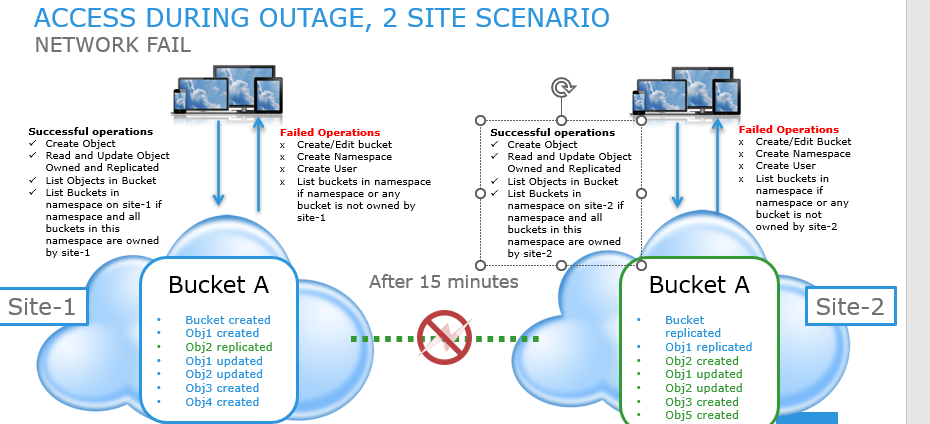
Expected behavior for two Site Scenario (Pay particular attention to successful and failed operations on both sites)
To help follow the flow above:
Before TSO
- Bucket created in site 1 and replicated in site 2
- Obj 1 created in site 1 and replicated in site 2
- Obj 2 created in site 2 and replicated in site 1
- After 15 minutes, a Temporary Site Outage occurs
- See list of successful and failed operations in Site 1. For instance, in site 1 is only able to create objects, read, and update objects owned and replicated, list objects in bucket, and list buckets locally owned.
- Similarly in site 2, here is a List of successful and failed operations in site 2. As in Site 1, site 2 can create objects, read, and update objects owned and replicated, list objects in bucket, list buckets locally owned.
- Thus, obj 1 can be updated in either site.
- Obj 2 can be updated in either site.
- Objects can be created in either site.
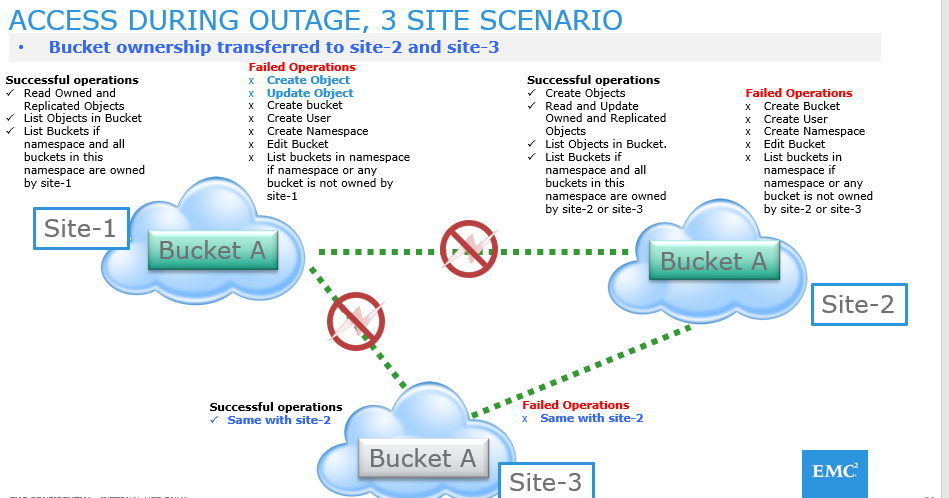
Expected behavior for three Site Scenario (Site 1 is lost or inaccessible from Site2 or Site3)
In this scenario, connections to site one are lost completely or site 1 is inaccessible from Site 2 and Site 3. Site 1 is the owner of Bucket A.
After 15 minutes, TSO occurs and the Bucket A ownership is transferred to site 2 and site 3. Between these two sites, the decision of object ownership is determined since the original bucket owner which is Site 1 is inaccessible.
Note: The main difference between two sites and three site TSO is that in the three site scenario, create and update objects is not allowed for site marked down.
Expected behavior for three Sites where only one site is down.
In this scenario, only one link is down and thus bucket ownership can be transferred to site 1 and site 3 or site 2 and site 3. ECS uses the PAXOS protocol to determine that Site 2 is down and Site 1 and Site 3 are two valid sites (in this example). The PAXOS protocol is a mechanism for solving and managing consensus. So in this example, object ownership is decided between site 1 and site 3. As in the previous slide, there is a limitation on access depending on the site.
For more details on expected behavior during TSO, see Administration guide. Here is the link to ECS 3.8 Administration Guide.
Affected Products
ECSArticle Properties
Article Number: 000224833
Article Type: How To
Last Modified: 22 Jan 2025
Version: 1
Find answers to your questions from other Dell users
Support Services
Check if your device is covered by Support Services.