Na obrazovce vybraných herních monitorů Alienware nebo Dell se zobrazí obdélníkový rámeček
Summary: Přečtěte si informace o obdélníkovém rámečku, který se zobrazuje na obrazovce vybraných monitorů Alienware nebo herních monitorů.
This article applies to
This article does not apply to
This article is not tied to any specific product.
Not all product versions are identified in this article.
Symptoms
Na obrazovce se objeví obdélníkový rámeček.
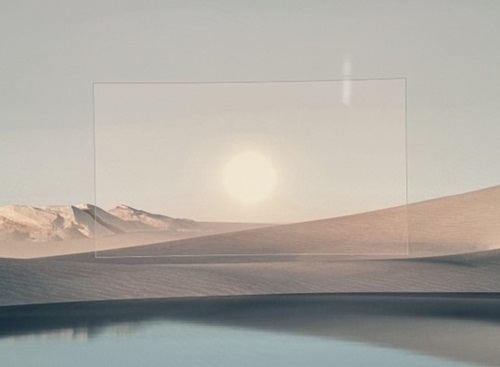

Dotčené monitory:
- Herní monitor Alienware 25 AW2523HF
- Herní monitor Alienware 27 280 Hz QD-OLED AW2725D
- Herní monitor Alienware 27 360 Hz QD OLED AW2725DF
- Herní monitor Alienware 27 4K s duálním rozlišením AW2725QF
- Herní monitor Alienware 27 4K QD-OLED AW2725Q
- Herní monitor Alienware 27 AW2723DF
- Herní monitor Alienware 27 AW2724DM
- Herní monitor Alienware 27 AW2724HF
- Herní monitor Alienware 32 4K QD OLED AW3225QF
- Herní monitor Alienware 34 240 Hz QD-OLED AW3425DW
- Zakřivený herní monitor Alienware 34 QD OLED AW3423DWF
- 500Hz herní monitor Alienware AW2524HF
- Herní monitor Dell 25 G2524H
- Herní monitor Dell 27 G2723H
- Herní monitor Dell 27 G2724D
- Herní monitor Dell 32 G3223D
Cause
Obdélníkový rámeček je součástí funkce AlienVision pro vybrané monitory Alienware nebo funkce Vision Engine pro vybrané herní monitory Dell. Tuto funkci zapnete pohybem joysticku směrem k sobě (u monitorů Alienware) nebo stisknutím klávesové zkratky (u herních monitorů Dell).
Resolution
U monitorů Alienware vypněte funkci AlienVision pohybem joysticku směrem k sobě. U některých modelů musíte stále pohybovat joystickem směrem k sobě a přepínat mezi různými možnostmi AlienVision, dokud funkci AlienVision nevypnete.
U herních monitorů Dell opakovaně stiskněte klávesovou zkratku a přepínejte mezi různými možnostmi modulu Vision Engine, dokud modul Vision Engine nevypnete.
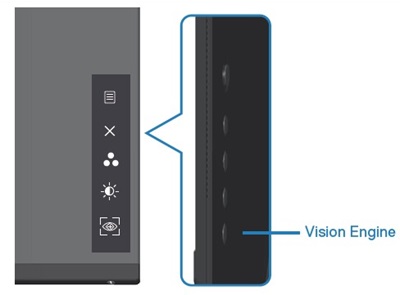
Případně lze funkci AlienVision nebo Vision Engine vypnout v nabídce OSD:
- Pro monitory Alienware: Hra –> AlienVision –> Vypnuto
- Pro herní monitory Dell: Hra –> Vision Engine –> vypnuto
Další informace naleznete v uživatelské příručce v části AlienVision nebo Vision Engine. Informace o tom, jak najít uživatelskou příručku pro váš produkt, naleznete v příručkách a dokumentaci pro produkt Dell .
Affected Products
Alienware 25 Gaming Monitor AW2523HF, Alienware 500Hz Gaming Monitor AW2524HF, Alienware 27 Gaming Monitor AW2723DF, Alienware 27 Gaming Monitor AW2724DM, Alienware 27 Gaming Monitor AW2724HF, Alienware 27 280Hz QD-OLED Gaming Monitor AW2725D
, Alienware 27 360Hz QD OLED Gaming Monitor AW2725DF, Alienware 27 4K QD-OLED Gaming Monitor AW2725Q, Alienware 27 4K Dual-Resolution Gaming Monitor AW2725QF, Alienware 32 4K QD OLED Gaming Monitor AW3225QF, Alienware 34 Curved QD OLED Gaming Monitor AW3423DWF, Alienware 34 240Hz QD-OLED Gaming Monitor AW3425DW, Dell 25 Gaming Monitor G2524H, Dell 27 Gaming Monitor G2723H, Dell 27 Gaming Monitor G2724D, Dell 32 Gaming Monitor G3223D
...
Article Properties
Article Number: 000225165
Article Type: Solution
Last Modified: 21 May 2026
Version: 13
Find answers to your questions from other Dell users
Support Services
Check if your device is covered by Support Services.