在选择 Alienware 或 Dell Gaming 显示器屏幕上显示矩形框
Summary: 了解部分 Alienware 或游戏显示器屏幕上显示的矩形框。
This article applies to
This article does not apply to
This article is not tied to any specific product.
Not all product versions are identified in this article.
Symptoms
屏幕上将显示一个矩形框。
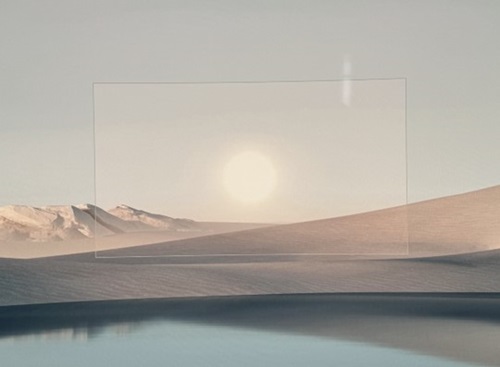

受影响的显示器:
- Alienware 25 游戏显示器 AW2523HF
- Alienware 27 280 Hz QD-OLED 游戏显示器 AW2725D
- Alienware 27 360 Hz QD OLED 游戏显示器 AW2725DF
- Alienware 27 4K 双分辨率游戏显示器 AW2725QF
- Alienware 27 4K QD-OLED 游戏显示器 AW2725Q
- Alienware 27 游戏显示器 AW2723DF
- Alienware 27 游戏显示器 AW2724DM
- Alienware 27 游戏显示器 AW2724HF
- Alienware 32 4K QD OLED 游戏显示器 AW3225QF
- Alienware 34 240 Hz QD-OLED 游戏显示器 AW3425DW
- Alienware 34 曲面 QD OLED 游戏显示器 AW3423DWF
- Alienware 500 Hz 游戏显示器AW2524HF
- 戴尔 25 游戏显示器 G2524H
- 戴尔 27 游戏显示器 G2723H
- 戴尔 27 游戏显示器 G2724D
- 戴尔 32 游戏显示器 G3223D
Cause
矩形框是特定 Alienware 显示器的 AlienVision 功能或特定 Dell Gaming 显示器的 Vision Engine 功能的一部分。通过将纵杆朝向您移动(对于 Alienware 显示器)或按快捷键(对于 Dell Gaming 显示器),可打开该功能。
Resolution
对于 Alienware 显示器,请将纵杆朝您所在方向移动,以关闭 AlienVision。对于某些型号,您需要继续向您移动纵杆,以便在不同的 AlienVision 选项之间切换,直至 AlienVision 关闭。
对于 Dell Gaming 显示器,请继续按快捷键以在不同的 Vision Engine 选项之间切换,直至 Vision Engine 关闭。
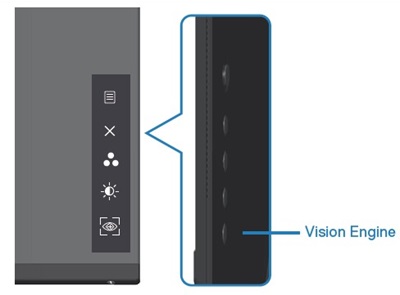
或者,可以通过转到 OSD 关闭 AlienVision 或 Vision Engine:
- 对于 Alienware 显示器:游戏 -> AlienVision -> 关闭
- 对于 Dell Gaming 显示器:游戏 -> Vision Engine -> 关闭
有关更多信息,请转至用户指南的 AlienVision 或 Vision Engine 部分。请参阅 戴尔产品手册和说明文件 ,了解如何查找产品的用户指南。
Affected Products
Alienware 25 Gaming Monitor AW2523HF, Alienware 500Hz Gaming Monitor AW2524HF, Alienware 27 Gaming Monitor AW2723DF, Alienware 27 Gaming Monitor AW2724DM, Alienware 27 Gaming Monitor AW2724HF, Alienware 27 280Hz QD-OLED Gaming Monitor AW2725D
, Alienware 27 360Hz QD OLED Gaming Monitor AW2725DF, Alienware 27 4K QD-OLED Gaming Monitor AW2725Q, Alienware 27 4K Dual-Resolution Gaming Monitor AW2725QF, Alienware 32 4K QD OLED Gaming Monitor AW3225QF, Alienware 34 Curved QD OLED Gaming Monitor AW3423DWF, Alienware 34 240Hz QD-OLED Gaming Monitor AW3425DW, Dell 25 Gaming Monitor G2524H, Dell 27 Gaming Monitor G2723H, Dell 27 Gaming Monitor G2724D, Dell 32 Gaming Monitor G3223D
...
Article Properties
Article Number: 000225165
Article Type: Solution
Last Modified: 21 May 2026
Version: 13
Find answers to your questions from other Dell users
Support Services
Check if your device is covered by Support Services.