使用 Switch Embedded Teaming 和 Intel i350 NIC 時,Windows Server 2022 0x7e STOP 錯誤
Summary: 本文說明何時在搭載 Intel i350 網路介面卡 (NIC) 的 Windows Server 2022 Hyper-V 主機上使用交換器內嵌成組 (SET)。如果已啟用虛擬機器佇列 (VMQ),伺服器可能會顯示藍色畫面,並顯示 STOP 0x7E 錯誤 (SYSTEM_THREAD_EXCEPTION_NOT_HANDLED)。
This article applies to
This article does not apply to
This article is not tied to any specific product.
Not all product versions are identified in this article.
Symptoms
請考慮使用具有下列特性的 PowerEdge 伺服器:
- Windows Server 2022 是作業系統,Hyper-V 虛擬化是主要的伺服器角色
- Gigabit Intel i350 網路介面卡 (NIC) 是使用中的主要配接卡
- 在介面卡的進階屬性中,虛擬機器佇列 (VMQ) 設定為 啟用 。
- 交換器內嵌組合 (SET) 用於實作 Hyper-V 虛擬交換器。
在這種情況下,伺服器會顯示藍色畫面並顯示 STOP 錯誤:
0x7E (SYSTEM_THREAD_EXCEPTION_NOT_HANDLED)
當機發生在執行 PowerShell cmdlet 期間,該 cmdlet 使用 Switch Embedded Teaming (SET) 實作 Hyper-V 虛擬交換器。伺服器重新開機後,當機會隨機發生。
Cause
此狀況記錄為預期行為。Intel i350 型 NIC 啟用 VMQ 時,不支援交換器內嵌成組。
這會指出於 Dell 支援網站上驅動程式下載頁面的「已知問題」區段 (驅動程式版本 22.5.0,2023 年 12 月 1 日發佈):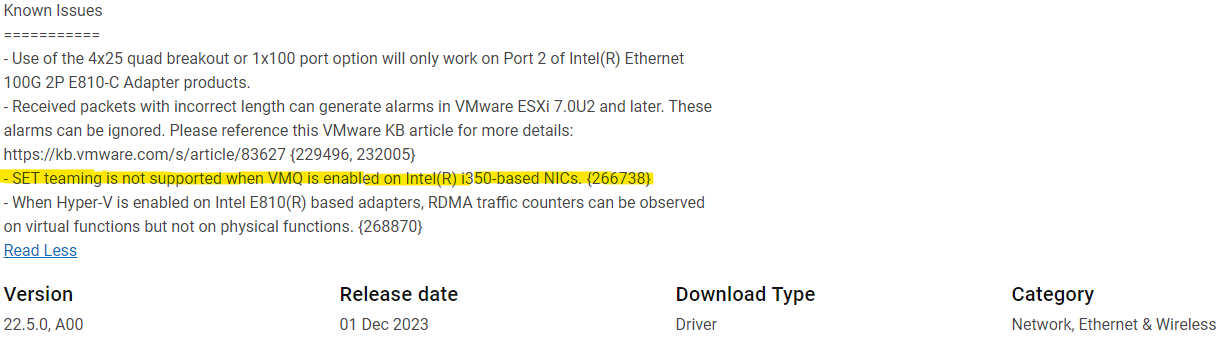
Resolution
Intel 表示在 Intel(R) i350 型 NIC 上啟用 VMQ 時,不支援 SET 成組。
如果遇到此問題,會提供下列因應措施作為替代方案:
- 在啟用 SET (實作 Hyper-V 虛擬交換器) 之前,請在 Windows Server 2022 裝置管理員中,於配接卡的進階屬性中停用 VMQ。
- 請勿使用 SET 實現 Hyper-V 虛擬交換器。
Affected Products
Microsoft Windows Server 2022Article Properties
Article Number: 000225629
Article Type: Solution
Last Modified: 16 May 2025
Version: 6
Find answers to your questions from other Dell users
Support Services
Check if your device is covered by Support Services.