VMware: VSAN Deduplication and Compression is enabled, but should be disabled
Summary: When disabling Deduplication and Compression on a VSAN cluster a warning is marked on VSAN Skyline Health for "Deduplication and Compression is enabled, but should be disabled" for some or all disk groups. ...
This article applies to
This article does not apply to
This article is not tied to any specific product.
Not all product versions are identified in this article.
Symptoms
When disabling Deduplication and Compression on a VSAN cluster a warning is marked on VSAN Skyline Health for "Deduplication and Compression is enabled, but should be disabled" for some or all disk groups
Performing the "remediate inconsistent configuration" option does not solve it.
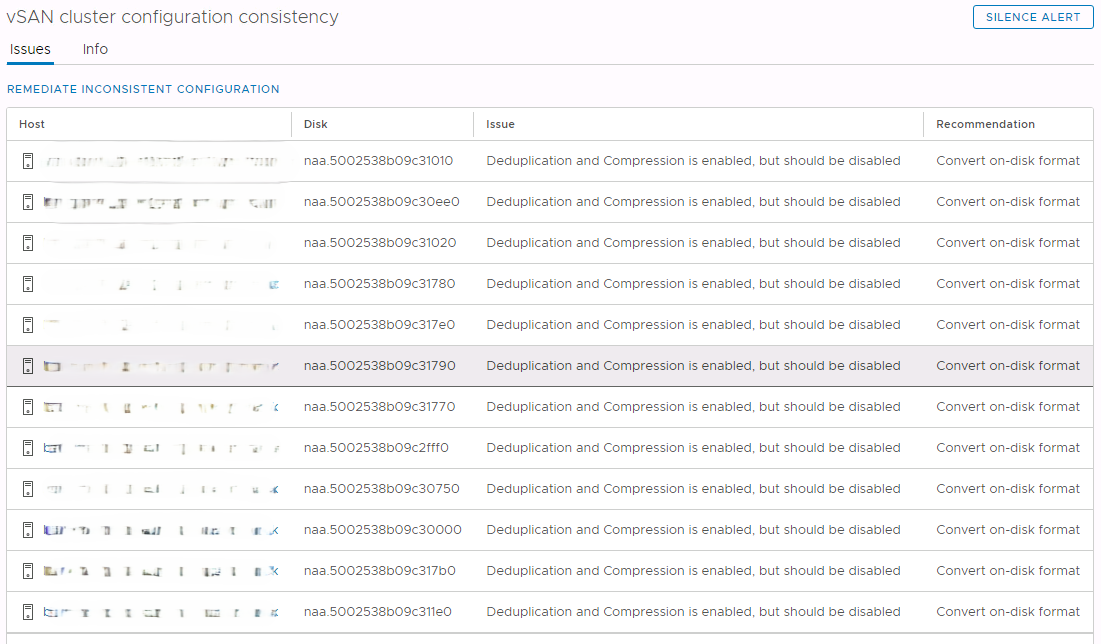
Deduplication and compression are "disabled" at cluster level. However, on the hosts, it is enabled at disk level:
# localcli vsan storage list | grep -E "^\w|Deduplicat|Compress"
naa.6000c29d3903f62e65db90e4a33c7113:
   Deduplication: true
   Compression: true
naa.6000c294ae2907d1eaccdabf00adad3b:
   Deduplication: true
   Compression: true
naa.6000c2950cfde25cd01bb892188cd5ca:
   Deduplication: true
   Compression: true
naa.6000c299347304271292f577d07f01f0:
   Deduplication: true
   Compression: true
In the clomd.log on a host there will be events relating to WhatIf checks failing.
2024-06-21T11:42:56.622Z error clomd[150152456] [Originator@6876] CLOMWhatIfObjectDecom: Couldn't check cluster resources: Failure
2024-06-21T11:42:56.622Z error clomd[150152456] [Originator@6876] CLOMWhatIfRunDecom: Failed to decommission object 45aa6365-287e-8de2-3ddc-b02628462420: Failure, doDeltaDecom = 0.
2024-06-21T11:42:56.622Z error clomd[150152456] [Originator@6876] CLOMWhatIfUpgrade: What-if upgrade failed to decom entity 52ff5aae-617d-111b-1067-c7c31f69a6f6: Failure
Cause
Insufficient capacity to support the full evacuation of a disk group while retaining redundancy.
When disabling deduplication and compression, the box "Allow reduced redundancy" was not checked.
So, when evacuating a disk group, VSAN attempts to ensure that there are enough copies of all components to ensure fault tolerance. If redundancy cannot be ensured, the process cannot be completed.
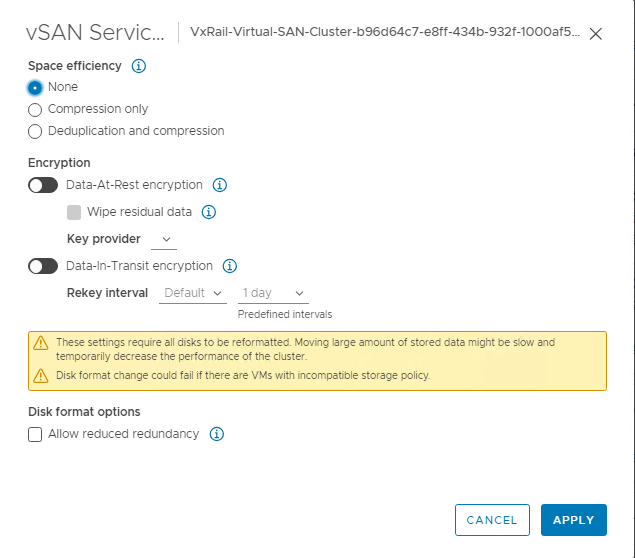
Resolution
Re-enable deduplication and compression and disable it again, but ensure to check the "Allow reduced redundancy" box.
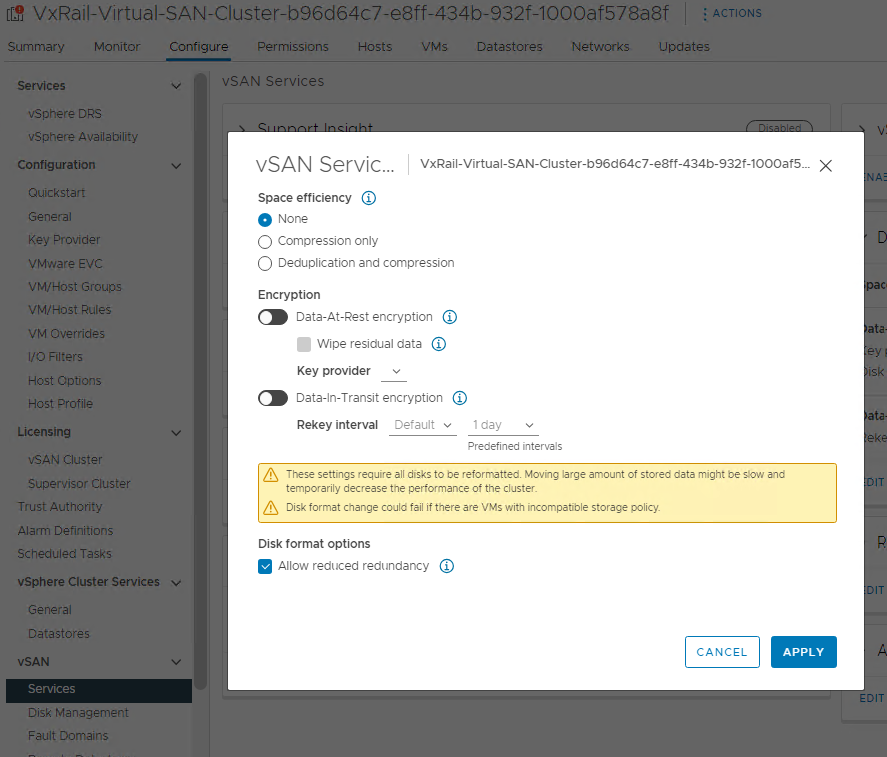
WARNING: During the process of disabling or enabling deduplication & compression, with reduced redundancy allowed, although accessibility will be ensured, there will be temporary periods of reduced redundancy, for some objects, as each disk group is evacuated.
Affected Products
VxRail, VMware ESXi 7.x, VMware ESXi 8.x, VMware VSANProducts
PowerEdge XR2, Poweredge C4140, PowerEdge C6420, PowerEdge C6520, PowerEdge C6525, PowerEdge C6615, PowerEdge C6620, PowerEdge FC640, PowerEdge M640, PowerEdge M640 (for PE VRTX), PowerEdge MX740C, PowerEdge MX750c, PowerEdge MX760c, PowerEdge MX840C
, PowerEdge R350, PowerEdge R360, PowerEdge R440, PowerEdge R450, PowerEdge R540, PowerEdge R550, PowerEdge R640, PowerEdge R6415, PowerEdge R650, PowerEdge R650xs, PowerEdge R6515, PowerEdge R6525, PowerEdge R660, PowerEdge R660xs, PowerEdge R6615, PowerEdge R6625, PowerEdge R740, PowerEdge R740XD, PowerEdge R740XD2, PowerEdge R7415, PowerEdge R7425, PowerEdge R750, PowerEdge R750XA, PowerEdge R750xs, PowerEdge R7515, PowerEdge R7525, PowerEdge R760, PowerEdge R760XA, PowerEdge R760xd2, PowerEdge R760xs, PowerEdge R7615, PowerEdge R7625, PowerEdge R840, PowerEdge R860, PowerEdge R940, PowerEdge R940xa, PowerEdge R960, PowerEdge T350, PowerEdge T360, PowerEdge T440, PowerEdge T550, PowerEdge T560, PowerEdge T640, PowerEdge XE2420, PowerEdge XE7420, PowerEdge XE7440, PowerEdge XR11, PowerEdge XR12
...
Article Properties
Article Number: 000226304
Article Type: Solution
Last Modified: 07 Jan 2025
Version: 6
Find answers to your questions from other Dell users
Support Services
Check if your device is covered by Support Services.