Data Protection Advisor:分析規則集「檔案系統使用率高」不會觸發 PowerProtect Data Domain 的事件
Summary: 分析規則集「檔案系統使用率高」不會觸發 PowerProtect Data Domain 的事件。
This article applies to
This article does not apply to
This article is not tied to any specific product.
Not all product versions are identified in this article.
Symptoms
嘗試在 Data Protection Advisor (DPA) 中使用分析原則為 PowerProtect Data Domain 設定警示時,不會觸發警示。分析原則設定為使用整合規則集「檔案系統使用率高」。這是一個基於事件的規則集。
有 DPA 文件指出這應該有效。文件的一個範例指出以下內容:
有 DPA 文件指出這應該有效。文件的一個範例指出以下內容:
File system utilization high
Attack vector: Ransomware/malware
During a ransomware or similar viral attack, attackers would employ malware to encrypt filesystems, subsequently generating a lot of “unique data” to be sent to the backup appliance, such as Dell PowerProtect DD. This rule can be used to monitor the “data” filesystem of a PowerProtect DD for high filesystem utilization. The high utilization threshold can be set by the use
如上所述,在嘗試此配置並驗證是否滿足條件后,不會觸發警報。
Cause
產品依設計運作。
這是文件問題,Data Protection Advisor 中的缺陷。
「Filesystem Adoption High」規則集無法與 PowerProtect Data Domain 搭配使用。
這是文件問題,Data Protection Advisor 中的缺陷。
「Filesystem Adoption High」規則集無法與 PowerProtect Data Domain 搭配使用。
Resolution
此為 Data Protection Advisor 正在考慮的增強要求 (RFE)。如需更多詳細資料,請聯絡您的 Dell 客戶團隊或 Dell 產品管理。
此問題有解決方法。
解決方法是在分析策略中使用計劃規則集。雖然這與事件式規則集並不完全相同,但頻率可以設定得足夠高,以合理偵測 PowerProtect Data Domain 上的檔案系統空間問題。
下面是配置計劃規則集和分析策略的範例。
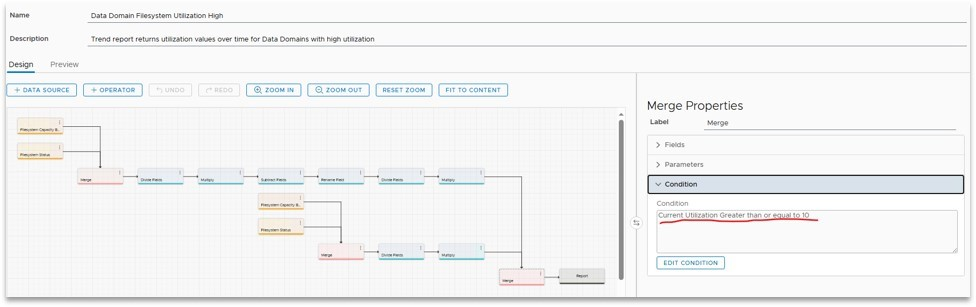
- 從系統報告範本「警告或關鍵系統的 Data Domain 檔案系統使用率」或「Data Domain 檔案系統使用率」建立自訂報告範本。將利用率百分比閾值設置為預期值。在此範例中,將其設定為 10,以便於測試警示的觸發。
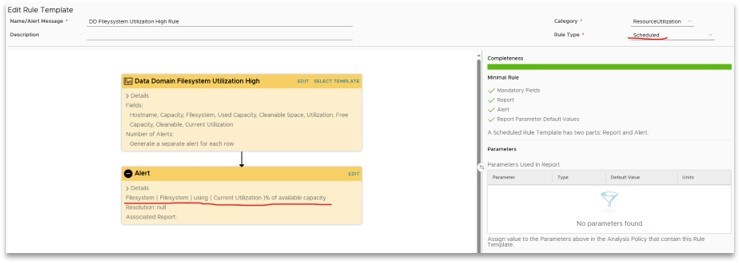
- 使用步驟 1 中的自訂報告範本建立自訂規則範本。將規則類型設定為「已排定」並更新警示內容。
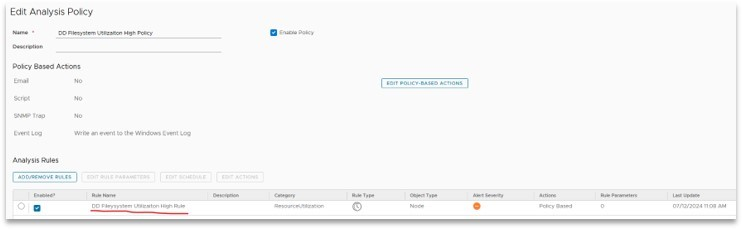
- 使用步驟2中的自定義規則範本創建分析策略。設定原則的排程和動作。
注意:建議不要安排得太激進。由於這些計劃規則集確實在後台運行報告,因此將頻率設置得太高可能會導致 DPA 應用程式載入不足。這可能會導致反應遲鈍或其他不當行為。
- 將分析原則套用至 PowerProtect Data Domain。如果 PowerProtect Data Domain 使用率超過閾值,則會觸發警示。
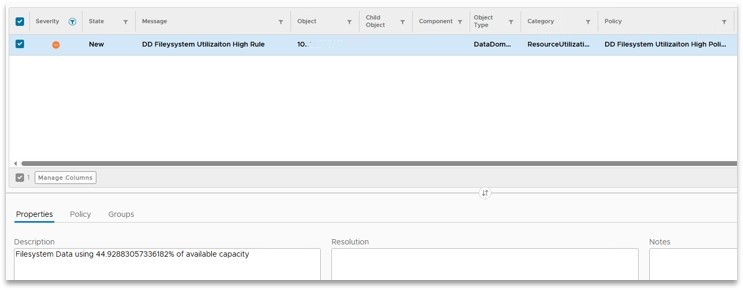
這是如何配置此功能的範例。您的要求可能會有所不同。
請聯絡 Dell 技術支援部門 ,以取得更多詳細資料或資訊。
Article Properties
Article Number: 000226979
Article Type: Solution
Last Modified: 22 Aug 2024
Version: 2
Find answers to your questions from other Dell users
Support Services
Check if your device is covered by Support Services.