NVIDIA RTX Desktop Manager hält den Desktop offen
Summary: Dieser Artikel enthält Informationen zum Problem, dass der neu erstellte Desktop von NVIDIA RTX Desktop Manager nicht geschlossen werden kann.
This article applies to
This article does not apply to
This article is not tied to any specific product.
Not all product versions are identified in this article.
Symptoms
Bei Dell Computern mit separater NVIDIA-GPU kann es vorkommen, dass NVIDIA RTX Desktop Manager den neu erstellten Desktop nicht schließen kann.
- Öffnen Sie NVIDIA RTX Desktop Manager und klicken Sie auf RTX DESKTOP MANAGER AKTIVIEREN. Die Anwendung erstellt Desktop 1 als Standard.
- Klicken Sie auf die Schaltfläche Neuer Desktop, um einen zweiten Desktop zu erstellen.
- Klicken Sie auf das X-Symbol in der rechten oberen Ecke von Desktop 2 , aber stellen Sie fest, dass es nicht geschlossen werden kann.
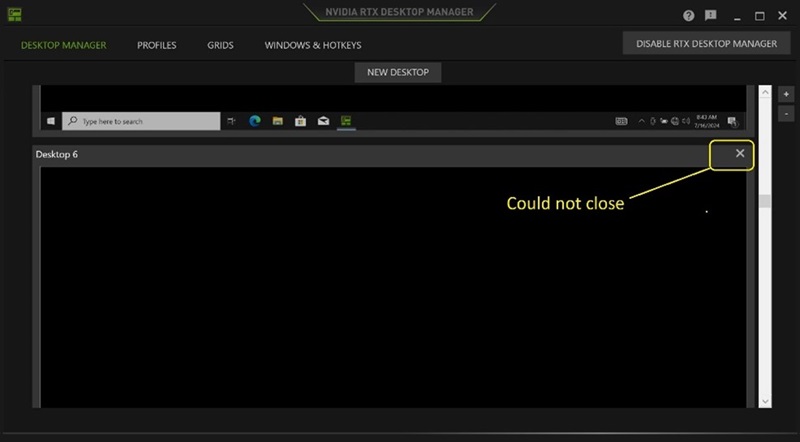
(Abbildung 1 : NVIDIA RTX Desktop Manager)
Betroffene Plattformen:
- Precision 7780
- Precision 7680
- Precision 7770
- Precision 7670
- Precision 7560
- Precision 7760
- Precision 7550
- Precision 7750
- Precision 7540
- Precision 7740
- Precision 7530
- Precision 7730
- Precision 7520
- Precision 7720
- Precision 5480
- Precision 5490
- Latitude 3490
- Latitude 3480
- Latitude 3470
- Latitude 3550
- Latitude 3530
- Latitude 3520
Cause
N. z.
Resolution
Das Aktualisieren des NVIDIA-Grafiklaufwerksr auf Version 552.84 oder höher auf dem Computer löst das Problem. Informationen zum Herunterladen und Installieren des Treibers finden Sie unter Herunterladen und Installieren von Dell Treibern.
Affected Products
Dell Latitude 3480/3488, Latitude 3490, Latitude 3520, Latitude 3530, Latitude 3550, Latitude 3470, Precision 5480, Precision 5490, Precision 7520, Precision 7530, Precision 7540, Precision 7550, Precision 7560, Precision 7670, Precision 7680
, Precision 7720, Precision 7730, Precision 7740, Precision 7750, Precision 7760, Precision 7770, Precision 7780
...
Article Properties
Article Number: 000227614
Article Type: Solution
Last Modified: 21 May 2026
Version: 3
Find answers to your questions from other Dell users
Support Services
Check if your device is covered by Support Services.