NVIDIA RTX Desktop Manager mantiene aperto il desktop
Summary: Questo articolo fornisce informazioni sul problema relativo al desktop appena creato di NVIDIA RTX Desktop Manager che non può essere chiuso.
This article applies to
This article does not apply to
This article is not tied to any specific product.
Not all product versions are identified in this article.
Symptoms
Nei computer Dell con GPU dedicata NVIDIA potrebbe verificarsi un problema in cui NVIDIA RTX Desktop Manager non riesce a chiudere il desktop appena creato.
- Aprire NVIDIA RTX Desktop Manager e cliccare su ENABLE RTX DESKTOP MANAGER, L'APPLICAZIONE CREA IL DESKTOP 1 COME IMPOSTAZIONE PREDEFINITA.
- Cliccare sul pulsante New Desktop per creare un secondo desktop.
- Fai clic sull'icona X nell'angolo in alto a destra di Desktop 2 ma scopri che non può essere chiuso.
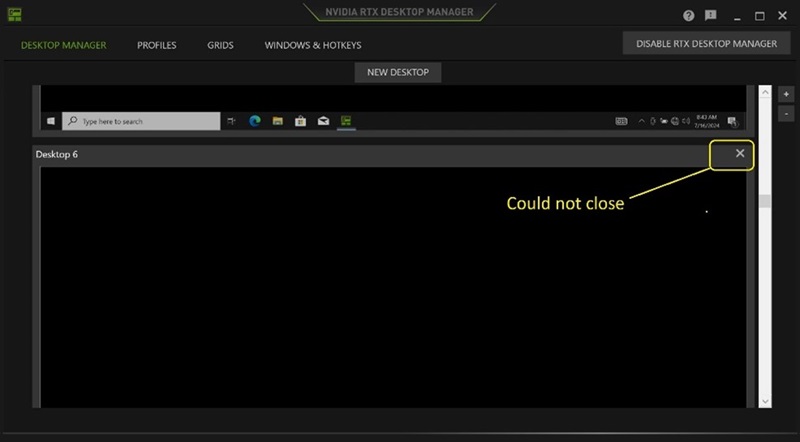
(Figura 1 . NVIDIA RTX Desktop Manager)
Piattaforme interessate:
- Precision 7780
- Precision 7680
- Precision 7770
- Precision 7670
- Precision 7560
- Precision 7760
- Precision 7550
- Precision 7750
- Precision 7540
- Precision 7740
- Precision 7530
- Precision 7730
- Precision 7520
- Precision 7720
- Precision 5480
- Precision 5490
- Latitude 3490
- Latitude 3480
- Latitude 3470
- Latitude 3550
- Latitude 3530
- Latitude 3520
Cause
N/D
Resolution
L'aggiornamento dell'unità grafica NVIDIAR alla versione 552.84 o successiva sul computer risolve il problema. Per scaricare e installare il driver, consultare Come scaricare e installare i driver Dell.
Affected Products
Dell Latitude 3480/3488, Latitude 3490, Latitude 3520, Latitude 3530, Latitude 3550, Latitude 3470, Precision 5480, Precision 5490, Precision 7520, Precision 7530, Precision 7540, Precision 7550, Precision 7560, Precision 7670, Precision 7680
, Precision 7720, Precision 7730, Precision 7740, Precision 7750, Precision 7760, Precision 7770, Precision 7780
...
Article Properties
Article Number: 000227614
Article Type: Solution
Last Modified: 21 May 2026
Version: 3
Find answers to your questions from other Dell users
Support Services
Check if your device is covered by Support Services.