NetWorker: vProxy upgrade to 4.4 shows vulnerability "SSL Certificate Cannot Be Trusted"
Summary: vProxy 4.4 Upgrade Shows Vulnerability: "SSL Certificate Cannot Be Trusted" Due to Use of Self-Signed Certificates; Custom Certificates Not Recommended.
This article applies to
This article does not apply to
This article is not tied to any specific product.
Not all product versions are identified in this article.
Symptoms
Self-signed certificates are considered insecure because they lack the validation from a trusted certification authority (CA).
vProxy 4.4 Upgrade Shows Vulnerability:
SSL Certificate Cannot Be Trusted
Cause
Self-signed certificates are considered insecure because they lack the validation from a trusted certification authority (CA). When connecting to an endpoint like a web browser, verify the server claiming to be the intended one is truly trustworthy. To address this, CA-signed certificates are used, as they are signed by a trusted CA, providing a level of assurance.
However, in the given scenario, the vProxy endpoint is not blindly trusted. It has already been configured within NetWorker during the initial setup. During this configuration, NetWorker stored the vProxy certificate in its configuration. Therefore, when connecting to vProxy, NetWorker checks if the presented certificate matches the certificate stored in its configuration.
Resolution
This behavior is expected, it is a false positive. The warning can be safely ignored.
It is not possible for someone to hijack or impersonate the vProxy without having elevated/root access to both the vProxy or NetWorker server. If someone already has such access, they must not impersonate vProxy to steal data, as they would have already gained unauthorized access.
Additional Information
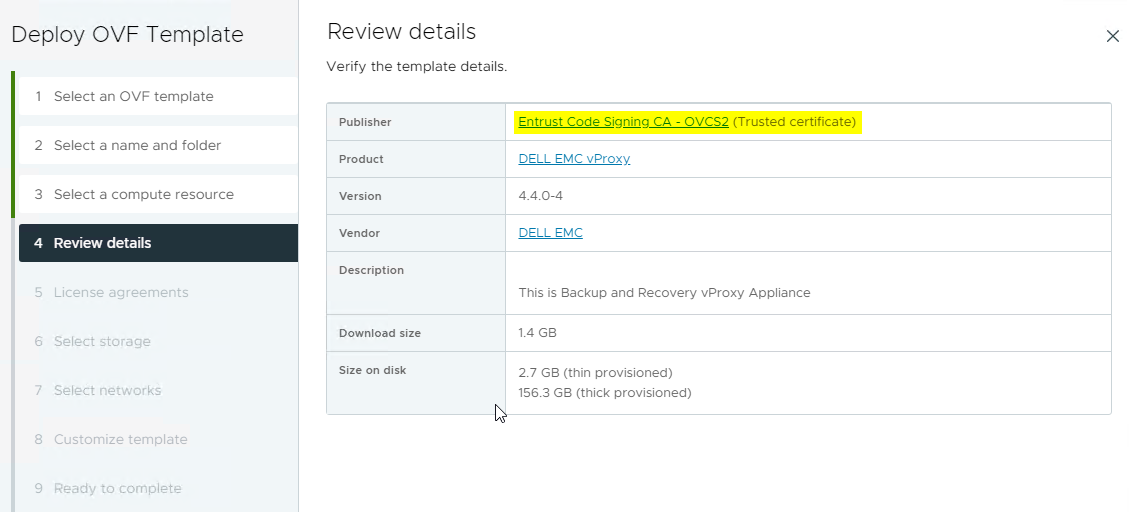
This warning can be removed from the OVA deployment by importing the Entrust Code Signing CA - OVCS2 certificate from Entrust to the vCenter server Certificate Manager:
https://www.entrust.com/knowledgebase/ssl/entrust-certificate-services-subordinate-cas

The process for importing the certificate is detailed in the following VMware article: https://kb.vmware.com/s/article/84240
NOTE: This must be performed by the vCenter Administrator.
After importing the Entrust Code Signing CA - OVCS2 certificate into the vCenter certificate manager, no SSL error is reported when deploying the OVA:
For more information, see:
vProxy uses a self-signed certificate and cannot use a CA-signed certificate.
Affected Products
NetWorker Family, NetWorkerArticle Properties
Article Number: 000228402
Article Type: Solution
Last Modified: 04 Dec 2025
Version: 4
Find answers to your questions from other Dell users
Support Services
Check if your device is covered by Support Services.