Alienware Command Center Applications Performance Section Does Not Show Processor Voltage and Max Frequency Values
Summary: Information about the Alienware Command Center (AWCC) applications performance section not showing all information due to an Intel Innovation Platform Framework (IPF) driver issue.
This article applies to
This article does not apply to
This article is not tied to any specific product.
Not all product versions are identified in this article.
Symptoms
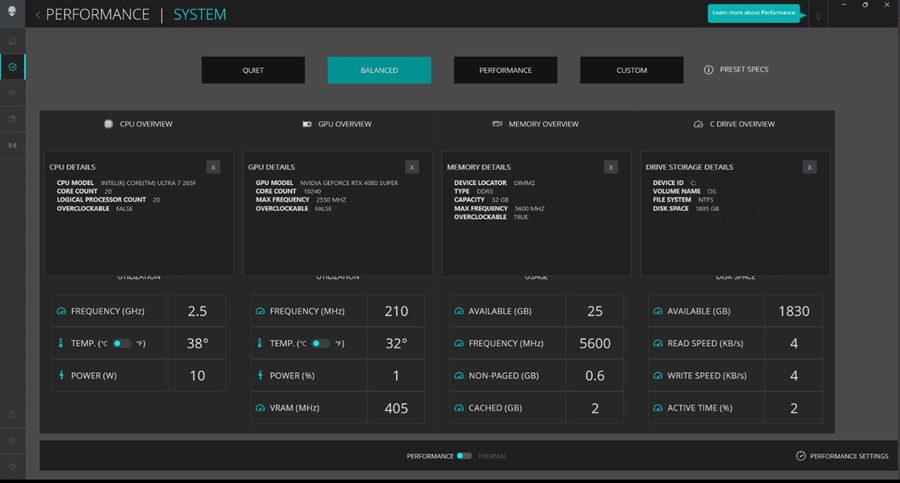
You do not see the processor voltage and max frequency information in the performance section of the AWCC application.
Cause
The Alienware Aurora ACT1250 and Alienware Area-51 AAT2250 non-OC systems rely on the IPF Software Development Kit (SDK), which does not provide data for voltage and max frequency. The AWCC is unable to show this information because of this limitation.
Resolution
Alienware Command Center
A fix for this behavior will be implemented in a new version of the Alienware Command Center application. No ETA on the release or workaround is available.
Affected Products
Alienware Area-51 AAT2250, Alienware Aurora ACT1250, Alienware Command CenterArticle Properties
Article Number: 000234153
Article Type: Solution
Last Modified: 21 May 2026
Version: 5
Find answers to your questions from other Dell users
Support Services
Check if your device is covered by Support Services.