VxRail: How To Convert an Internal VMware vCenter Server to an External VMware vCenter Server
Summary: The procedure is for converting a VxRail-managed VMware vCenter Server to a customer-managed VMware vCenter Server
This article applies to
This article does not apply to
This article is not tied to any specific product.
Not all product versions are identified in this article.
Instructions
Consider the following instructions before conversion:
- This is a one-way conversion. The customer cannot convert back to a VxRail-managed VMware vCenter Server once it has been converted.
- After the conversion, the customer may need to use a customer-supplied VMware vCenter Server license to manage the external vCenter Server. The external vCenter Server is not supported by the embedded VxRail license.
- After the conversion, VxRail Manager is not responsible for the life-cycle management of the external VMware vCenter Server.
If the above condition is happy, follow the below procedure for converting an Internal VMware vCenter Server to an External VMware vCenter Server:
- Take an online VM snapshot (no memory) and a file-based backup of VxRail Manager and VxRail-managed VMware vCenter Server.
-
- To create a backup of VxRail Manager:
cd /mystic/vxm_backup_restore
- To create a backup of VxRail Manager:
For versions earlier than VxRail 8.0.300, enter:
python vxm_backup_restore.py -b --keeplog
For VxRail 8.0.300 and later, enter:
mcp_python vxm_backup_restore.py -b --keeplog
-
- To create a backup of VMware vCenter Server:
-
-
- In a Web browser, go to the vCenter Server Management Interface:
https://appliance-IP-address-or-FQDN:5480
- Log in as root.
- In the vCenter Server Management Interface, click Backup.
- The table under Activity displays the most current backup version taken of the vCenter Server.
- Click Backup Now.
- In a Web browser, go to the vCenter Server Management Interface:
-
- Perform the prechecks, skyline health checks, and ensure there are no critical issues or alerts on vCenter or cluster:
Inventory--> VxRail Cluster--> Monitor--> VSAN--> Skyline Test
- Navigate to:
Inventory--> VxRail Cluster--> Configure--> VxRail--> System
- Under VxRail tab, Select:
Actions--> Convert to external vCenter

- Add the Administrator credentials for authentication and submit:
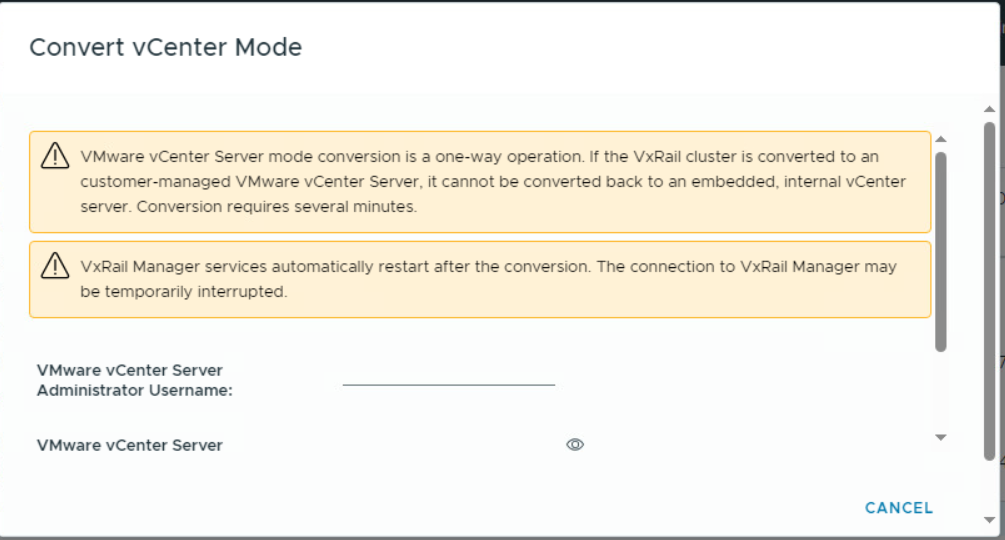
- The conversion process with take couple of minutes to complete. Once the VMware vCenter Server is converted, the VxRail manager services will be restarted
- Perform skyline health checks, and ensure there are no critical issues or alerts on vCenter or cluster:
Inventory--> VxRail Cluster--> Monitor--> VSAN--> Skyline Test)
Products
VxRail, CloudArray Virtual Edition for VxRail Appliance, VMWare Cloud on Dell EMC VxRail E560F, VMWare Cloud on Dell EMC VxRail E560N, VxRail 460 and 470 Nodes, VxRail Appliance Family, VxRail Appliance Series, VxRail G410, VxRail G Series Nodes
, VxRail D Series Nodes, VxRail D560, VxRail D560F, VxRail E Series Nodes, VxRail E460, VxRail E560, VxRail E560 VCF, VxRail E560F, VxRail E560F VCF, VxRail E560N, VxRail E560N VCF, VxRail E660, VxRail E660F, VxRail E660N, VxRail E665, VxRail E665F, VxRail E665N, VxRail G560, VxRail G560 VCF, VxRail G560F, VxRail G560F VCF, VxRail Gen2 Hardware, VxRail P Series Nodes, VxRail P470, VxRail P570, VxRail P570 VCF, VxRail P570F, VxRail P570F VCF, VxRail P580N, VxRail P580N VCF, VxRail P670F, VxRail P670N, VxRail P675F, VxRail P675N, VxRail S Series Nodes, VxRail S470, VxRail S570, VxRail S570 VCF, VxRail S670, VxRail Software, VxRail V Series Nodes, VxRail V470, VxRail V570, VxRail V570 VCF, VxRail V570F, VxRail V570F VCF, VXRAIL V670F, VxRail VD-4000R, VxRail VD-4000W, VxRail VD-4000Z, VxRail VD-4510C, VxRail VD-4520C, VxRail VD Series Nodes, VxRail VE-660, VxRail VE-6615, VxRail VP-760, VxRail VP-7625, VxRail VS-760
...
Article Properties
Article Number: 000242846
Article Type: How To
Last Modified: 05 Nov 2024
Version: 1
Find answers to your questions from other Dell users
Support Services
Check if your device is covered by Support Services.