Avamar: How to manage Checkpoint Backups on Data Domain
Summary: This article outlines how to manage checkpoint backups (CP-Backup) with Avamar and Data Domain.
This article applies to
This article does not apply to
This article is not tied to any specific product.
Not all product versions are identified in this article.
Instructions
A checkpoint backup of an Avamar grid can be used for checkpoint restores in a disaster recovery event for Avamar.
The checkpoint backup is a special backup of the Avamar checkpoint stored on the Data Domain.
Note: Checkpoint backups are only available for the single-node Avamar and Avamar Virtual Editions (AVE).
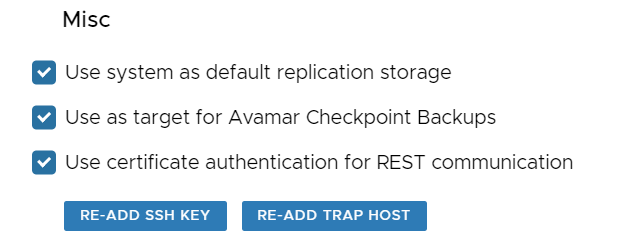
Where there is an attached Data Domain (DD), this is configured in the Avamar User Interface (AUI), by selecting "System" -> "Data Domain" -> "Edit" -> "Use as target for Avamar Checkpoint Backups":
To list the available checkpoint backups, run the following command from the Avamar command line:
ddrmaint cp-backup-list --ddr-server=<dd hostname/ip> --ddr-user-name=<ddboost username> --ddr-password=<ddboost user password>
Example:
ddrmaint cp-backup-list --ddr-server=ddve-v713 --ddr-user-name=ddboost --ddr-password=DellPassword
cp.20241105150114 2024-11-05 12:20:23 ------- --- ---  partitions  3 avamar-1709325232 ave-v1910
cp.20241105150405 2024-11-05 12:22:21 ------- --- ---  partitions  3 avamar-1709325232 ave-v1910
To check the checkpoint backup contents on the Data Domain:
a. Identify the Avamar hfscreate time from the Avamar command line:
avmaint hfscreate
b. Enter bash mode on Data Domain Data Domain: How to enter BASH Mode (Support and Engineering Only) and mount the file system with the hfscreate value from above:
mount localhost:/data/col1/avamar-<hfscreate> /data
c. List the checkpoint backup directories:
ls -ltr /data/GSAN/
The following is an example of a checkpoint backup directory:
!!!! ddve-v713 YOUR DATA IS IN DANGER !!!! # ls -ltr /data/GSAN/cp.20241105150405
total 1339
-rw-rw-rw- 1 ddboost admin     520 Nov  5 10:22 gsanbackup.xml
-rw-rw-rw- 1 ddboost admin    3003 Nov  5 10:22 ddr_info
drwxrwxrwx 2 ddboost admin   15970 Nov  5 10:22 data03
drwxrwxrwx 2 ddboost admin   15625 Nov  5 10:22 data02
drwxrwxrwx 2 ddboost admin   23402 Nov  5 10:22 data01
-rw-rw-rw- 1 ddboost admin 1310720 Nov  5 10:22 backupupgradefiles.tar
d. Remember to unmount the file system:
umount /data
The following command is used to take a manual checkpoint backup:
cpbackup --cptag <checkpoint>
Example:
cpbackup --cptag cp.20241105150405
The checkpoint value can be found by listing all checkpoints on the Avamar:
cplistAffected Products
Avamar Server, DD OSArticle Properties
Article Number: 000244907
Article Type: How To
Last Modified: 02 Jun 2026
Version: 7
Find answers to your questions from other Dell users
Support Services
Check if your device is covered by Support Services.