보안 연결 게이트웨이 Virtual Edition: 관리자 암호 재설정
Summary: 이 절차에서는 보안 연결 게이트웨이 Virtual Edition의 잊어버린 관리자 암호를 재설정하는 방법을 설명하지만 루트 암호를 알고 있어야 합니다.
This article applies to
This article does not apply to
This article is not tied to any specific product.
Not all product versions are identified in this article.
Instructions
절차:
참고: 해결 방법을 적용하기 전에 VM의 스냅샷을 생성합니다.
- 루트 자격 증명(사용자 이름 및 비밀번호)으로 SSH를 사용하여 보안 연결 게이트웨이 어플라이언스 시스템에 연결합니다.
- 로그인한 후 아래 나열된 명령을 실행합니다.
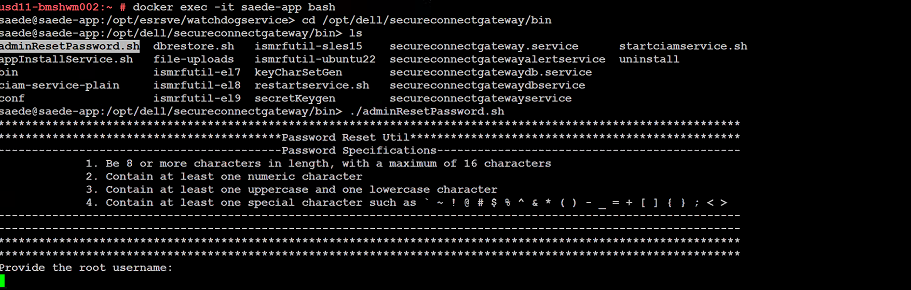
➢ docker exec -it saede-app bash
➢ cd /opt/dell/secureconnectgateway/bin
➢ ls
➢ ./adminResetPassword.sh
암호 요구 사항:
암호는 다음과 같아야 합니다.
- 길이가 8자 이상, 최대 16자
- 숫자를 하나 이상 포함해야 합니다.
- 대문자와 소문자를 하나 이상 포함해야 합니다.
- 다음과 같은 특수 문자를 하나 이상 포함해야 합니다.
' ~ ! @ # $ % ^ & * ( ) - _ + = { } [ ] ; < >
루트 사용자 이름과 비밀번호를 입력합니다.
새 관리자 암호를 제공합니다.
Additional Information
암호를 변경하는 명령의 스크린샷:
Affected Products
Secure Connect Gateway - Virtual EditionArticle Properties
Article Number: 000250890
Article Type: How To
Last Modified: 29 Dec 2025
Version: 2
Find answers to your questions from other Dell users
Support Services
Check if your device is covered by Support Services.