安全连接网关虚拟版本:重置管理员密码
Summary: 此过程说明如何重置忘记的安全连接网关虚拟版管理员密码,但您必须知道 root 密码。
This article applies to
This article does not apply to
This article is not tied to any specific product.
Not all product versions are identified in this article.
Instructions
步骤:
提醒:在应用解决方法之前,先拍摄虚拟机的快照。
- 使用 root 凭据(用户名和密码)通过 SSH 连接到安全连接网关设备系统。
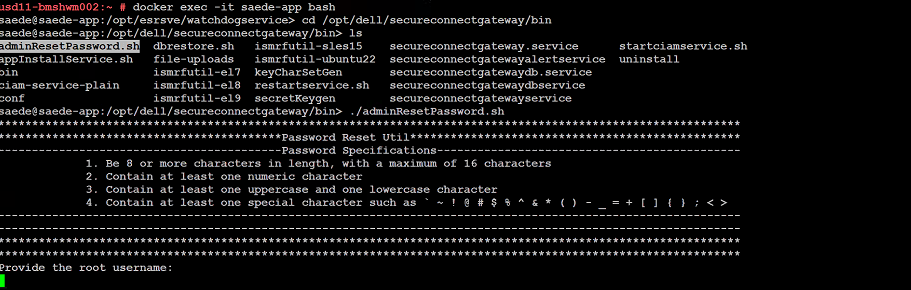
- 成功登录后,运行下面列出的命令:
➢ docker exec -it saede-app bash
➢ cd /opt/dell/secureconnectgateway/bin
➢ ls
➢ ./adminResetPassword.sh
密码要求:
密码必须为:
- 长度为 8 个或更多字符,最多 16 个字符
- 至少包含一个数字字符
- 至少包含一个大写字母和一个小写字符
- 至少包含一个特殊字符,例如
' ~ ! @ # $ % ^ & * ( ) - _ + = { } [ ] ; < >
提供 root 用户名和密码。
提供新的管理员密码。
Additional Information
用于更改密码的命令的屏幕截图:
Affected Products
Secure Connect Gateway - Virtual EditionArticle Properties
Article Number: 000250890
Article Type: How To
Last Modified: 29 Dec 2025
Version: 2
Find answers to your questions from other Dell users
Support Services
Check if your device is covered by Support Services.