Avamar: Deaktivace proxy serveru změní vc_id s více integracemi vCenter
Summary: Tento článek vysvětluje, jak deaktivace serveru proxy na serveru Avamar s více integrovanými vCenter změní vc_id.
This article applies to
This article does not apply to
This article is not tied to any specific product.
Not all product versions are identified in this article.
Symptoms
Tento článek používá skript goav. Použijte tento článek Avamar: GoAV nástroj pro více informací
V tomto scénáři má server Avamar (av-server) dvě virtuální centra:
- vcenter01.lab.com
- vcenter02.lab.com
Každý nástroj vCenter obsahuje některé proxy servery. V tomto článku se používá proxy av-proxy-08.lab.com.
1. Připojte se k serveru Avamar jako správce a zobrazte seznam proxy serverů:
./goav proxy show
admin@av-server:~/>: ./goav proxy show
===========================================================
GoAv    :        1.91
Avamar  :        19.10
Date    :        27 Dec 2024 10:02 EST
===========================================================
COMMAND :  ./goav proxy show
NOTE: This is not an official tool
===========================================================
+---------------------------+------------+-------------------------------+------------------------------------------+-----------+---------------+------------------------+
|           name            | domainFqdn |          vcenterHost          |                    id                    | activated | autoDsMapping |     clientVersion      |
+---------------------------+------------+-------------------------------+------------------------------------------+-----------+---------------+------------------------+
| av-proxy-01.lab.com       | /clients   | vcenter01.lab.com             | 451e50d90593232b55ead709d7c150c222c73357 | true      | false         | 19.10.100-166          |
| av-proxy-02.lab.com       | /clients   | vcenter02.lab.com             | 4c521927efd418d29ea054b983aa98cdaba0164f | true      | false         | 19.10.100-135_HF338865 |
| av-proxy-03.lab.com       | /clients   | vcenter01.lab.com             | bbf88da2fca1f51234b86348f02bd5530229e734 | true      | false         | 19.7.100-82_HF338743   |
| av-proxy-04.lab.com       | /clients   | vcenter01.lab.com             | 22a31e18f995a442a2dc745a28ffff3ee82b627b | true      | false         | 19.9.100-78            |
| av-proxy-05.lab.com       | /clients   | vcenter01.lab.com             | 90c3058d07f43532d41ea4fc82d07be6f5eecdbb | true      | false         | 19.10.100-166          |
| av-proxy-06.lab.com       | /clients   | vcenter02.lab.com             | 907da738167186a952d78850c366ba6efbed578f | true      | false         | 19.10.100-135_HF338865 |
| av-proxy-07.lab.com       | /clients   | vcenter02.lab.com             | f685ef4e7497eadf67e8e683898c9996ffffde11 | true      | false         | 19.10.100-135_HF338865 |
| av-proxy-08.lab.com       | /clients   | vcenter01.lab.com             | 170fecda603b533247db21c1c5f536f6d2bf4c1b | true      | false         | 19.4.100-116           |
+---------------------------+------------+-------------------------------+------------------------------------------+-----------+---------------+------------------------+
admin@av-server:~/>:
2. Zkontrolujte ID klienta (cid) pro dvě centra vCenter:
psql -p 5555 mcdb -c 'select mgmt_client.cid, clients.descr, mgmt_client.uuid from mgmt_client, clients where mgmt_client.cid=clients.cid;'
admin@av-server:~/>: psql -p 5555 mcdb -c 'select mgmt_client.cid, clients.descr, mgmt_client.uuid from mgmt_client, clients where mgmt_client.cid=clients.cid;'
                   cid                    |                            descr                             |                 uuid
------------------------------------------+--------------------------------------------------------------+--------------------------------------
 70556d54b3eb4831d3e1a75742b9973fc930c1ca | /vcenter01.lab.com/vcenter01.lab.com | 1e414dc1-3107-4f05-8159-5a5beaf8f9ab
 1e1825c377e14943e6c0ec7921ceb4efc21a1934 | /vcenter02.lab.com/vcenter02.lab.com | 0ed1532e-13d2-41cb-b437-cdd244af42f8
(2 rows)
admin@av-server:~/>:
3. Zkontrolujte identifikátor CID serveru proxy a odpovídající identifikátor CID nástroje vCenter. Proxy av-proxy-08.lab.com patří nástroji vCenter vcenter01.lab.com:
psql -p 5555 mcdb -c 'select * from proxy_mgmt_mapping order by vc_cid asc ;'
admin@av-server:~/>: psql -p 5555 mcdb -c 'select * from proxy_mgmt_mapping order by vc_cid asc ;'
                proxy_cid                 |                  vc_cid
------------------------------------------+------------------------------------------
 4c521927efd418d29ea054b983aa98cdaba0164f | 1e1825c377e14943e6c0ec7921ceb4efc21a1934
 907da738167186a952d78850c366ba6efbed578f | 1e1825c377e14943e6c0ec7921ceb4efc21a1934
 f685ef4e7497eadf67e8e683898c9996ffffde11 | 1e1825c377e14943e6c0ec7921ceb4efc21a1934
 170fecda603b533247db21c1c5f536f6d2bf4c1b | 70556d54b3eb4831d3e1a75742b9973fc930c1ca --> Testing this proxy
 bbf88da2fca1f51234b86348f02bd5530229e734 | 70556d54b3eb4831d3e1a75742b9973fc930c1ca
 451e50d90593232b55ead709d7c150c222c73357 | 70556d54b3eb4831d3e1a75742b9973fc930c1ca
 22a31e18f995a442a2dc745a28ffff3ee82b627b | 70556d54b3eb4831d3e1a75742b9973fc930c1ca
 90c3058d07f43532d41ea4fc82d07be6f5eecdbb | 70556d54b3eb4831d3e1a75742b9973fc930c1ca
(8 rows)
admin@av-server:~/>:
4 – Spusťte konzoli Avamar Administrator (grafické uživatelské rozhraní Java).
Poznámka: Toto chování nelze reprodukovat pomocí uživatelského rozhraní Avamar (AUI), protože neumožňuje deaktivaci serveru proxy.
5. Přejděte na kartu >Policy > Clients Upravte proxy av-proxy-08.
- Clear: Aktivováno, Povolit zálohování iniciované klientem, Povolit výběr souboru u záloh iniciovaných klientem
- Kontrolovat: Zakázat všechny zálohy
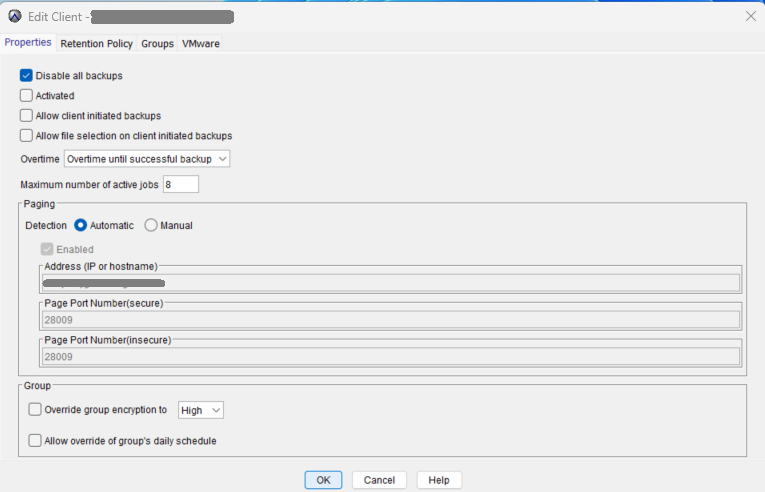
6. Klikněte na tlačítko OK a vraťte se do rozhraní příkazového řádku (CLI).
7. Zkontrolujte, zda proxy server av-proxy-08 přepne vc_cid z "70556d54b3eb4831d3e1a75742b9973fc930c1ca" na "1e1825c377e14943e6c0ec7921ceb4efc21a1934"
psql -p 5555 mcdb -c 'select * from proxy_mgmt_mapping order by vc_cid asc ;'
admin@av-server:~/>: psql -p 5555 mcdb -c 'select * from proxy_mgmt_mapping order by vc_cid asc ;'
                proxy_cid                 |                  vc_cid
------------------------------------------+------------------------------------------
 170fecda603b533247db21c1c5f536f6d2bf4c1b | 1e1825c377e14943e6c0ec7921ceb4efc21a1934 --> Proxy vc_cid changed after de-activate it
 907da738167186a952d78850c366ba6efbed578f | 1e1825c377e14943e6c0ec7921ceb4efc21a1934
 f685ef4e7497eadf67e8e683898c9996ffffde11 | 1e1825c377e14943e6c0ec7921ceb4efc21a1934
 4c521927efd418d29ea054b983aa98cdaba0164f | 1e1825c377e14943e6c0ec7921ceb4efc21a1934
 bbf88da2fca1f51234b86348f02bd5530229e734 | 70556d54b3eb4831d3e1a75742b9973fc930c1ca
 22a31e18f995a442a2dc745a28ffff3ee82b627b | 70556d54b3eb4831d3e1a75742b9973fc930c1ca
 90c3058d07f43532d41ea4fc82d07be6f5eecdbb | 70556d54b3eb4831d3e1a75742b9973fc930c1ca
 451e50d90593232b55ead709d7c150c222c73357 | 70556d54b3eb4831d3e1a75742b9973fc930c1ca
(8 rows)
admin@av-server:~/>:
8 - Přihlaste se k av-proxy-08 jako admin a přepněte na uživatele root.
9. Opětovná registrace proxy av-proxy-08:
./initproxyappliance.sh --start
Příklad:
av-proxy-08:/usr/local/avamarclient/etc # ./initproxyappliance.sh --start
=== Client Registration and Activation ===
This script will register and activate the client with the Administrator server.
Enter the Administrator server address (DNS text name or numeric IP address, DNS name preferred): 192.168.1.110
Enter the Avamar server domain [/clients]:
avagent.d Info: Stopping Avamar Client Agent (avagent)...
avagent.d Info: Client Agent stopped.
avagent Info <5008>: Logging to /usr/local/avamarclient/var/avagent.log
avagent Error <7531>: Unable to register /clients/av-proxy-08 with Administrator 192.168.1.110:28001
 'vCenter id(s) changed from [1e1825c377e14943e6c0ec7921ceb4efc21a1934] to [70556d54b3eb4831d3e1a75742b9973fc930c1ca]' (203)
avagent.d Info: Client activation error.
avagent Info <5008>: Logging to /usr/local/avamarclient/var/avagent.log
avagent Info <5417>: daemonized as process id 2410
avagent.d Info: Client Agent started.
Registration Failed.
Updating rpms from /extra...
Mounting CDROM...
mount: /mnt/cdrom: no medium found on /dev/sr0.
Updating rpms from /mnt/cdrom...
Public key[/mnt/cdrom/avpkgkey.pub] not exist
Verify the list of gpg public keys in RPM DB
----------------
gpg-pubkey-39db7c82-5847eb1f --> gpg(SuSE Package Signing Key <build@suse.de>)
gpg-pubkey-50a3dd1c-50f35137 --> gpg(SuSE Package Signing Key (reserve key) <build@suse.de>)
gpg-pubkey-b37b98a9-4be01a1a --> gpg(SUSE PTF Signing Key <support@suse.com>)
gpg-pubkey-7c601e3e-5d26445f --> gpg(DellEMC Avamar (https://support.emc.com) <avamar.certificate.support@emc.com>)
gpg-pubkey-cbf00d5c-54de52e3 --> gpg(RSA Security LLC - SA RPM Signer (2015 key for SA) <RSASupport@emc.com>)
gpg-pubkey-ec551f03-53619141 --> gpg(Oracle OSS group (Open Source Software group) <build@oss.oracle.com>)
----------------
Patching OS...
No security patch found on /mnt/cdrom
Checking if this script has been updated...
Nope.
av-proxy-08:/usr/local/avamarclient/etc #
10 – Proces opětovné registrace se nezdaří s chybou:
avagent Error <7531>: Unable to register /clients/av-proxy-08 with Administrator 192.168.1.110:28001
 'vCenter id(s) changed from [1e1825c377e14943e6c0ec7921ceb4efc21a1934] to [70556d54b3eb4831d3e1a75742b9973fc930c1ca]' (203)
11 – Vraťte se do konzole >Administration Account Management, vyberte proxy av-proxy-08 a odstraňte jej.
12. Po smazání přejděte na proxy av-proxy-08 a znovu se zaregistrujte:
./initproxyappliance.sh --start
Příklad:
av-proxy-08:/usr/local/avamarclient/etc # ./initproxyappliance.sh --start
Please press a key now if you want to re-register this proxy with Avamar Administrator. Continuing in 10 seconds...
Please press a key now if you want to re-register this proxy with Avamar Administrator. Continuing in 9 seconds...
=== Client Registration and Activation ===
This script will register and activate the client with the Administrator server.
Enter the Administrator server address (DNS text name or numeric IP address, DNS name preferred): 192.168.1.110
Enter the Avamar server domain [/clients]:
avagent.d Info: Stopping Avamar Client Agent (avagent)...
avagent.d Info: Client Agent stopped.
avagent Info <5008>: Logging to /usr/local/avamarclient/var/avagent.log
avagent.d Info: Client activated successfully.
avagent Info <5008>: Logging to /usr/local/avamarclient/var/avagent.log
avagent Info <5417>: daemonized as process id 2746
avagent.d Info: Client Agent started.
Registration Complete.
Initialize Avamar Services, Please wait...
Do you want this proxy to be managed by PDM(Proxy Deploy Manager) in AVE [192.168.1.110][Y/N]?N
av-proxy-08:/usr/local/avamarclient/etc #
13 – Registrace byla úspěšně dokončena.
14 – Server Avamar vytvoří nový identifikátor CID pro server proxy av-proxy-08 a nastaví správnou vc_id:
psql -p 5555 mcdb -c 'select * from proxy_mgmt_mapping order by vc_cid asc ;'
admin@av-server:~/>: psql -p 5555 mcdb -c 'select * from proxy_mgmt_mapping order by vc_cid asc ;'
                proxy_cid                 |                  vc_cid
------------------------------------------+------------------------------------------
 4c521927efd418d29ea054b983aa98cdaba0164f | 1e1825c377e14943e6c0ec7921ceb4efc21a1934
 907da738167186a952d78850c366ba6efbed578f | 1e1825c377e14943e6c0ec7921ceb4efc21a1934
 f685ef4e7497eadf67e8e683898c9996ffffde11 | 1e1825c377e14943e6c0ec7921ceb4efc21a1934
 bbf88da2fca1f51234b86348f02bd5530229e734 | 70556d54b3eb4831d3e1a75742b9973fc930c1ca
 0bf1203540d3136125f44c102556c1d201c22d25 | 70556d54b3eb4831d3e1a75742b9973fc930c1ca --> this is the proxy av-proxy-08
 451e50d90593232b55ead709d7c150c222c73357 | 70556d54b3eb4831d3e1a75742b9973fc930c1ca
 22a31e18f995a442a2dc745a28ffff3ee82b627b | 70556d54b3eb4831d3e1a75742b9973fc930c1ca
 90c3058d07f43532d41ea4fc82d07be6f5eecdbb | 70556d54b3eb4831d3e1a75742b9973fc930c1ca
(8 rows)
admin@av-server:~/>:
./goav proxy show
admin@av-server:~/>: ./goav proxy show
===========================================================
GoAv    :        1.91
Avamar  :        19.10
Date    :        27 Dec 2024 10:25 EST
===========================================================
COMMAND :  ./goav proxy show
NOTE: This is not an official tool
===========================================================
+---------------------------+------------+-------------------------------+------------------------------------------+-----------+---------------+------------------------+
|           name            | domainFqdn |          vcenterHost          |                    id                    | activated | autoDsMapping |     clientVersion      |
+---------------------------+------------+-------------------------------+------------------------------------------+-----------+---------------+------------------------+
| av-proxy-01.lab.com       | /clients   | vcenter01.lab.com             | 451e50d90593232b55ead709d7c150c222c73357 | true      | false         | 19.10.100-166          |
| av-proxy-02.lab.com       | /clients   | vcenter02.lab.com             | 4c521927efd418d29ea054b983aa98cdaba0164f | true      | false         | 19.10.100-135_HF338865 |
| av-proxy-03.lab.com       | /clients   | vcenter01.lab.com             | bbf88da2fca1f51234b86348f02bd5530229e734 | true      | false         | 19.7.100-82_HF338743   |
| av-proxy-04.lab.com       | /clients   | vcenter01.lab.com             | 22a31e18f995a442a2dc745a28ffff3ee82b627b | true      | false         | 19.9.100-78            |
| av-proxy-05.lab.com       | /clients   | vcenter01.lab.com             | 90c3058d07f43532d41ea4fc82d07be6f5eecdbb | true      | false         | 19.10.100-166          |
| av-proxy-06.lab.com       | /clients   | vcenter02.lab.com             | 907da738167186a952d78850c366ba6efbed578f | true      | false         | 19.10.100-135_HF338865 |
| av-proxy-08.lab.com       | /clients   | vcenter01.lab.com             | 0bf1203540d3136125f44c102556c1d201c22d25 | true      | false         | 19.4.100-116           |
| av-proxy-07.lab.com       | /clients   | vcenter02.lab.com             | f685ef4e7497eadf67e8e683898c9996ffffde11 | true      | false         | 19.10.100-135_HF338865 |
+---------------------------+------------+-------------------------------+------------------------------------------+-----------+---------------+------------------------+
admin@av-server:~/>:
Cause
Přestože je to neobvyklé, technický tým již neopravuje ani neaktualizuje konzoli Avamar Administrator (grafické uživatelské rozhraní Java).
Resolution
Za žádných okolností nedeaktivujte proxy server z konzole Avamar Administrator. Doporučuje se používat AUI co nejvíce.
Affected Products
Avamar, Avamar Client for VMware, Avamar ServerArticle Properties
Article Number: 000265232
Article Type: Solution
Last Modified: 02 Dec 2025
Version: 4
Find answers to your questions from other Dell users
Support Services
Check if your device is covered by Support Services.