Data Domain: VOSS 모듈 교체 후 SDPM을 다시 초기화합니다.
Summary: VOSS(Vault-Optimized Storage) 디바이스 또는 NVRAM 모듈을 교체한 후에는 SDPM(Software Defined Persistent Memory)을 다시 초기화해야 합니다.
This article applies to
This article does not apply to
This article is not tied to any specific product.
Not all product versions are identified in this article.
Instructions
VOSS 또는 NVRAM 모듈을 교체한 후에는 SDPM을 다시 초기화해야 합니다.
적용 대상:
- NVRAM(VOSS) 모듈 교체 후 DD9910, DD9410 및 DD6410
- VOSS 모듈에서 SDPM을 사용하는 PowerProtect Data Domain 시스템
- 지원되는 모든 소프트웨어(DDOS) 버전
필요한 조치:
VOSS 모듈을 교체한 후 SDPM을 다시 초기화합니다.
- 시스템 BIOS에 액세스합니다. 시스템 BIOS>메모리 설정>영구 메모리
- 모든 NVDIMM 삭제를활성화로 설정합니다
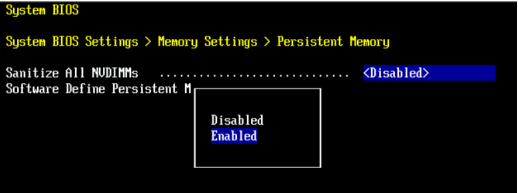
- SDPM 메모리 크기를32GB로 설정합니다.
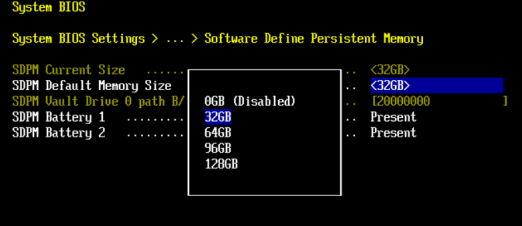
- SDPM 삭제를 확인하고 재부팅합니다.
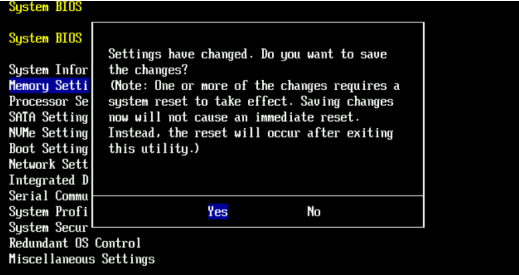
- 시스템이 DDOS로 재부팅되도록 한 다음 NVRAM 장애 알림을 확인하고 파일 시스템이 활성화되어 있는지 확인하여 SDPM을 확인합니다.
# alerts show current
-- There should be no outstanding alert relating to the NVRAM subsystem.
Caution: It may take one to two minutes for the system to clear the NVRAM failure alert.

# system show nvram
Note: The battery must be at least 80% charged for the file system to start.

# filesys status
-- The Filesystem should be Enabled & Running
Affected Products
Data Domain, DD9410 Appliance, DD9910 ApplianceProducts
Data Domain Deduplication Storage SystemsArticle Properties
Article Number: 000283787
Article Type: How To
Last Modified: 12 Feb 2025
Version: 1
Find answers to your questions from other Dell users
Support Services
Check if your device is covered by Support Services.